PgDoorman
A multi-threaded PostgreSQL connection pooler written in Rust. Drop-in replacement for PgBouncer and Odyssey, and an alternative to PgCat. Three years in production at Ozon under Go (pgx), .NET (Npgsql), Python (asyncpg, SQLAlchemy), and Node.js workloads.
Get PgDoorman 3.11.0 · Comparison · Benchmarks
Headline features
In the extended protocol, many drivers send short parameterised queries as an unnamed Parse. PgDoorman rewrites that Parse on the PostgreSQL side to an internal DOORMAN_<N> name and keeps the mapping in the pool. Later Binds for the same query shape reuse prepared backend state.
That cuts repeated PostgreSQL planner work on hot OLTP paths without application changes. PgBouncer 1.21+ and Odyssey can track named prepared statements, but they forward anonymous Parse unchanged; PgDoorman covers the driver-default case.
The cache is bounded: anonymous entries expire after idle timeout, and named entries are freed after their last reference. SHOW INTERNER exposes query-text memory; Prometheus metrics expose hits, misses, and evictions.
When several user pools share one database, the global limit should protect PostgreSQL, not just queue clients. PgDoorman enforces max_db_connections: once the cap is reached, the coordinator closes an idle connection from a pool with spare capacity and gives the slot to a client waiting for a backend.
Donors are ranked by excess idle connections. On a tie, the pool with the higher p95 transaction time yields first: fast pools keep more reuse chances, while evicting an idle connection from a slower pool hurts less. The reserve pool absorbs short bursts, and min_guaranteed_pool_size protects critical workloads from eviction.
PgBouncer's max_db_connections sets a shared cap, but it does not redistribute already-open idle connections between pools. Odyssey has no direct equivalent.
When PgDoorman runs next to PostgreSQL and the local server disappears during a Patroni switchover, new backend connections temporarily go to another live cluster member. PgDoorman chooses the target through the Patroni REST API (GET /cluster): sync_standby first, then replica.
The local server enters cooldown, and fallback connections get a short lifetime. Once the local node is reachable again, the pool returns to it without a separate HAProxy or consul-template in front of the pooler. patroni_api_urls and fallback_cooldown are configured in [general].
Before SIGUSR2 or UPGRADE, operators can replace the binary and config on disk. PgDoorman validates that pair with -t, starts a child process with it, passes the listening socket to the child, and keeps the old process serving existing clients while eligible sessions migrate.
The new process receives connection_id, the cancel key, PostgreSQL session parameters, backend authentication state, and the client prepared-statement cache. From the application's point of view the connection stays open: no reconnect, no repeated auth/SCRAM, and no lost prepared statements. If the new backend connection has not prepared a statement yet, PgDoorman sends the needed Parse on the first Bind.
In foreground mode, non-TLS TCP sessions move through SCM_RIGHTS. TLS sessions migrate only on a Linux build with tls-migration and the same tls_certificate/tls_private_key; distro packages and the Docker image are built without it, so TLS clients drain. Clients inside a transaction stay on the old process and move after COMMIT or ROLLBACK. PgBouncer (-R, deprecated since 1.20, or rolling restart via so_reuseport) and Odyssey (SIGUSR2 + bindwith_reuseport) leave old sessions in the old process until clients disconnect.
PgDoorman serves the web console on the same address and port as /metrics. It is a local incident panel, not a replacement for long-term Prometheus/Grafana monitoring.
One screen shows pool saturation, p95/p99 query, transaction, and checkout latency, SQLSTATE errors, long-running queries, prepared-statement and query-interner state, the log tail, CPU by tokio-worker, and process memory (jemalloc, /proc/self/status, text/libs, stacks, swap).
The console can run Pause, Resume, Reconnect, and Reload for one pool or the whole instance. Other views are read-only. The UI is enabled only when [web].ui = true and general.admin_password is set to a non-placeholder value; otherwise PgDoorman keeps only /metrics and logs a WARN.
Why PgDoorman
- Caches
Parseon hot query paths. Prepared backend state is reused between clients sharing a pool, including the anonymousParsemost drivers send for short parameterised queries. That cuts PostgreSQL planner CPU on repeated OLTP queries;SHOW INTERNERshows query-text memory, while Prometheus metrics show cache hits, misses, and evictions. - Multi-threaded, single shared pool. All worker threads share one pool. PgBouncer is single-threaded; the recommended scale-out — several instances behind
so_reuseport— gives each instance its own pool, and idle counts can drift between processes for the same database. - Thundering herd suppression. When 200 clients race for 4 idle connections, PgDoorman caps concurrent backend creates (
scaling_max_parallel_creates) and routes returning servers straight to the longest-waiting client through an in-process oneshot channel — no requeue through the idle pool. - Bounded tail latency. Waiters are served strict FIFO so the worst-case wait can't be overtaken by latecomers. Pre-replacement of expiring backends — at 95% of
server_lifetime, up to 3 in parallel — keeps the pool warm, so there is no checkout spike when a generation of connections rotates out. - Dead backend detection inside transactions. If the backend dies mid-transaction (failover, OOM, network partition), PgDoorman returns SQLSTATE
08006immediately by racing the client read against backend readability with a 100 ms tick. Without this, the client would block until TCP keepalive fires — on Linux defaults that is about two hours plus 9×75 s probes. - Built for operations. YAML or TOML config with human-readable durations (
30s,5m).pg_doorman generate --host …introspects an existing PostgreSQL and emits a starter config.pg_doorman -tvalidates the config without starting the server. A Prometheus/metricsendpoint is built-in.
Comparison
| Feature | PgDoorman | PgBouncer | Odyssey |
|---|---|---|---|
| Multi-threaded with shared pool | Yes | No (single-threaded) | Workers, separate pools |
| Prepared statements in transaction mode | Yes | Yes (since 1.21) | Yes (pool_reserve_prepared_statement) |
Anonymous Parse cache for hot parameterised queries | Yes, reused across clients in a pool | No, named statements only | No, named statements only |
| Pool Coordinator (per-database cap, priority eviction) | Yes | No | No |
| Patroni-assisted fallback (built-in) | Yes | No | No |
Pre-replacement on server_lifetime expiry | Yes | No | No |
| Stale backend detection inside a transaction | Yes (immediate 08006) | No (waits for TCP keepalive) | No (waits for TCP keepalive) |
| Hot process handoff with idle-session migration | Yes, via SCM_RIGHTS; TLS state with tls-migration and same cert/key | No (sessions stay on old process) | No (sessions stay on old process) |
| Backend TLS to PostgreSQL | Yes (5 modes, hot reload via SIGHUP) | Yes (server_tls_*, hot reload via RELOAD) | No |
| Auth: SCRAM passthrough (no plaintext password) | Yes (ClientKey extracted from proof) | Yes (encrypted SCRAM secret via auth_query/userlist.txt, since 1.14) | Yes |
| Auth: JWT (RSA-SHA256) | Yes | No | No |
Auth: PAM / pg_hba.conf / auth_query | Yes | Yes | Yes |
| Auth: LDAP | No | Yes (since 1.25) | Yes |
| Config format | YAML / TOML | INI | Own format |
| JSON structured logging | Yes | No | Yes (log_format "json") |
| Latency percentiles (p50/p90/p95/p99) | Yes (built-in /metrics) | No (averages only) | Yes (via separate Go exporter) |
Config test mode (-t) | Yes | No | No |
Auto-config from PostgreSQL (generate --host) | Yes | No | No |
| Prometheus endpoint | Built-in /metrics | External exporter | External exporter (Go sidecar) |
Benchmarks
AWS Fargate (16 vCPU), pool size 40, pgbench 30 s per test:
| Scenario | vs PgBouncer | vs Odyssey |
|---|---|---|
| Extended protocol, 500 clients + SSL | ×3.5 | +61% |
| Prepared statements, 500 clients + SSL | ×4.0 | +5% |
| Simple protocol, 10 000 clients | ×2.8 | +20% |
| Extended + SSL + reconnect, 500 clients | +96% | ~0% |
Quick start
Install via your distro package manager:
# Ubuntu / Debian
sudo add-apt-repository ppa:vadv/pg-doorman
sudo apt update
sudo apt install pg-doorman

# Fedora / RHEL family
sudo dnf copr enable @pg-doorman/pg-doorman
sudo dnf install pg_doorman
Distro packages and the Docker image are built without the tls-migration and pam features. See Installation for the TLS feature matrix and how to build with them.
Or run via Docker:
docker run -p 6432:6432 \
  -v $(pwd)/pg_doorman.yaml:/etc/pg_doorman/pg_doorman.yaml \
  ghcr.io/ozontech/pg_doorman \
  pg_doorman /etc/pg_doorman/pg_doorman.yaml
Minimal config (pg_doorman.yaml):
general:
  host: "0.0.0.0"
  port: 6432
  admin_username: "admin"
  admin_password: "change_me"

pools:
  mydb:
    server_host: "127.0.0.1"
    server_port: 5432
    pool_mode: "transaction"
    users:
      - username: "app"
        password: "md5..."   # hash from pg_shadow / pg_authid
        pool_size: 40
server_username and server_password are omitted on purpose: PgDoorman re-uses the client's MD5 hash or SCRAM ClientKey to authenticate against PostgreSQL. No plaintext passwords in the config.
Installation guide → · Configuration reference →
Where to next
- New to PgDoorman? Start with Overview, then Installation and Basic usage.
- Migrating from PgBouncer or Odyssey? Read Comparison and Authentication.
- Running Patroni? See Patroni-assisted fallback and
patroni_proxy. - Production sizing? Read Pool pressure and Pool Coordinator.
- Operating PgDoorman? See Binary upgrade, Signals, Troubleshooting.
PgDoorman vs PgBouncer vs Odyssey
Side-by-side feature matrix for choosing a PostgreSQL connection pooler. Every PgBouncer claim is anchored to its config reference and changelog; every Odyssey claim is anchored to the project's docs.
PgCat is intentionally omitted: its design centre is sharding/load-balancing rather than drop-in replacement of PgBouncer, so a row-by-row comparison is misleading. See the PgCat repo if you need horizontal sharding.
For benchmark numbers, see Benchmarks.
Authentication
| Feature | PgDoorman | PgBouncer | Odyssey |
|---|---|---|---|
| MD5 password | Yes | Yes | Yes |
| SCRAM-SHA-256 (client → pooler) | Yes | Yes | Yes |
| SCRAM-SHA-256 passthrough (no plaintext password in config) | Yes (ClientKey extracted from client proof) | Yes (since 1.14, encrypted SCRAM secret in auth_query / userlist.txt) | Yes |
| MD5 passthrough | Yes | Yes | Yes |
auth_query (dynamic users) | Yes | Yes | Yes |
auth_query passthrough mode (per-user backend identity) | Yes | No (single auth_user for all lookups) | Yes |
pg_hba.conf-style file | Yes (file or inline) | Yes (auth_hba_file) | Yes (since 1.4) |
| PAM | Yes (Linux) | Yes (auth_type=pam or via HBA) | Yes |
| JWT (RSA-SHA256) | Yes | No | No |
| Talos (custom JWT with role extraction) | Yes (Ozon-specific) | No | No |
| LDAP | No | Yes (since 1.25) | Yes |
SCRAM channel binding (scram-sha-256-plus) | No | Yes | Yes |
| User-name maps (cert/peer → DB user) | No | Yes (since 1.23) | Yes |
Tunable scram_iterations | No | Yes (since 1.25) | No |
See Authentication.
TLS
| Feature | PgDoorman | PgBouncer | Odyssey |
|---|---|---|---|
Client-side TLS (modes: disable, allow, require, verify-full) | Yes | Yes (disable, allow, prefer, require, verify-ca, verify-full) | Yes |
Server-side TLS to PostgreSQL (disable, allow, require, verify-ca, verify-full) | Yes (5 modes) | Yes (server_tls_*, 6 modes incl. prefer) | No |
| mTLS to PostgreSQL (client cert sent to backend) | Yes (server_tls_certificate + server_tls_private_key) | Yes (server_tls_key_file + server_tls_cert_file) | No |
| Hot reload of server-side TLS certificates | Yes (SIGHUP) | Yes (via RELOAD / SIGHUP, "new file contents will be used for new connections") | No |
| Hot reload of client-facing TLS certificates | No (SIGHUP unsupported; handoff loads new files for new connections only) | Yes (via RELOAD / SIGHUP) | No |
| Minimum TLS version configurable | Yes (defaults to TLS 1.2) | Yes (tls_protocols, default tlsv1.2,tlsv1.3) | Configurable, defaults differ |
Direct TLS handshake (PostgreSQL 17, no SSLRequest) | No | Yes (since 1.25) | No |
| TLS 1.3 cipher control | No | Yes (since 1.25, client_tls13_ciphers/server_tls13_ciphers) | No |
| TLS session migration across binary upgrade | Yes (Linux tls-migration build, same cert/key) | No (TLS connections are dropped during online restart) | No |
See TLS.
Routing and high availability
| Feature | PgDoorman | PgBouncer | Odyssey |
|---|---|---|---|
Patroni-assisted fallback (built-in /cluster lookup) | Yes | No | No |
Bundled TCP proxy with role-based routing (patroni_proxy) | Yes | No | No |
| Replica lag guard | Yes (max_lag_in_bytes in patroni_proxy) | No | Yes (watchdog_lag_query + catchup_timeout) |
| Multiple backend hosts with load balancing | Yes (patroni_proxy) | Yes (since 1.24, load_balance_hosts) | Yes |
target_session_attrs (read-write / read-only routing) | Yes (via patroni_proxy roles) | No | Yes |
| Sequential routing rules (first-match wins) | No | No | Yes |
| Connection-type routing (TCP vs UNIX) | No | No | Yes |
| Availability-zone-aware host selection | No | No | Yes |
See Patroni-assisted fallback, patroni_proxy.
Pooling
| Feature | PgDoorman | PgBouncer | Odyssey |
|---|---|---|---|
| Pool modes | session, transaction | session, transaction, statement | session, transaction |
| Pool Coordinator (per-database cap with priority eviction) | Yes (max_db_connections + p95-ranked eviction) | No (max_db_connections queues clients until idle timeout closes existing connections) | No |
| Reserve pool | Yes (reserve_pool_size) | Yes (reserve_pool_size) | No |
Per-user min_guaranteed_pool_size | Yes | No | No |
Pre-replacement on server_lifetime expiry (warm before old expires) | Yes (95% threshold, up to 3 in parallel) | No | No |
Anticipation / burst scaling (scaling_warm_pool_ratio, fast retries) | Yes | No | No |
| Direct-handoff (returning server goes to longest-waiting client via in-process oneshot channel) | Yes | No | No |
| Strict FIFO ordering of waiters | Yes | No (LIFO via server_round_robin = 0) | No |
min_pool_size (warm connections) | Yes | No | Yes |
| Prepared statements in transaction mode | Yes (named and anonymous, two-level cache, query interner) | Yes (named, since 1.21, max_prepared_statements) | Yes (named, pool_reserve_prepared_statement) |
Anonymous Parse cache for performance | Yes (DOORMAN_N, reused across clients in a pool) | No (anonymous Parse passes through unchanged) | No (named statements required) |
Smart cleanup on checkin (skip DEALLOCATE ALL if cache untouched) | Yes (mutation-tracking RESET ALL / DEALLOCATE ALL on demand) | No (always DISCARD ALL if server_reset_query set) | Yes (auto) |
| LISTEN / NOTIFY pinning in transaction mode | No | No | Experimental |
Cross-rule connection cap (shared_pool) | No | No | Yes (since 1.5.1) |
PAUSE / RESUME / RECONNECT admin commands | Yes | Yes | Yes (since 1.4.1) |
Configured PostgreSQL GUCs in backend StartupMessage per pool | Yes (startup_parameters, applied as general → pool → passthrough auth_query; client RESET ALL / DISCARD ALL returns to those values; PG startup errors reach the client unchanged) | No equivalent configured defaults; selected client startup parameters can be tracked or ignored | No (maintain_params preserves client-side parameters across rebind; no configured GUCs) |
See Pool Coordinator, Pool pressure.
Limits and timeouts
| Feature | PgDoorman | PgBouncer | Odyssey |
|---|---|---|---|
server_idle_check_timeout (probe before checkout) | Yes | No | No |
idle_timeout (server-side) | Yes (idle_timeout) | Yes (server_idle_timeout) | Yes |
server_lifetime | Yes | Yes | Yes |
query_wait_timeout | Yes | Yes | Yes |
client_idle_timeout | No | Yes (since 1.24) | No |
transaction_timeout (pooler-enforced) | No | Yes (since 1.25) | No |
max_user_client_connections | No | Yes (since 1.24) | No |
max_db_client_connections | No | Yes (since 1.24) | No |
Per-user query_timeout | No | Yes (since 1.24) | No |
Per-user reserve_pool_size | No | Yes (since 1.24) | No |
| Notify client while waiting for backend | No | Yes (since 1.25, query_wait_notify) | Yes (pool_notice_after_waiting_ms) |
See General settings reference, Pool settings reference.
Observability
| Feature | PgDoorman | PgBouncer | Odyssey |
|---|---|---|---|
| Built-in admin web UI (HTML console in the binary) | Yes (single-page console on the same port as /metrics, opt-in via [web].ui) | No (psql admin console only) | No (psql admin console only) |
| Prometheus endpoint | Built-in /metrics | External (pgbouncer_exporter) | External (Go exporter sidecar that polls the admin console) |
| Latency percentiles per pool (p50, p90, p95, p99) | Yes (HDR Histogram) | No (averages only in SHOW STATS) | Yes via the exporter (TDigest, requires quantiles rule option) |
Prepared statement counters in SHOW STATS | Yes | Yes (since 1.24) | No |
| JSON structured logging | Yes (--log-format structured) | No | Yes (log_format "json") |
Runtime log level control (SET log_level) | Yes | No | No |
SHOW POOL_COORDINATOR / SHOW POOL_SCALING / SHOW SOCKETS | Yes | No | No |
SHOW PREPARED_STATEMENTS | Yes | No | No |
SHOW INTERNER (per-kind entries / bytes / preview) | Yes | No | No |
| Bounded prepared-statement cache (TTL on anonymous, per-client LRU split) | Yes | Named only, bounded by max_prepared_statements; no anonymous cache | No |
SHOW HOSTS (host CPU/memory) | No | No | Yes |
SHOW RULES (dump effective routing) | No | No | Yes |
| Server-side TLS connection metrics (handshake duration, errors, active count) | Yes | No | No |
| Patroni API metrics | Yes | No | No |
| Fallback metrics (active flag, current host, hits) | Yes | No | No |
See Prometheus metrics reference, Admin commands.
Operations
| Feature | PgDoorman | PgBouncer | Odyssey |
|---|---|---|---|
| Binary upgrade with session migration (TCP socket, cancel keys, prepared cache) | Yes (SCM_RIGHTS, plus TLS state with Linux tls-migration and same cert/key) | No: -R deprecated since 1.20; so_reuseport rolling restart drains old sessions in place | No: SIGUSR2 + bindwith_reuseport drains old sessions in place |
| Configuration format | YAML or TOML | INI | Own format (lex/yacc) |
Human-readable durations and sizes (30s, 1h, 256MB) | Yes | No (integer microseconds / bytes) | No |
Config test mode (pg_doorman -t) | Yes | No | No |
Auto-config from PostgreSQL (pg_doorman generate --host) | Yes | No | No |
SIGHUP reload | Yes (server TLS certs included; client TLS still requires restart) | Yes (auth_file, auth_hba_file, server and client TLS certs) | Yes |
systemd sd-notify (Type=notify) integration | Yes | No | No |
Memory cap (max_memory_usage) | Yes | No | No |
| TCP socket buffer cap | Yes (tcp_socket_buffer_size, client and backend TCP sockets) | Yes (tcp_socket_buffer) | No |
See Binary upgrade, Signals.
Protocol
| Feature | PgDoorman | PgBouncer | Odyssey |
|---|---|---|---|
| Simple query | Yes | Yes | Yes |
| Extended query | Yes | Yes | Partial |
| Pipelined batches | Yes | Yes | Partial |
| Async Flush | Yes | Yes | No |
| Cancel requests over TLS | Yes | Yes | Yes |
COPY IN / COPY OUT | Yes | Yes | Yes |
Replication passthrough (replication=true startup) | No | Yes (since 1.23) | No |
| Protocol version negotiation (3.2) | No | Yes (since 1.23) | No |
server_drop_on_cached_plan_error | No | No | Yes (since 1.5.1) |
When PgDoorman is not the right fit
- You need LDAP authentication. Use Odyssey or PgBouncer 1.25+.
- You need replication passthrough for logical replication tools. Use PgBouncer 1.23+.
- You need
transaction_timeoutenforced by the pooler. Use PgBouncer 1.25+. - You need horizontal sharding inside the pooler. Use PgCat.
For prepared statements in transaction mode, Patroni HA without external proxies, multi-threaded throughput in a single shared pool, and binary upgrades that migrate live sessions, PgDoorman is the closer fit.
Overview
What PgDoorman does
PgDoorman sits between your applications and PostgreSQL. To the application it looks like a PostgreSQL server (same wire protocol, same psql connect string); under the hood it multiplexes many client sessions onto a much smaller set of real backend connections.
graph LR
    App1[Application A] --> Pooler(PgDoorman)
    App2[Application B] --> Pooler
    App3[Application C] --> Pooler
    Pooler --> DB[(PostgreSQL)]
PgDoorman was originally forked from PgCat but has since been rewritten around different goals: prepared statements in transaction mode, multi-threaded shared pools, Patroni integration, and binary upgrades that migrate live sessions. It is now a separate codebase.
Why a pooler at all
Each PostgreSQL connection costs the server roughly 10 MB of RAM, a process, and time on every handshake (auth, SCRAM, search_path resolution). Without a pooler, an application that opens N short-lived connections per second pays N×handshake-time. A pooler lets the same N clients reuse a small set of long-lived backend connections, so the handshake cost is paid once per backend instead of once per client.
Concrete impact:
- A
pool_sizeof 40 typically serves several thousand client sessions for short OLTP transactions. - PostgreSQL avoids the per-process memory overhead of the connections it would otherwise have to keep open.
- Failover, restart, or rolling deployments don't translate into a thundering herd of fresh handshakes.
Pool modes
The backend connection is held for the duration of one transaction and returned to the pool on COMMIT or ROLLBACK. This is the mode where pooling actually pays off.
The backend connection is held for the entire client session and returned only when the client disconnects. Use this for clients that depend on session-scoped state (SET TIME ZONE outside a transaction, advisory locks across transactions, WITH HOLD cursors).
PgDoorman does not implement statement mode. See Pool Modes for the exact contract of each mode and what works in transaction mode that doesn't work in other poolers.
Operations surface
- Admin console — a PostgreSQL-compatible endpoint for
SHOW POOLS,SHOW CLIENTS,RELOAD,PAUSE,UPGRADE, etc. - Prometheus
/metrics— built-in HTTP endpoint with per-pool latency percentiles, prepared-statement counters, fallback state, and TLS metrics. - Prepared-statement cache visibility —
SHOW INTERNERandSHOW POOLS_MEMORYexpose interner footprint and per-client Named / Anonymous counts, with matching Prometheus gauges. pg_doorman -t— validate the config without starting the server.pg_doorman generate --host …— emit a starter config by introspecting an existing PostgreSQL.
See Admin commands and Prometheus reference.
Where to go next
- Installation — install pg_doorman from packages, source, or Docker.
- Basic usage — minimal config, first connection, common gotchas.
- Pool Coordinator — when one database is shared between several user-pools.
- Binary upgrade — replace the binary in production without dropping live sessions.
Installing PgDoorman
PgDoorman runs on Linux and macOS. The recommended path for production is to build from source against the Rust toolchain you control. Pre-built distribution packages and binaries are also available; Docker is intended for testing.
System requirements
- Linux (recommended) or macOS
- PostgreSQL 10 or newer (any supported version)
- Memory budget proportional to pool size (a few MB per pool plus prepared statement cache)
- Rust 1.87 or newer if building from source
Build from source (recommended)
Build against your own toolchain so you control compiler version, target platform, and dependencies:
git clone https://github.com/ozontech/pg_doorman.git
cd pg_doorman
cargo build --release
sudo install -m 0755 target/release/pg_doorman /usr/local/bin/pg_doorman
cargo build --release produces an optimized binary at target/release/pg_doorman. Build prerequisites and the development workflow are in Contributing.
Cargo features
| Feature | Default | Effect |
|---|---|---|
tls-migration | off | Vendored OpenSSL 3.5.5 with a patch that lets TLS-encrypted clients survive a binary upgrade. Required for zero-downtime restart of TLS clients. |
pam | off | PAM authentication support (Linux only). |
Building with TLS client migration
By default, TLS clients cannot migrate to the new process during binary upgrade — they disconnect with 58006 and reconnect. Enable seamless migration with the tls-migration feature:
cargo build --release --features tls-migration
This compiles a vendored OpenSSL 3.5.5 with a custom patch that exports and re-imports TLS cipher state (keys, IVs, sequence numbers, TLS 1.3 traffic secrets) across the binary handover. Encrypted clients keep the same TCP connection without re-handshaking.
Requirements:
- Linux only (macOS and Windows use platform-native TLS, not OpenSSL).
perlandpatchutilities inPATH.- Roughly 5 minutes of additional build time for OpenSSL compilation.
Offline / air-gapped builds:
curl -fLO https://github.com/openssl/openssl/releases/download/openssl-3.5.5/openssl-3.5.5.tar.gz
OPENSSL_SOURCE_TARBALL=$(pwd)/openssl-3.5.5.tar.gz \
  cargo build --release --features tls-migration
Both the old and the new process must use identical tls_certificate and tls_private_key files. For the full upgrade flow, monitoring, and troubleshooting, see Binary Upgrade → TLS migration.
For deb/rpm packaging see debian/ and pkg/ in the repository.
Distribution packages
Pre-built deb and rpm packages are published from the same release tags. Use these when you cannot or do not want to build from source.
Packages from the Ubuntu PPA and Fedora COPR are built without TLS support. If you need TLS — for client connections, for server connections to PostgreSQL, or for graceful TLS migration during binary upgrade — build from source with the TLS feature enabled. See Build from source above.
Ubuntu / Debian (PPA)
sudo add-apt-repository ppa:vadv/pg-doorman
sudo apt update
sudo apt install pg-doorman
Supported releases: jammy (22.04 LTS), noble (24.04 LTS), questing (25.10), resolute (26.04 LTS).
Fedora / RHEL / CentOS / Rocky / AlmaLinux (COPR)
sudo dnf copr enable @pg-doorman/pg-doorman
sudo dnf install pg_doorman
Supported targets: Fedora 39, 40, 41; EPEL 8 and 9 for RHEL-family distributions.
The systemd unit, default config layout, and pg_doorman user are set up by the package.
Pre-built binaries from GitHub Releases
If neither building from source nor distribution packages fit, download a static binary from the releases page:
# Replace VERSION and TARGET with the desired values from the releases page.
curl -L -o pg_doorman \
  "https://github.com/ozontech/pg_doorman/releases/download/VERSION/pg_doorman-TARGET"
curl -L -o pg_doorman.sha256 \
  "https://github.com/ozontech/pg_doorman/releases/download/VERSION/pg_doorman-TARGET.sha256"
sha256sum -c pg_doorman.sha256                    # must print "OK"
chmod +x pg_doorman
sudo mv pg_doorman /usr/local/bin/
Skipping the checksum step means trusting the network path between you and objects.githubusercontent.com. Don't.
Docker (testing only)
Docker is supported for development, CI, and quick demos. We do not recommend it for production — packaging and lifecycle management are simpler with the system packages above.
docker run -p 6432:6432 \
  -v $(pwd)/pg_doorman.yaml:/etc/pg_doorman/pg_doorman.yaml \
  ghcr.io/ozontech/pg_doorman \
  pg_doorman /etc/pg_doorman/pg_doorman.yaml
The image's default CMD runs pg_doorman without arguments. With WORKDIR /etc/pg_doorman, that means /etc/pg_doorman/pg_doorman.toml. If you mount a YAML config, pass the path explicitly as shown above.
Publish 6432 for PostgreSQL protocol traffic. If your config enables web.enabled, also publish 9127 for /metrics and the web console; without that flag the listener is not started. The config path can be passed as a positional argument or through CONFIG_FILE; the image also accepts LOG_LEVEL (default info), LOG_FORMAT (text, structured, or debug), and NO_COLOR.
The Dockerfile sets STOPSIGNAL SIGTERM, so docker stop sends pg_doorman the normal container stop signal. Do not use SIGINT to stop the container: outside a TTY, that signal starts binary upgrade, which normally exits PID 1 in a container run.
The public image is built without the tls-migration and pam features. Regular TLS for client and backend connections does not depend on tls-migration; that feature is only needed to migrate TLS sessions across a binary upgrade. For TLS migration or PAM, build your own image from the public Dockerfile and add --features tls-migration and/or pam to the cargo build --release step.
A docker-compose.yaml with a sidecar PostgreSQL is in example/ for end-to-end smoke tests.
Verifying the installation
pg_doorman --version
pg_doorman -t /etc/pg_doorman/pg_doorman.yaml   # validates config
psql -h 127.0.0.1 -p 6432 -U admin pgdoorman -c "SHOW VERSION;"
pg_doorman -t validates the config file before deploy — PgBouncer and Odyssey lack this.
Where to next
- Basic Usage — first config, admin console, monitoring.
- Authentication — pick the right auth method.
- Operations — signals, reload, systemd integration.
- Binary Upgrade — replacing the binary without dropping clients.
PgDoorman Basic Usage Guide
End-to-end walkthrough: command-line flags, minimal config, the admin console, and operational commands (PAUSE, RESUME, RECONNECT, RELOAD). Intended as the second page you read after Overview and Installation.
Command-line options
$ pg_doorman --help

PgDoorman: Nextgen PostgreSQL Pooler (based on PgCat)

Usage: pg_doorman [OPTIONS] [CONFIG_FILE] [COMMAND]

Commands:
  generate  Generate configuration for pg_doorman by connecting to PostgreSQL and auto-detecting databases and users
  help      Print this message or the help of the given subcommand(s)

Arguments:
  [CONFIG_FILE]  [env: CONFIG_FILE=] [default: pg_doorman.toml]

Options:
  -l, --log-level <LOG_LEVEL>    [env: LOG_LEVEL=] [default: INFO]
  -F, --log-format <LOG_FORMAT>  [env: LOG_FORMAT=] [default: text] [possible values: text, structured, debug]
  -n, --no-color                 force colors off in the log output
  -d, --daemon                   run as daemon [env: DAEMON=]
  -h, --help                     Print help
  -V, --version                  Print version
Available Options
| Option | Description |
|---|---|
-d, --daemon | Run in the background. Without this option, the process will run in the foreground. In daemon mode, setting daemon_pid_file and syslog_prog_name is required. No log messages will be written to stderr after going into the background. |
-l, --log-level | Set log level: INFO, DEBUG, or WARN. |
-F, --log-format | Set log format. Possible values: text, structured, debug. |
-n, --no-color | Force colors off in the log output. Colors are also auto-disabled when stderr is not a TTY (under systemd, the journal pipe is not a terminal) and when the NO_COLOR environment variable is set to any non-empty value. |
-V, --version | Show version information. |
-h, --help | Show help information. |
Setup and Configuration
Configuration File Structure
PgDoorman supports both YAML and TOML configuration formats. YAML is recommended for new setups. The configuration is organized into several sections:
general:        # Global settings for the PgDoorman service
pools:
  <name>:       # Settings for a specific database pool
    users:
      - ...     # User settings for this pool
Some parameters must be specified in the configuration file for PgDoorman to start, even if they have default values. For example, you must specify an admin username and password to access the administrative console.
Minimal Configuration Example
Here's a minimal configuration example to get you started:
YAML (recommended)
general:
  host: "0.0.0.0"         # Listen on all interfaces
  port: 6432               # Port for client connections
  admin_username: "admin"
  admin_password: "admin"  # Change this in production!

pools:
  exampledb:
    server_host: "127.0.0.1"  # PostgreSQL server address
    server_port: 5432          # PostgreSQL server port
    pool_mode: "transaction"   # Connection pooling mode
    users:
      - pool_size: 40
        username: "doorman"
        password: "SCRAM-SHA-256$4096:6nD+Ppi9rgaNyP7...MBiTld7xJipwG/X4="
TOML
[general]
host = "0.0.0.0"
port = 6432
admin_username = "admin"
admin_password = "admin"

[pools.exampledb]
server_host = "127.0.0.1"
server_port = 5432
pool_mode = "transaction"

[pools.exampledb.users.0]
pool_size = 40
username = "doorman"
password = "SCRAM-SHA-256$4096:6nD+Ppi9rgaNyP7...MBiTld7xJipwG/X4="
For a complete list of configuration options, run pg_doorman generate --reference --output ref.yaml to get an annotated config with all parameters and defaults.
Automatic Configuration Generation
The generate command creates a configuration file by connecting to your PostgreSQL server and detecting databases and users. By default, the generated config includes inline comments explaining every parameter.
# View all available options
pg_doorman generate --help

# Generate a YAML configuration file (recommended)
pg_doorman generate --output pg_doorman.yaml

# Generate a TOML configuration file (for backward compatibility)
pg_doorman generate --output pg_doorman.toml

# Generate a reference config with all settings (no PG connection needed)
pg_doorman generate --reference --output pg_doorman.yaml

# Generate a reference config with Russian comments for quick start
pg_doorman generate --reference --ru --output pg_doorman.yaml

# Generate a config without comments (plain serialization)
pg_doorman generate --no-comments --output pg_doorman.yaml
The generate command supports several options:
| Option | Description |
|---|---|
--host | PostgreSQL host to connect to (uses localhost if not specified) |
--port, -p | PostgreSQL port to connect to (default: 5432) |
--user, -u | PostgreSQL user to connect as (requires superuser privileges to read pg_shadow) |
--password | PostgreSQL password to connect with |
--database, -d | PostgreSQL database to connect to (uses same name as user if not specified) |
--ssl | PostgreSQL connection to server via SSL/TLS |
--pool-size | Pool size for the generated configuration (default: 40) |
--session-pool-mode, -s | Session pool mode for the generated configuration |
--output, -o | Output file for the generated configuration (uses stdout if not specified) |
--server-host | Override server_host in config (uses the host parameter if not specified) |
--no-comments | Disable inline comments in generated config (by default, comments are included) |
--reference | Generate a complete reference config with example values, no PG connection needed |
--russian-comments, --ru | Generate comments in Russian for quick start guide |
--format, -f | Output format: yaml (default) or toml. If --output is specified, format is auto-detected from file extension. This flag overrides auto-detection |
The command connects to PostgreSQL, detects databases and users, and creates a documented configuration file.
The generate command also respects standard PostgreSQL environment variables like PGHOST, PGPORT, PGUSER, PGPASSWORD, and PGDATABASE.
PgDoorman uses passthrough authentication by default: the client's cryptographic proof (MD5 hash or SCRAM ClientKey) is automatically reused to authenticate to the backend PostgreSQL server. No plaintext passwords in config needed — just set password to the hash from pg_shadow / pg_authid.
Set server_username and server_password only when the backend user differs from the pool username (e.g., username mapping or JWT auth):
users:
  - username: "app_user"              # client-facing name
    password: "md5..."                # hash for client authentication
    server_username: "pg_app_user"    # different backend PostgreSQL user
    server_password: "real_password"  # plaintext password for that user
See server_username and server_password fields in the generated reference config for details.
Reading user information from PostgreSQL requires superuser privileges to access the pg_shadow table.
Client access control (pg_hba)
PgDoorman can enforce client access rules using PostgreSQL-style pg_hba.conf semantics via the general.pg_hba parameter.
You can embed rules directly in the config or reference a file path. See the reference section for full examples.
Trust mode: when a matching rule uses trust, PgDoorman will accept connections without prompting the client for a password,
mirroring PostgreSQL behavior. TLS-related rule types are honored: hostssl requires TLS, hostnossl forbids TLS.
Running PgDoorman
After creating your configuration file, you can run PgDoorman from the command line:
$ pg_doorman pg_doorman.toml
If you don't specify a configuration file, PgDoorman will look for pg_doorman.toml in the current directory.
Connecting to PostgreSQL via PgDoorman
Once PgDoorman is running, connect to it instead of connecting directly to your PostgreSQL database:
$ psql -h localhost -p 6432 -U doorman exampledb
Your application's connection string should be updated to point to PgDoorman instead of directly to PostgreSQL:
postgresql://doorman:password@localhost:6432/exampledb
The application talks PostgreSQL wire protocol; the connection-pooling layer is transparent to it.
Administration
Admin Console
PgDoorman exposes an administrative interface through the special database pgdoorman (or pgbouncer for backward compatibility):
$ psql -h localhost -p 6432 -U admin pgdoorman
Once connected, you can view available commands:
pgdoorman=> SHOW HELP;
NOTICE:  Console usage
DETAIL:
	SHOW HELP|CONFIG|DATABASES|POOLS|POOLS_EXTENDED|POOLS_MEMORY|POOL_COORDINATOR|POOL_SCALING
	SHOW CLIENTS|SERVERS|USERS|CONNECTIONS|STATS|PREPARED_STATEMENTS|AUTH_QUERY
	SHOW LISTS|SOCKETS|LOG_LEVEL|VERSION
	SET log_level = '<filter>'
	RELOAD
	SHUTDOWN
	UPGRADE
	PAUSE [db]
	RESUME [db]
	RECONNECT [db]
The admin console currently supports only the simple query protocol.
Some database drivers use the extended query protocol for all commands, making them unsuitable for admin console access. In such cases, use the psql command-line client for administration.
Only the user specified by admin_username in the configuration file is allowed to log in to the admin console.
If your general.pg_hba rules allow it, the admin console can also be accessed using the trust method (no password prompt), for example:
# Allow only local admin to access the admin DB without a password
host  pgdoorman  admin  127.0.0.1/32  trust
Use trust with extreme caution. Always restrict it by address and, where possible, require TLS via hostssl. In production, prefer password-based methods unless you fully understand the implications.
Monitoring PgDoorman
The admin console provides several commands to monitor the current state of PgDoorman:
SHOW STATS- View performance statisticsSHOW CLIENTS- List current client connectionsSHOW SERVERS- List current server connectionsSHOW POOLS- View connection pool statusSHOW DATABASES- List configured databasesSHOW USERS- List configured users
These commands are described in detail in the Admin Console Commands section below.
Reloading Configuration
If you make changes to the pg_doorman.toml file, you can apply them without restarting the service:
pgdoorman=# RELOAD;
When you reload the configuration:
- PgDoorman reads the updated configuration file
- Changes to database connection parameters are detected
- Existing server connections are closed when they're next released (according to the pooling mode)
- New server connections immediately use the updated parameters
This allows you to make configuration changes with minimal disruption to your applications.
Admin Console Commands
The admin console provides a set of commands to monitor and manage PgDoorman. These commands follow a SQL-like syntax and can be executed from any PostgreSQL client connected to the admin console.
Show Commands
The SHOW commands display information about PgDoorman's operation. Each command provides different insights into the pooler's performance and current state.
SHOW STATS
The SHOW STATS command displays comprehensive statistics about PgDoorman's operation:
pgdoorman=> SHOW STATS;
Statistics are presented per (database, user) pair:
| Metric | Description |
|---|---|
database | Database name |
user | Username |
total_xact_count | Total SQL transactions since startup |
total_query_count | Total SQL commands since startup |
total_received | Total bytes received from clients |
total_sent | Total bytes sent to clients |
total_xact_time | Total microseconds in transactions (including idle in transaction) |
total_query_time | Total microseconds executing queries |
total_wait_time | Total microseconds clients spent waiting for a server connection |
total_errors | Total error count since startup |
avg_xact_count | Average transactions per second in the last 15-second period |
avg_query_count | Average queries per second in the last 15-second period |
avg_recv | Average bytes received per second from clients |
avg_sent | Average bytes sent per second to clients |
avg_errors | Average errors per second in the last 15-second period |
avg_xact_time | Average transaction duration in microseconds |
avg_query_time | Average query duration in microseconds |
avg_wait_time | Average wait time for a server in microseconds |
Pay special attention to the avg_wait_time metric. If this value is consistently high, it may indicate that your pool size is too small for your workload.
SHOW SERVERS
The SHOW SERVERS command displays detailed information about all server connections:
pgdoorman=> SHOW SERVERS;
| Column | Description |
|---|---|
server_id | Unique identifier for the server connection |
server_process_id | PID of the backend PostgreSQL server process (if available) |
database_name | Name of the database this connection is using |
user | Username PgDoorman uses to connect to the PostgreSQL server |
application_name | Value of the application_name parameter set on the server connection |
state | Current state of the connection: active, idle, or used |
wait | Wait state of the connection: idle, read, or write |
transaction_count | Total number of transactions processed by this connection |
query_count | Total number of queries processed by this connection |
bytes_sent | Total bytes sent to the PostgreSQL server |
bytes_received | Total bytes received from the PostgreSQL server |
age_seconds | Lifetime of the current server connection in seconds |
prepare_cache_hit | Number of prepared statement cache hits |
prepare_cache_miss | Number of prepared statement cache misses |
prepare_cache_size | Number of unique prepared statements in the cache |
- active: The connection is currently executing a query
- idle: The connection is available for use
- used: The connection is allocated to a client but not currently executing a query
SHOW CLIENTS
The SHOW CLIENTS command displays information about all client connections to PgDoorman:
pgdoorman=> SHOW CLIENTS;
| Column | Description |
|---|---|
client_id | Unique identifier for the client connection |
database | Name of the database (pool) the client is connected to |
user | Username the client used to connect |
application_name | Application name reported by the client |
addr | Client's IP address and port (IP:port) |
tls | Whether the connection uses TLS encryption (true or false) |
state | Current state of the client connection: active, idle, or waiting |
wait | Wait state of the client connection: idle, read, or write |
transaction_count | Total number of transactions processed for this client |
query_count | Total number of queries processed for this client |
error_count | Total number of errors for this client |
age_seconds | Lifetime of the client connection in seconds |
The age_seconds column can help identify long-running connections that might be holding resources unnecessarily. Consider implementing connection timeouts in your application for idle connections.
SHOW POOLS
The SHOW POOLS command displays information about connection pools. A new pool entry is created for each (database, user) pair:
pgdoorman=> SHOW POOLS;
| Column | Description |
|---|---|
database | Name of the database |
user | Username associated with this pool |
pool_mode | Pooling mode in use: session or transaction |
cl_idle | Number of idle client connections (not in a transaction) |
cl_active | Number of active client connections (linked to servers or idle) |
cl_waiting | Number of client connections waiting for a server connection |
cl_cancel_req | Number of cancel requests from clients |
sv_active | Number of server connections linked to clients |
sv_idle | Number of idle server connections available for immediate use |
sv_used | Number of server connections recently used but not yet idle |
sv_login | Number of server connections currently in the login process |
pool_size | Configured maximum pool size for this (database, user) pair |
maxwait | Maximum wait time in seconds for the oldest client in the queue |
maxwait_us | Microsecond part of the maximum waiting time |
avg_xact_time | Average transaction time in microseconds |
paused | Whether the pool is paused: 1 (paused) or 0 (active) |
If the maxwait value starts increasing, your server pool may not be handling requests quickly enough. This could be due to an overloaded PostgreSQL server or insufficient pool_size setting.
SHOW USERS
The SHOW USERS command displays information about all configured users:
pgdoorman=> SHOW USERS;
| Column | Description |
|---|---|
name | Username as configured in PgDoorman |
pool_mode | Pooling mode assigned to this user: session or transaction |
SHOW DATABASES
The SHOW DATABASES command displays information about all configured database pools:
pgdoorman=> SHOW DATABASES;
| Column | Description |
|---|---|
name | Name of the configured pool |
host | Hostname of the PostgreSQL server |
port | Port number of the PostgreSQL server |
database | Actual database name on the backend (may differ from pool name if server_database is set) |
force_user | User forced for this pool (if configured) |
pool_size | Maximum number of server connections for this pool |
min_pool_size | Minimum number of server connections to maintain |
reserve_pool | Maximum number of additional reserve connections |
pool_mode | Default pooling mode for this pool |
max_connections | Maximum allowed server connections (from max_db_connections) |
current_connections | Current number of server connections for this pool |
Monitor the ratio between current_connections and pool_size to ensure your pool is properly sized. If current_connections frequently reaches pool_size, consider increasing the pool size.
SHOW SOCKETS
The SHOW SOCKETS command displays TCP/TCP6/Unix socket state counts (Linux only):
pgdoorman=> SHOW SOCKETS;
Shows aggregated counts of socket states (ESTABLISHED, SYN_SENT, etc.) parsed from /proc/net/tcp, /proc/net/tcp6, and /proc/net/unix.
SHOW VERSION
The SHOW VERSION command displays the PgDoorman version information:
pgdoorman=> SHOW VERSION;
This is useful for verifying which version you're running, especially after upgrades.
Control Commands
PgDoorman provides control commands that allow you to manage the service operation directly from the admin console.
SHUTDOWN
The SHUTDOWN command gracefully terminates the PgDoorman process:
pgdoorman=> SHUTDOWN;
When executed:
- PgDoorman stops accepting new client connections
- Existing transactions are allowed to complete (within the configured timeout)
- All connections are closed
- The process exits
Using the SHUTDOWN command will terminate the PgDoorman service, disconnecting all clients. Use this command with caution in production environments.
SET log_level
Change the log level at runtime without restarting the pooler:
-- Global level
pgdoorman=> SET log_level = 'debug';

-- Per-module (RUST_LOG syntax)
pgdoorman=> SET log_level = 'warn,pg_doorman::pool::pool_coordinator=debug';

-- View current level
pgdoorman=> SHOW LOG_LEVEL;

-- Reset to startup default
pgdoorman=> SET log_level = 'default';
Changes are ephemeral — lost on restart. Valid levels: error, warn, info, debug, trace, off.
RELOAD
The RELOAD command refreshes PgDoorman's configuration without restarting the service:
pgdoorman=> RELOAD;
This command:
- Rereads the configuration file
- Updates all changeable settings
- Applies changes to connection parameters for new connections
- Maintains existing connections until they're released back to the pool
The RELOAD command allows you to modify most configuration parameters without disrupting existing connections. This is ideal for production environments where downtime must be minimized.
PAUSE
The PAUSE [db] command blocks new backend connection acquisition for the specified database (or all databases if no argument is given). Active transactions continue to work — only new connection requests are blocked.
-- Pause all pools
pgdoorman=> PAUSE;

-- Pause only pools for a specific database
pgdoorman=> PAUSE mydb;
Clients that request a new backend connection while the pool is paused will wait until RESUME is issued or until query_wait_timeout expires (whichever comes first). If the timeout expires, the client receives a timeout error.
Use SHOW POOLS to verify pause state — the paused column will show 1 for paused pools.
PAUSE is useful during maintenance operations when you want to prevent new queries from reaching the backend:
- Database failover: PAUSE → switch backend → RECONNECT → RESUME
- Full connection rotation: PAUSE → RECONNECT → RESUME ensures all connections are recreated
- Backend maintenance: PAUSE while performing schema changes, then RESUME
RESUME
The RESUME [db] command lifts a PAUSE and immediately unblocks all waiting clients:
-- Resume all pools
pgdoorman=> RESUME;

-- Resume only pools for a specific database
pgdoorman=> RESUME mydb;
Clients that were waiting due to PAUSE will immediately proceed to acquire a backend connection.
RECONNECT
The RECONNECT [db] command forces all backend connections to be recreated:
-- Reconnect all pools
pgdoorman=> RECONNECT;

-- Reconnect only pools for a specific database
pgdoorman=> RECONNECT mydb;
When executed:
- The pool's internal epoch counter is incremented
- All idle connections are immediately closed
- Active connections (currently serving a transaction) continue working but are discarded when returned to the pool — they will not be reused
This means RECONNECT does not interrupt active transactions. New connections are created on demand with the current epoch, so they will be accepted by recycle().
Gradual rotation (minimal disruption): RECONNECT alone — idle connections are dropped immediately, active connections are dropped when they finish their current transaction. New connections are created as needed.
Full rotation (guaranteed all-new connections): PAUSE → RECONNECT → RESUME — pausing first ensures no new transactions start, then RECONNECT marks everything for disposal. After RESUME, all subsequent queries get fresh connections.
After RECONNECT, pools with min_pool_size configured will be automatically replenished to their minimum size on the next retain cycle. The new connections will have the current epoch.
Edge Cases and Behavior
The following table describes behavior in edge cases for PAUSE, RESUME, and RECONNECT:
| Scenario | Behavior |
|---|---|
| PAUSE an already paused pool | No-op (idempotent). No error is returned. |
| RESUME a non-paused pool | No-op (idempotent). No error is returned. |
| RECONNECT a paused pool | Works: idle connections are drained and epoch is bumped. When RESUME is issued, new connections will be created with the new epoch. |
| PAUSE/RESUME/RECONNECT with nonexistent database | Returns an error: No pool for database "xxx". Without a database argument, all pools are affected (no error even if there are no pools). |
query_wait_timeout during PAUSE | Clients waiting for a connection receive a timeout error, as expected. The pool remains paused. |
| RELOAD during PAUSE | RELOAD recreates pools from configuration, so pause state is lost. This is expected — new configuration means new pools. |
| GC of paused dynamic pools | Paused dynamic pools are protected from garbage collection, even if they have 0 connections. |
| Replenish during PAUSE | Pools with min_pool_size are not replenished while paused — no new connections are created. Replenishment resumes after RESUME. |
| Connection lifetime during PAUSE | The retain task continues to close expired connections (idle timeout, server lifetime). Connections still age normally. |
| Multiple RECONNECT calls | Each call increments the epoch further. Only connections created after the latest RECONNECT are valid. |
Signal Handling
PgDoorman responds to standard Unix signals for control and management. Send signals using kill (e.g., kill -HUP <pid>).
| Signal | Effect |
|---|---|
| SIGHUP | Configuration reload — equivalent to the RELOAD admin command. |
| SIGUSR2 | Binary upgrade + graceful shutdown. Validates the new binary with -t, spawns a new process, then shuts down. Recommended for upgrades. See Binary Upgrade Process. |
| SIGINT | Foreground + TTY (Ctrl+C): graceful shutdown only (no binary upgrade). Daemon / no TTY: binary upgrade + graceful shutdown (legacy behavior). |
| SIGTERM | Immediate shutdown. Active connections are terminated. |
In systemd-based environments, the default unit file uses ExecReload=/bin/kill -SIGUSR2 $MAINPID to trigger binary upgrade on systemctl reload.
Authentication
PgDoorman authenticates clients before forwarding them to PostgreSQL. It supports six methods, dispatched in priority order based on what the client sends and what the pool config defines.
This page explains how PgDoorman picks an authentication method. For setup details, follow the per-method links below.
Methods at a glance
| Method | When to use | Stores secret in config? |
|---|---|---|
| Passthrough (MD5 / SCRAM) | Default. Pool user matches PostgreSQL user. | MD5 hash or SCRAM ClientKey, never plaintext |
| auth_query | Many users, dynamic onboarding. Lookup credentials from PostgreSQL itself. | One service-user secret only |
| PAM | OS-level authentication (LDAP via pam_ldap, Kerberos, local accounts). Linux only. | No |
| JWT | Service-to-database with short-lived tokens signed by an external IdP. | Public key only |
| Talos | JWT with role extraction baked in. Used at Ozon. | Public key only |
| pg_hba.conf | Restrict who can connect from where (network ACL), independent of credential method. | No |
LDAP, Kerberos GSSAPI, certificate-based auth, and SCRAM channel binding (scram-sha-256-plus) are not supported. See Comparison.
Dispatch order
pg_hba.conf is evaluated first, before any credential check. A reject rule terminates the connection; a trust rule skips the credential check entirely.
After HBA, PgDoorman picks a credential method in this order:
- Talos. Activated when the client connects with username
talos. The client's password is parsed as a JWT, the role (owner/read_write/read_only) is extracted, and the connection continues under that derived identity. - HBA Trust. If
pg_hba.confmatched atrustrule, no credential check happens. - PAM. If the matched user has
auth_pam_serviceset, credentials go to PAM (Linux only). PAM wins over a static password. - SCRAM static. If the user's
passwordin config starts withSCRAM-SHA-256$, PgDoorman runs SCRAM authentication. - MD5 static. If the user's
passwordstarts withmd5, PgDoorman runs MD5 authentication. - JWT. If the user's
passwordstarts withjwt-pkey-fpath:, the client's password is verified as a JWT against the public key on disk.
auth_query is not in this dispatch list — it runs before the dispatch to populate the pool's user list with hashes pulled from PostgreSQL. After auth_query returns a passwd value, dispatch picks the right method based on that value's prefix (SCRAM-SHA-256$ or md5).
If none of the methods matches the password format, PgDoorman returns "Authentication method not supported" and closes the connection.
Talking to PostgreSQL: passthrough vs configured
PgDoorman has to authenticate twice: once as the gateway (client → PgDoorman) and once as the backend (PgDoorman → PostgreSQL). Three patterns:
- Passthrough (default). The client's MD5 hash or SCRAM
ClientKeyis reused to authenticate to PostgreSQL. No plaintext password in config. Requiresserver_usernameto be unset (or equal to the client username). - Configured backend user. Set
server_usernameandserver_passwordin the user block. PgDoorman authenticates to PostgreSQL with these instead. Use this when the pool username is decoupled from the database user (Talos, JWT, name remapping). - auth_query in dedicated mode. Set
server_userinside theauth_queryblock. All dynamically-discovered users share one backend pool authenticated asserver_user. Trades per-user backend identity for pool reuse efficiency.
See Passthrough for details and auth_query for dedicated mode.
Restricting connections
pg_hba.conf is enforced before credentials are checked. Common patterns:
- Reject everything except localhost:
host all all 0.0.0.0/0 rejectfollowed byhost all all 127.0.0.1/32 trust. - Require TLS for non-local connections:
hostssl all all 0.0.0.0/0 scram-sha-256andhostnossl all all 127.0.0.1/32 trust. - Per-database ACL:
host mydb appuser 10.0.0.0/8 scram-sha-256.
See pg_hba.conf.
Where to next
- New deployment? Read Passthrough and Basic usage.
- Many users with rotating credentials? Use auth_query.
- Token-based service identity? Use JWT.
- OS-integrated authentication? Use PAM.
- Network-level restrictions? Configure pg_hba.conf.
Passthrough Authentication (Default)
PgDoorman reuses the client's cryptographic proof — MD5 hash or SCRAM ClientKey — to authenticate to PostgreSQL. The plaintext password never leaves the client and is never stored in the pool config.
This is the recommended setup when the pool username matches the PostgreSQL user.
How it works
MD5
PostgreSQL's MD5 password protocol stores md5(password + username) server-side. The client also hashes the password the same way and sends md5(stored_hash + salt). PgDoorman:
- Receives the client's hashed response.
- Looks up the stored MD5 hash in its config (or via
auth_query). - Verifies the client response matches.
- Forwards the stored hash to PostgreSQL as the password during backend authentication. PostgreSQL accepts it because the hash is what
pg_authidactually stores.
The password field in the pool config holds the stored hash, formatted as md5XXXXXXXXXXXXXXXXXXXXXXXXXXXXXXXX (the 32-character MD5 of password + username, prefixed with literal md5).
SCRAM-SHA-256
SCRAM verifies the client without sending any password-equivalent material. PgDoorman:
- Performs SCRAM handshake with the client, validating the
ClientProof. - Extracts the
ClientKeyfrom a successful exchange. - Performs SCRAM handshake with PostgreSQL, replaying the same
ClientKeyto compute a freshClientProoffor the backend nonce.
The password field in the pool config holds the SCRAM verifier from pg_authid.rolpassword, formatted as SCRAM-SHA-256$<iterations>:<salt>$<StoredKey>:<ServerKey>.
PgDoorman does not support SCRAM channel binding (scram-sha-256-plus).
Configuration
pools:
  mydb:
    server_host: "127.0.0.1"
    server_port: 5432
    pool_mode: "transaction"
    users:
      - username: "app"
        password: "md5d41d8cd98f00b204e9800998ecf8427e"
        pool_size: 40
Note what is not there: no server_username, no server_password. PgDoorman infers passthrough from the absence of these fields.
For SCRAM, the password field looks like:
password: "SCRAM-SHA-256$4096:random_salt$stored_key:server_key"
Getting the hash
Connect as a superuser to PostgreSQL and read pg_shadow (or pg_authid):
SELECT usename, passwd FROM pg_shadow WHERE usename = 'app';
The passwd column contains either an MD5 hash (md5...) or a SCRAM verifier (SCRAM-SHA-256$...), depending on password_encryption setting at the time the password was set.
To force MD5 storage: SET password_encryption = 'md5'; ALTER ROLE app PASSWORD 'plaintext';
To force SCRAM: SET password_encryption = 'scram-sha-256'; ALTER ROLE app PASSWORD 'plaintext';
When passthrough is not enough
Set server_username and server_password explicitly when:
- The pool user differs from the backend user (username remapping).
- The client authenticates with JWT — there is no MD5 hash or SCRAM key to pass through.
- The client authenticates with Talos and you want a fixed backend identity per role.
- You use auth_query in dedicated mode.
users:
  - username: "external_app"
    password: "jwt-pkey-fpath:/etc/pg_doorman/jwt.pub"
    server_username: "app"
    server_password: "md5..."
    pool_size: 40
Auto-generated config
pg_doorman generate --host your-pg-host --user your-admin-user introspects PostgreSQL and produces a config with hashes from pg_shadow filled in automatically. Use this for new deployments to avoid copy-paste mistakes.
pg_doorman generate --host db.example.com --user postgres --output pg_doorman.yaml
See Basic Usage for the full generate flow.
auth_query
Look up user credentials from PostgreSQL itself instead of listing every user in the pool config. Useful when users are provisioned dynamically or rotated frequently.
Two modes
PgDoorman supports two modes; both are configured in the same auth_query block. Choose by whether you set server_user:
- Passthrough mode (no
server_user): each authenticated user gets its own backend pool, authenticated as that user. Preserves per-user backend identity forcurrent_user, row-level security, and audit logs. - Dedicated mode (with
server_user): all dynamic users share a single backend pool authenticated asserver_user. Trades per-user identity for higher pool reuse and lower connection count.
PgBouncer-style auth_query is dedicated mode. Odyssey supports both. PgDoorman's passthrough mode is the default.
Passthrough mode
pools:
  mydb:
    server_host: "127.0.0.1"
    server_port: 5432
    pool_mode: "transaction"
    auth_query:
      query: "SELECT passwd FROM pg_shadow WHERE usename = $1"
      user: "postgres"
      password: "md5..."
      database: "postgres"
      cache_ttl: "1h"
      cache_failure_ttl: "30s"
The query must return a column named passwd or password containing
the MD5 or SCRAM hash. Extra columns are ignored except for
startup_parameters. In passthrough mode, pg_doorman reads that column
as a text JSON object with per-user PostgreSQL startup parameters.
Dedicated mode ignores the column and logs a warning.
user and password are the credentials PgDoorman uses to run the lookup query. They must have permission to read the credential column. Either grant access to a custom view (recommended) or use a user in pg_read_server_files group.
When a client connects as alice:
- PgDoorman runs the query with
$1 = 'alice'and gets her hash. - Caches the hash in memory for
cache_ttlseconds. - Performs MD5 or SCRAM passthrough authentication (see Passthrough).
- Opens a backend connection authenticated as
alicewith the same hash.
Dedicated mode
pools:
  mydb:
    server_host: "127.0.0.1"
    server_port: 5432
    pool_mode: "transaction"
    auth_query:
      query: "SELECT passwd FROM pg_shadow WHERE usename = $1"
      user: "auth_lookup"
      password: "md5..."
      database: "postgres"
      server_user: "app"
      server_password: "md5..."
      pool_size: 40
      min_pool_size: 5
      cache_ttl: "1h"
Setting server_user switches the mode. Now:
- The client authenticates as
aliceagainst the hash returned by the query. - The backend pool is authenticated as
app(theserver_user), and is shared across all dynamic users. current_userin PostgreSQL will always beapp, regardless of which client connected.
Use this when you have many users (thousands) and per-user backend pools would exhaust PostgreSQL's connection slots.
Recommended PostgreSQL setup
Avoid using a superuser for the lookup. Create a dedicated function with SECURITY DEFINER:
CREATE OR REPLACE FUNCTION pg_doorman_lookup(uname text)
RETURNS TABLE(passwd text)
LANGUAGE sql
SECURITY DEFINER
SET search_path = pg_catalog, pg_temp
AS $$
  SELECT passwd FROM pg_shadow WHERE usename = uname;
$$;

REVOKE ALL ON FUNCTION pg_doorman_lookup(text) FROM public;
GRANT EXECUTE ON FUNCTION pg_doorman_lookup(text) TO auth_lookup;
Then in the pool config:
auth_query:
  query: "SELECT passwd FROM pg_doorman_lookup($1)"
  user: "auth_lookup"
  password: "md5..."
Caching
| Parameter | Default | Purpose |
|---|---|---|
cache_ttl | "1h" | How long a successful lookup is cached. |
cache_failure_ttl | "30s" | How long a failed lookup is cached. Prevents brute-force amplification. |
min_interval | "1s" | Minimum interval between repeated lookups for the same user. |
Duration values are quoted strings: "1h", "30m", "300s". A bare integer is interpreted as milliseconds — cache_ttl: 3600 would cache for 3.6 seconds, not one hour.
Cache is per-pool, in-memory, evicted on RELOAD. Restart or RELOAD after rotating a user's password.
Observability
SHOW AUTH_QUERY exposes per-database stats:
database | cache_entries | cache_hits | cache_misses | cache_refetches | rate_limited | auth_success | auth_failure | executor_queries | executor_errors
Prometheus metrics: pg_doorman_auth_query_cache, pg_doorman_auth_query_auth, pg_doorman_auth_query_executor, pg_doorman_auth_query_dynamic_pools. See Admin commands.
PAM Authentication
PgDoorman delegates client authentication to a PAM service on the host. Use this for OS-integrated authentication (LDAP via pam_ldap, Kerberos, local PAM modules) without putting per-user credentials in the pool config.
PAM is Linux-only. The pre-built binaries ship with PAM support enabled.
Configuration
pools:
  mydb:
    server_host: "127.0.0.1"
    server_port: 5432
    pool_mode: "transaction"
    users:
      - username: "alice"
        auth_pam_service: "pg_doorman"
        server_username: "alice"
        server_password: "md5..."
        pool_size: 20
auth_pam_service is the name of the PAM service file under /etc/pam.d/. PgDoorman does not validate the service name at startup — make sure the file exists.
The password field is omitted because PAM does the verification. server_username and server_password are required: PAM only authenticates the client to PgDoorman; PgDoorman still needs credentials for the backend connection.
Example PAM service
/etc/pam.d/pg_doorman:
auth     required pam_unix.so
account  required pam_unix.so
For LDAP-backed authentication:
auth     required pam_ldap.so
account  required pam_ldap.so
Configure pam_ldap in /etc/ldap.conf (or /etc/nslcd.conf) per your environment.
Dispatch order
PAM is checked after Talos and HBA Trust, but before any password-based method. If a user has both auth_pam_service and a static password (MD5, SCRAM, or JWT prefix), PAM wins.
See Overview.
Caveats
- PAM blocks the worker thread during the authentication call. If your PAM stack does network calls (LDAP, Kerberos), expect occasional latency spikes.
pam_unix.sorequires read access to/etc/shadow— usually onlyroot. Run PgDoorman as a user with the right group membership, or use a different PAM module.- PAM does not support SCRAM passthrough. The backend connection always uses
server_usernameandserver_password. - For LDAP without PAM machinery, PgDoorman has no native LDAP support. Use Odyssey or PgBouncer 1.25+ for that.
JWT Authentication
Authenticate clients with a JSON Web Token signed by an external identity provider. PgDoorman verifies the token's RSA-SHA256 signature using a public key from disk, checks the preferred_username claim, and forwards the connection to PostgreSQL with a configured backend identity.
This fits service-to-database access where short-lived tokens are issued by an OIDC provider, Vault, or an internal token service.
Configuration
Generate (or obtain) an RSA public key and reference it in the user's password field with the jwt-pkey-fpath: prefix:
pools:
  mydb:
    server_host: "127.0.0.1"
    server_port: 5432
    pool_mode: "transaction"
    users:
      - username: "billing-service"
        password: "jwt-pkey-fpath:/etc/pg_doorman/jwt-public.pem"
        server_username: "billing"
        server_password: "md5..."
        pool_size: 40
Whatever the client sends as a password is treated as a JWT and verified against /etc/pg_doorman/jwt-public.pem. The token must:
- Be signed with RS256 (RSA-SHA256). HS256 and EC variants are not supported.
- Have a
preferred_usernameclaim equal to the configuredusername(billing-servicein the example above). - Pass standard
expandnbfvalidation.
The backend connection is opened as billing with the server_password hash. The client's identity (billing-service) is decoupled from the database identity (billing).
Generating a key pair
openssl genrsa -out jwt-private.pem 2048
openssl rsa -in jwt-private.pem -pubout -out jwt-public.pem
Keep jwt-private.pem on the token issuer. Distribute jwt-public.pem to PgDoorman.
Issuing a token
Any RS256 JWT library works. Example with Python (PyJWT):
import jwt
import time

private_key = open("jwt-private.pem").read()

token = jwt.encode(
    {
        "preferred_username": "billing-service",
        "iat": int(time.time()),
        "exp": int(time.time()) + 300,  # 5 minutes
    },
    private_key,
    algorithm="RS256",
)
The client connects to PgDoorman with user=billing-service and password=<token>. Most PostgreSQL drivers accept any string in the password field.
Token rotation
PgDoorman reads the public key file once at startup and on SIGHUP. Rotate the key by:
- Add the new public key to a second user entry with a parallel name.
- Reload (
kill -HUP). - Switch the issuer to the new key.
- Remove the old user entry after the grace period.
Or, simpler, replace the file in place and SIGHUP. There is no support for multiple keys per user.
Dispatch order
JWT is the lowest-priority password format: PgDoorman checks SCRAM-SHA-256$ and md5 prefixes first, then jwt-pkey-fpath:. In practice this only matters if you use a placeholder password — set auth_pam_service for PAM, or use the jwt-pkey-fpath: prefix exclusively for JWT users.
If the same user has both auth_pam_service and a jwt-pkey-fpath: password, PAM wins.
See Overview.
Caveats
- The
preferred_usernameclaim must match exactly. There is no claim mapping or aliasing. - No JWKS endpoint support: the public key must be on disk.
- No issuer (
iss) or audience (aud) checks. If you need them, terminate JWT at a sidecar and translate to passthrough. - For client identity carrying database role information (e.g.,
read_onlyvsread_write), see Talos.
Talos Authentication
Talos is a JWT-based authentication scheme developed at Ozon. The token carries a role assignment per database in its resource_access claim, and PgDoorman extracts the highest role to pick the backend identity. Multiple signing keys are supported via the kid header.
If you operate inside Ozon's Talos identity stack, this is the integration. Outside, prefer plain JWT.
How it works
- A client connects with username
talosand a JWT as the password. - PgDoorman reads the
kidfield from the JWT header and looks up the matching public key ingeneral.talos.keys. - The token is verified (RS256,
exp,nbf). - PgDoorman walks
resource_accesskeys, splits each on:, and matches the part after the colon againstgeneral.talos.databases. So a key like"postgres.stg:billing"matches thebillingdatabase. The roles from every matching entry are collected; the highest wins (owner>read_write>read_only). - The connection is authenticated against a pool user named after the role:
owner,read_write, orread_only. That user must exist in the pool withserver_usernameandserver_passwordconfigured.
The client identity (clientId from the token) is preserved in application_name and audit logs.
Configuration
general:
  host: "0.0.0.0"
  port: 6432
  talos:
    keys:
      - "/etc/pg_doorman/talos/keys/abc123.pem"
      - "/etc/pg_doorman/talos/keys/def456.pem"
    databases:
      - "billing"
      - "inventory"

pools:
  billing:
    server_host: "127.0.0.1"
    server_port: 5432
    pool_mode: "transaction"
    users:
      - username: "owner"
        server_username: "billing_owner"
        server_password: "md5..."
        pool_size: 20
      - username: "read_write"
        server_username: "billing_app"
        server_password: "md5..."
        pool_size: 40
      - username: "read_only"
        server_username: "billing_ro"
        server_password: "md5..."
        pool_size: 60
The file stem of each key (abc123, def456) is the kid matched against the JWT header.
databases is a filter: only listed databases are eligible for Talos. A token without an entry for the requested database is rejected.
Token shape
{
  "kid": "abc123",
  "alg": "RS256"
}
.
{
  "exp": 1714500000,
  "nbf": 1714400000,
  "clientId": "billing-service",
  "resource_access": {
    "postgres.stg:billing": { "roles": ["read_write"] },
    "postgres.stg:inventory": { "roles": ["read_only", "read_write"] }
  }
}
resource_access keys must include a colon. PgDoorman ignores everything before it and matches the suffix against general.talos.databases. A token built without the colon prefix will produce no role and authentication will fail with "Token may not contain valid roles for the requested databases".
A client connecting to inventory with this token lands in the read_write user (max of the two listed roles).
Dispatch order
Talos has highest priority. If a client connects with username talos and general.talos.keys is non-empty, no other authentication method is tried.
See Overview.
Caveats
- Talos requires the special
talosusername. Non-Talos clients use other authentication methods normally. - The role-to-user mapping is fixed:
owner,read_write,read_only. Custom role names need code changes. - Multiple roles in the same
resource_accessentry collapse to the maximum. There is no "deny" semantics. - Public keys are loaded once at startup and reloaded on
SIGHUP.
pg_hba.conf
Restrict who can connect to PgDoorman based on source address, database, user, and connection type. Uses the same rule format as PostgreSQL's pg_hba.conf.
This is a network-level access control layer that runs before credential authentication. A connection rejected by pg_hba never gets to the password check.
Configuration
Three formats. Pick whichever fits your deployment.
Inline string
general:
  hba: |
    hostssl all all 0.0.0.0/0 scram-sha-256
    host    all all 127.0.0.1/32 trust
    local   all all              trust
    host    all all 0.0.0.0/0    reject
From file
general:
  hba:
    path: "/etc/pg_doorman/pg_hba.conf"
The file is read on startup and on SIGHUP.
Inline content under structured key
general:
  hba:
    content: |
      hostssl all all 0.0.0.0/0 scram-sha-256
      host    all all 127.0.0.1/32 trust
Same as the inline string, useful when you generate the config from templating tools.
Rule format
Each line:
<connection_type> <database> <user> [<source_cidr>] <method>
connection_type — one of:
| Type | Matches |
|---|---|
host | TCP, with or without TLS |
hostssl | TCP only when TLS is active |
hostnossl | TCP only when TLS is not active |
local | Unix domain socket |
database — all, a specific database name, or a comma-separated list. replication is not handled (PgDoorman doesn't support replication passthrough).
user — all, a specific user, or a comma-separated list. +groupname (PostgreSQL role membership) is not supported.
source_cidr — IPv4 or IPv6 CIDR. Required for host, hostssl, hostnossl. Not applicable to local.
method — one of:
| Method | Behavior |
|---|---|
trust | Skip credential check entirely. The client is admitted with the username it claimed. |
md5 | Force MD5 password authentication. |
scram-sha-256 | Force SCRAM-SHA-256 authentication. |
reject | Refuse the connection before any credential check. |
Rules are evaluated top to bottom. The first match wins.
Examples
Require TLS from the network, allow plain local
hostssl   all all 10.0.0.0/8     scram-sha-256
hostnossl all all 10.0.0.0/8     reject
host      all all 127.0.0.1/32   trust
local     all all                trust
Per-database ACL
host billing  app_billing  10.0.0.0/8 scram-sha-256
host billing  all          0.0.0.0/0  reject
host inventory app_inv     10.0.0.0/8 scram-sha-256
host all       admin       10.1.1.0/24 scram-sha-256
host all       all         0.0.0.0/0  reject
Block legacy MD5 from the open internet
hostssl all all 0.0.0.0/0 scram-sha-256
host    all all 0.0.0.0/0 reject
If your database stores MD5 hashes only and a client requests SCRAM, authentication fails with a clear error. Switch the database to SCRAM-SHA-256 (ALTER ROLE ... PASSWORD) before tightening rules.
Differences from PostgreSQL's pg_hba.conf
- No
replicationkeyword (PgDoorman does not pass replication connections). - No
peer,ident,cert,gss,sspi, orpammethods. PAM is configured per-user withauth_pam_service, not via HBA. - No
+groupnameuser prefix. - No regex (
/regexsyntax). - IPv6 CIDR is supported. IPv4-mapped IPv6 (
::ffff:1.2.3.4) is matched against IPv4 rules.
Reload
kill -HUP $(pidof pg_doorman)
Existing connections are not re-evaluated. New connections use the new rules.
Caveats
- Rules apply to clients connecting to PgDoorman, not to PostgreSQL. PostgreSQL's own
pg_hba.confstill matters for the backend connection. trustadmits the client without any credential check. The backend still has to authenticate as the pool user — but the client side is unverified. Usetrustonly on networks where the source address is trustworthy (loopback, restricted Unix socket).- For LDAP, Kerberos, or
peerauthentication, see Comparison — these are not supported.
TLS
PgDoorman terminates TLS on the client side (clients → PgDoorman) and originates TLS on the server side (PgDoorman → PostgreSQL). The two sides are configured independently.
Client-side TLS
Encrypt connections between client applications and PgDoorman.
Modes
| Mode | Behavior |
|---|---|
disable | Do not advertise TLS. Clients sending SSLRequest get 'N' (rejected). |
allow | Advertise TLS but accept plain TCP. |
require | Require TLS. Plain connections are dropped after SSLRequest fails. |
verify-full | Require TLS and a valid client certificate. Used for mTLS. |
verify-full is mTLS — the server verifies the client's certificate. Set up a client CA bundle with tls_ca_cert.
Configuration
general:
  tls_mode: "require"
  tls_certificate: "/etc/pg_doorman/tls/server.crt"
  tls_private_key: "/etc/pg_doorman/tls/server.key"
  tls_ca_cert: "/etc/pg_doorman/tls/client_ca.pem"   # only for verify-full
  tls_rate_limit_per_second: 100                       # optional handshake throttle
The certificate may be self-signed for development; production deployments typically use Let's Encrypt or an internal CA.
Reload (client side)
Client-side certificates are loaded at startup. Changing them requires a process restart. There is no SIGHUP reload for client-side TLS.
Hot process handoff can load a new certificate and key for new inbound TLS connections, but it is not seamless rotation for sessions that are already open. To migrate TLS sessions, both processes must use the same tls_certificate and tls_private_key, and PgDoorman must run as a Linux build with tls-migration; if those files change, TLS clients drain and reconnect.
Cipher policy
Minimum TLS 1.2 enforced in the handshake. PgDoorman does not set an explicit cipher list — the effective ciphers come from the system OpenSSL build. If you need a hardened cipher list, configure it system-wide (/etc/ssl/openssl.cnf) or build OpenSSL with the policy you want.
Direct TLS handshake (PG17, no SSLRequest) is not supported. For TLS 1.3 cipher control or PG17 direct TLS, use PgBouncer 1.25+.
Server-side TLS
Encrypt connections between PgDoorman and PostgreSQL backends. Added in 3.6.0.
Modes
| Mode | Behavior |
|---|---|
disable | Plain TCP. |
allow (default) | Try plain first; if the server rejects, retry on a new socket with TLS. Matches libpq sslmode=allow. |
prefer | Send SSLRequest; if the server says 'N', fall back to plain. |
require | Require TLS. Fail if the server does not support it. |
verify-ca | Require TLS and verify the server certificate against the configured CA. |
verify-full | Require TLS, verify CA, and verify the server hostname against the certificate. |
allow is the default to keep backward compatibility — existing deployments where PostgreSQL has TLS configured automatically upgrade without config changes. New deployments wanting explicit guarantees should use require or verify-full.
Configuration
general:
  server_tls_mode: "verify-full"
  server_tls_ca_cert: "/etc/pg_doorman/tls/pg_ca_bundle.pem"

# Optional: client certificate for mTLS to PostgreSQL
  server_tls_certificate: "/etc/pg_doorman/tls/pg_client.crt"
  server_tls_private_key: "/etc/pg_doorman/tls/pg_client.key"
server_tls_ca_cert accepts a PEM bundle (multiple CA certificates concatenated). All are loaded.
Hot reload
On SIGHUP, server-side certificates are re-read from disk. Existing connections keep using their original TLS context; new connections use the reloaded certificates. The reload is lock-free via Arc<ArcSwap<...>> — no connection drop, no handshake stall.
kill -HUP $(pidof pg_doorman)
This is the only TLS reload path. Client-side certificates do not reload on SIGHUP.
mTLS to PostgreSQL
Set server_tls_certificate and server_tls_private_key. PostgreSQL must be configured with ssl_ca_file matching the client cert's signer, and the role must have clientcert=verify-ca (or verify-full) in pg_hba.conf on the PostgreSQL side.
Observability
Three Prometheus series cover server-side TLS:
| Metric | Type | Purpose |
|---|---|---|
pg_doorman_server_tls_connections | gauge per pool | Number of active TLS connections to PostgreSQL. |
pg_doorman_server_tls_handshake_duration_seconds | histogram per pool | Handshake duration buckets. |
pg_doorman_server_tls_handshake_errors_total | counter per pool | Failed handshakes. Alert if non-zero rate. |
See Prometheus reference.
Known limitations
- The
COPYprotocol over server TLS is not exercised by the BDD test suite. Behavior is expected to work but unverified. - Cancel requests to the backend bypass server TLS — they use a fresh plain TCP connection. This matches PostgreSQL's protocol design (cancel is sent on a separate socket).
- Direct TLS handshake (PG17 fast handshake without
SSLRequest) is not supported on either side.
Where to next
- New cluster setup? See Installation.
- Rotating certificates? See Binary Upgrade and Signals. Client-facing TLS certificate rotation is not seamless for already-open TLS sessions.
- Hardening an existing deployment? Combine with pg_hba.conf: force
hostsslfor non-local connections.
Pool Modes
PgDoorman supports two pool modes: transaction and session. Set per pool, with optional per-user override.
There is no statement mode. Statement pooling rotates the backend after every statement, which forces clients to give up multi-statement transactions and breaks the prepared-statement protocol entirely; PgDoorman invests its tuning (prepared-statement cache, direct handoff, strict-FIFO scheduling) in transaction mode instead. PgBouncer keeps statement mode for backward compatibility; Odyssey omits it.
Transaction mode (recommended)
pools:
  mydb:
    pool_mode: "transaction"
A backend connection is held for the duration of a transaction, then returned to the pool on COMMIT, ROLLBACK, or implicit completion.
This is the mode that delivers PgDoorman's connection efficiency: a pool_size of 40 can serve thousands of clients as long as transactions are short.
What works in transaction mode (where most poolers fail):
- Prepared statements. PgDoorman caches them per-pool, remaps statement names across backend connections, and replays preparation transparently. Drivers that pin to
unnamedstatement (Go pgx, .NET Npgsql, Python asyncpg) work without configuration. - Pipelined batches and async
Flushflow. - Cancel requests over TLS.
LISTEN/NOTIFY— but only inside a transaction. ALISTENissued and then committed releases the backend, and any notifications delivered to it after that go to whichever client checks it out next, not to the originalLISTEN-er. PgBouncer behaves the same way; if you need cross-transactionLISTEN, use session mode for that client.
What does not work in transaction mode:
SETandRESEToutside a transaction. Use session mode for clients that rely on session-level GUC changes (SET TIME ZONE,SET search_pathonce per connection).- Advisory locks held across transactions. Use session mode.
- Cursors held outside transactions (
WITH HOLD). Use session mode. SET LOCALworks as expected — it is transaction-scoped.
Session mode
pools:
  legacy_app:
    pool_mode: "session"
A backend connection is held for the duration of the client session. Returned to the pool only when the client disconnects.
Use this when:
- The application uses session-scoped state (
SET search_path,SET TIME ZONE). - The application uses
WITH HOLDcursors. - The application uses advisory locks across transactions.
- You are migrating an unmodified PgBouncer deployment that was using session mode and you want a like-for-like swap.
In session mode, pool_size is effectively the maximum number of concurrent clients. Sizing matches PostgreSQL's max_connections minus reserves.
Per-user override
A pool's mode can be overridden per user:
pools:
  mydb:
    pool_mode: "transaction"
    users:
      - username: "app"
        password: "md5..."
        pool_size: 40
      - username: "admin_tools"
        password: "md5..."
        pool_size: 4
        pool_mode: "session"
Useful when one user (operations tooling, migrations) needs session semantics but the main application stays in transaction mode.
Cleanup on checkin
Cleanup in transaction mode is mutation-tracked, not unconditional. PgDoorman watches each transaction for SET, PREPARE, and DECLARE CURSOR, and only when the backend returns to the pool with one of those flags set does it issue RESET ALL, DEALLOCATE ALL, or CLOSE ALL respectively. A read-only transaction skips cleanup entirely — that's a measurable win on hot OLTP paths.
What gets reset when a flag fires:
SETflag →RESET ALLdrops session-level GUCs and runspg_advisory_unlock_allimplicitly.PREPAREflag →DEALLOCATE ALLdrops PostgreSQL-side prepared statements that the driver named explicitly. PgDoorman's own prepared-statement cache survives the reset because it is keyed by query text, not by backend name.DECLARE CURSORflag →CLOSE ALLdrops cursors.
DEALLOCATE ALL and DISCARD ALL issued by the client clear that client's prepared-statement cache (so the next Parse registers anew). The pool-level shared cache is not affected; other clients keep their entries.
To opt out of cleanup entirely (for performance, in tightly-controlled deployments):
pools:
  mydb:
    pool_mode: "transaction"
    cleanup_server_connections: false
Only do this if you are sure your application never leaks session state. The mutation-tracked default is already cheap when no mutation happened, so the opt-out is rarely worth the risk.
Reference
pool_modeparameter: Pool Settings.cleanup_server_connections: Pool Settings.- Pool sizing: Pool Coordinator, Pool Pressure.
Pool Coordinator
The Pool Coordinator caps total backend connections per database across all users in that pool, with priority eviction when the cap is reached. It is what PgBouncer's max_db_connections should have been: enforced fairly, with a reserve for short bursts, and per-user minimums to protect critical workloads.
This page explains the concept and when to use it. For tuning recipes and read-out from SHOW POOL_COORDINATOR, see Pool Pressure.
What problem it solves
Without a coordinator, every user-pool is independent. A pool_size of 40 across 5 users means up to 200 backend connections — and PostgreSQL fights to maintain its own limits.
max_db_connections in PgBouncer caps the total, but once the cap is reached new clients simply queue. Connections only free up when their current owner closes them naturally on server_idle_timeout. Whoever grabbed connections first keeps them regardless of how heavily they use them, and slow workloads never yield to fast ones.
PgDoorman's Pool Coordinator caps the total and:
- Evicts idle connections from over-allocated users when another user needs to grow.
- Ranks users by p95 transaction time so the slowest pools yield first. Pools running fast transactions keep their reuse advantage; pools running long transactions sit idle a larger fraction of the time, so taking from them costs less.
- Reserves a small overflow for short bursts. Configured separately from the main cap.
- Guarantees a per-user minimum that is never evicted. Critical workloads keep their footing during contention.
When to use it
Turn on the coordinator when:
- Multiple distinct workloads share the same database and you need an upper bound on backend connection count (PostgreSQL
max_connections, RAM, file descriptors). - One workload has bursty demand and you want it to absorb idle slots from others without crowding them out permanently.
- You operate near the PostgreSQL connection ceiling and need fair degradation rather than first-come-first-served.
You do not need it when:
- Each user's
pool_sizeis small enough that the sum is comfortably below PostgreSQL'smax_connections. - Workloads are predictable and pre-sized.
- You want PgBouncer-level simplicity.
max_db_connectionswithout eviction is supported but discouraged for shared databases.
Configuration
pools:
  shared_db:
    server_host: "127.0.0.1"
    server_port: 5432
    pool_mode: "transaction"

    # Total cap across all users in this pool.
    max_db_connections: 80

    # Reserve overflow above max_db_connections for short bursts.
    # Acquired only when no idle connection is available within reserve_pool_timeout.
    reserve_pool_size: 16
    reserve_pool_timeout: "3s"

    # Per-user safety net: connections never evicted from a user, even under pressure.
    # Sum across users should be ≤ max_db_connections.
    min_guaranteed_pool_size: 5

    # Eviction grace period: connections younger than this are not evicted.
    # Prevents thrashing when a workload briefly idles.
    min_connection_lifetime: "30s"

    users:
      - username: "fast_app"
        password: "md5..."
        pool_size: 40

      - username: "batch_job"
        password: "md5..."
        pool_size: 60
Effective ceiling: max_db_connections + reserve_pool_size = 96. The reserve absorbs sub-second spikes; if the spike persists, eviction kicks in.
How it picks who donates
When a user requests a new backend and the cap is reached:
- Find candidates with idle connections. A user holding only active connections cannot donate — its work is in flight.
- Skip protected users. A user below
min_guaranteed_pool_sizeis excluded. - Skip recently-created connections. Connections younger than
min_connection_lifetimeare not evicted (avoids churn during minor idle gaps). - Rank by surplus. Users with the most idle connections above their
min_guaranteed_pool_sizerank highest. - Tiebreak by p95 transaction time. Among equally-idle users, the pool with the higher p95 yields first. Higher p95 means each transaction holds the connection longer; the same user therefore reuses each connection less often, so a single eviction translates into fewer reused checkouts lost.
The chosen idle connection is closed; the requesting user receives a fresh connection from PostgreSQL.
Observability
SHOW POOL_COORDINATOR shows current state per database:
database    | max_db_conn | current | reserve_size | reserve_used | evictions | reserve_acq | exhaustions
shared_db   | 80          | 78      | 16           | 2            | 142       | 18          | 0
evictionsrising fast — one user is starved repeatedly. Either raisemax_db_connectionsor setmin_guaranteed_pool_sizefor that user.reserve_acqhigh — bursts are normal but you might be undersized; consider raisingmax_db_connectionsinstead of relying on reserve.exhaustionsnon-zero — even reserve was full. Clients hitquery_wait_timeoutwaiting for a backend. Raise the cap.
Prometheus: pg_doorman_pool_coordinator{type="..."} (gauges) and pg_doorman_pool_coordinator_total{type="evictions|reserve_acquisitions|exhaustions"} (counters). See Admin commands and Prometheus reference.
Caveats
- The coordinator only operates within one pool (one database). Cross-pool / cross-database limits are not supported.
- Eviction picks idle connections; a user holding all connections in long transactions cannot donate, so other users may starve. If this is your shape, raise
max_db_connectionsor split the workload. min_guaranteed_pool_sizeis a floor for eviction, not amin_pool_sizefor warm-up. The pool still has to create those connections on demand.- Setting
max_db_connectionswithoutmin_guaranteed_pool_sizeis the PgBouncer mode — works, but starves smaller users under pressure. Always set both for shared databases.
Where to next
- Sizing recipe with worked examples: Pool Pressure → Sizing the cap.
- Tuning under load: Pool Pressure → Tuning parameters.
- Reading admin output: Admin Commands → SHOW POOL_COORDINATOR.
- Pool modes (transaction vs session): Pool Modes.
Anonymous Parse caching
PgDoorman caches anonymous Parse messages for transaction pooling.
Many drivers send short parameterised queries as Parse with an empty
statement name. Without a remap, PostgreSQL plans the query again on
every Bind, so hot OLTP paths pay planner CPU on every call.
PgDoorman transparently remaps every anonymous Parse to an internal
DOORMAN_<N> name on the backend. The plan lands in the backend's
named prepared statement registry and gets reused across Binds of
one client and across clients sharing the same pool. The main effect
is less planner CPU and fewer repeated backend Parses for the same
query shape.
The remap is transparent to the driver: clients send and receive empty statement names just as they would against a vanilla PostgreSQL.
PgBouncer (1.21+) and Odyssey support prepared statements in
transaction mode, but only for named statements. They forward
anonymous Parse unchanged. PgDoorman's extra behaviour is the
anonymous remap. Cache bounds, LRU, TTL, and observability keep that
remap controlled under dynamic SQL.
What gets faster
Anonymous Parse caching removes repeated work from hot
parameterised query paths:
- the backend does not receive the same
Parseon every reuse of an already known query shape; - PostgreSQL can use a prepared statement already created on that backend connection;
- different clients in the same pool share one pool-level entry instead of warming the same query independently;
- on a server-cache hit, PgDoorman synthesizes
ParseCompletewithout a PostgreSQL round-trip.
This is primarily a performance optimization for OLTP workloads with repeated query shapes. Cache caps, TTL, and the interner exist so the speedup does not become unbounded memory growth in the pooler or on PostgreSQL backends.
The PostgreSQL baseline
A Parse message carries a statement name. An empty name means
anonymous, anything else means named:
                          Lifetime in PG          Plan caching
  ─────────────────────   ─────────────────       ─────────────────────
  Anonymous (name="")     Until next anonymous    No named registry
                          Parse or session end    entry; each new
                                                   unnamed Parse plans
  Named (name="stmt_42")  Until Close /           Starts with custom
                          DEALLOCATE /            plans; may switch to
                          session end             a generic plan after
                                                   5 custom executions
Most modern drivers default to anonymous for one-shot
parameterised queries: lib/pq (Go), libpq PQexecParams (C),
some flows in pgjdbc and psycopg. The application code looks
identical to a parameterised named-statement query, but the wire
protocol carries an empty name.
Why this is a problem for transaction-mode pooling
Transaction pooling rotates a backend among many clients. If the
pooler forwards the empty Parse name as-is, every client's Bind
runs against a backend that has no plan cached for that query. Hot
OLTP paths pay the planner cost on every call.
Named prepared statements solve planner performance, but they push the bookkeeping problem onto the pooler:
- The pooler must remember each client's named statements until the client disconnects, even if the pool-level shared cache evicts the entry.
- On every
Bind, it must verify the current backend knows the name and re-Parseotherwise. - On client disconnect, it must issue
CloseorDEALLOCATEto the right backend. - Drivers that mint per-query names (
stmt_<seq>) compound the per-client cache size: hundreds of entries per client times tens of thousands of clients.
So the choice is: give up plan caching for anonymous traffic, or inherit the full cost of named-statement bookkeeping. PgDoorman takes a third option.
What PgDoorman does
On every anonymous Parse from the client, PgDoorman:
- Hashes the query text, parameter type OIDs, and a digest of the
planner GUCs pinned by the client's StartupMessage (
search_path,default_transaction_isolation,default_transaction_read_only,default_text_search_config,role). Two clients that send the same query and parameter OIDs but pin differentsearch_pathvalues therefore get separate cache entries and separate PostgreSQL plans. Planner GUCs outside this list (TimeZone,DateStyle,plan_cache_mode,enable_*, JIT cost knobs) are not part of the key. See thesync_server_parametersreference before mixing the same prepared query across different values of those GUCs. - Looks up the hash in the pool-level cache (shared across all
clients of this pool). On miss, it allocates a fresh
DOORMAN_<counter>name and registers anArc<Parse>entry. - Stores a per-client cache entry keyed by
Anonymous(hash)so the followingBindcan locate the sameDOORMAN_<N>. - Forwards
Parseto the backend with the rewritten name. - On the matching
Bind(with empty name), rewrites the statement name toDOORMAN_<N>and ensures the current backend already holds the named statement; sends a freshParseif not.
The client never sees DOORMAN_<N>: the rewrite lives only on the
leg between PgDoorman and the backend. When the backend already
holds the name, PgDoorman synthesises ParseComplete itself and
skips the round-trip.
Wire-protocol example
A Go application running
db.Query("SELECT * FROM t WHERE name = $1", "vasya")
through lib/pq produces this exchange:
  Client                   PgDoorman                  Backend
  ──────                   ─────────                  ───────
  Parse("", q)        ────►│ hash, miss → DOORMAN_42
                            │ pool_cache[hash] = Arc<Parse>
                            │ client_cache[Anon(hash)] = ...
                            │             Parse("DOORMAN_42") ────►
                            │                    ◄── ParseComplete
                       ◄────│ ParseComplete
  Bind("", "vasya")   ────►│ rewrite "" → "DOORMAN_42"
                            │             Bind("DOORMAN_42") ─────►
                            │             Execute, Sync ──────────►
                            │                ◄── BindComplete, ...
                            │                ◄── ReadyForQuery
                       ◄────│ BindComplete, ...
A second client running the same query in the same pool hits the
pool cache and skips the backend Parse entirely:
  Client B           PgDoorman                       Backend (same)
  ────────           ─────────                       ──────────────
  Parse("", q)  ───►│ hash hit → DOORMAN_42
                     │ server_cache contains "DOORMAN_42"
                ◄────│ synthetic ParseComplete       (no message sent)
  Bind("", v)   ───►│ rewrite "" → "DOORMAN_42"
                     │           Bind("DOORMAN_42") ────►
                     │           ...
Cache layers
PgDoorman keeps prepared-statement state at three levels:
  Pool-level    DashMap<hash, CacheEntry>
                One per pool. Holds Arc<Parse> with name "DOORMAN_N".
                Size:    prepared_statements_cache_size (default 8192).
                Eviction: approximate LRU.

  Client-level  Named:     AHashMap<String, CachedStatement>, unbounded.
                Anonymous: LruCache<u64, CachedStatement> bounded by
                           client_anonymous_prepared_cache_size (defaults to
                           prepared_statements_cache_size when unset),
                           or AHashMap if size = 0.
                Eviction of an Anonymous entry is local: the Arc<Parse>
                is dropped, the underlying DOORMAN_<N> on the backend
                stays.

  Server-level  LruCache<String, ()>, per backend connection.
                Tracks which DOORMAN_N this backend already holds.
                True LRU; on eviction issues Close to the backend.
When the Anonymous LRU evicts an entry, PgDoorman drops the local
reference and does not send Close to the backend. The underlying
DOORMAN_<N> is recycled by the server-level LRU or server_lifetime
(default 20 min), whichever comes first.
The query text itself is interned via Arc<str>: ten clients sending
the same anonymous query share one allocation in memory.
When the remap helps
- API workloads with a small set of hot queries. A handful of
unique
SELECT/INSERTshapes shared across thousands of clients. Pool-cache hit rate near 100 %, planner runs once per backend per query shape, and later calls go throughBindagainst already prepared backend state. - Drivers that pin to anonymous prepared.
lib/pq,libpqPQexecParams, pgjdbc before theprepareThresholdis reached. Without the remap they would re-plan on every call. - Mixed pools where named and anonymous coexist. Anonymous statements get the same plan-cache benefit as named ones, without growing the per-client named cache.
When the remap doesn't help
- Ad-hoc / OLAP traffic. Each query is unique. When the pool cache
is full, each new query shape must find an old entry to evict with an
O(N) scan. Disable prepared-statement remapping with
prepared_statements: falseif the instance only serves this traffic. - Single-statement scripts. A connect →
Parse→ 1Bind→ disconnect pattern doesn't accumulate enough hits to repay the bookkeeping. The overhead perParseis small (~700 ns) but measurable. - Async drivers in pipeline mode. Each session gets a unique
DOORMAN_async_<N>name to avoid name collisions between in-flight operations, so the server cache can't reuse entries across sessions. The pool-level cache still shares the query text across sessions; the backend planner still runs once per session.
Track effectiveness with
rate(pg_doorman_servers_prepared_hits_total[5m]) and
rate(pg_doorman_servers_prepared_misses_total[5m]). A sustained miss
share above 30 % means the remap is spending CPU and memory without
enough backend plan reuse. Either disable it or raise
prepared_statements_cache_size.
How other poolers handle this
| Pooler | Parse/plan cache for anonymous prepared statements |
|---|---|
| PgDoorman | Yes: transparent remap to DOORMAN_<N> |
| PgBouncer 1.21+ | No: named only, anonymous forwarded unchanged |
| Odyssey | No: named only, pool_reserve_prepared_statement |
| PgCat | No: named only |
PgBouncer added prepared-statement support in 1.21, but limited it
to named statements: an anonymous Parse is forwarded as-is and
each Bind re-runs the planner. Odyssey's
pool_reserve_prepared_statement requires named statements; it does
nothing for anonymous traffic. PgCat behaves the same way.
In this comparison, only PgDoorman caches anonymous Parse.
Configuration
| Setting | Default | Effect |
|---|---|---|
prepared_statements | true | Enables prepared-statement remapping and caching. Set false to disable the feature. |
prepared_statements_cache_size | 8192 | Pool-level cache size in entries. Must be greater than 0 while prepared_statements is true. |
server_prepared_statements_cache_size | inherits prepared_statements_cache_size | Per-backend LRU size for DOORMAN_<N> names. 0 disables backend retention but not the pool-level remap. |
client_anonymous_prepared_cache_size | inherits prepared_statements_cache_size | Per-client Anonymous LRU size. 0 means unlimited. Named is unbounded. |
The Named part of the per-client cache is always unlimited and is not
affected by client_anonymous_prepared_cache_size.
To disable prepared-statement remapping entirely (rare, for OLAP-only deployments):
general:
  prepared_statements: false
There is no separate anonymous-only switch. Do not use
prepared_statements_cache_size: 0 as the disable switch: pg_doorman
rejects that general config while prepared_statements is enabled.
Differences from PostgreSQL semantics
The remap changes a few protocol-level behaviours that strict applications may rely on:
- The same anonymous
Parseissued twice does not discard the previous one. Each(query, param_types)lives independently in the pool cache under a separateDOORMAN_<N>. Closewith an empty name is a no-op for PgDoorman's caches. The underlyingDOORMAN_<N>lives until pool-level LRU evicts it or the pool shuts down.- PostgreSQL's custom/generic plan decision is shared by all clients
using the same
DOORMAN_<N>. A named statement starts with custom plans; after five custom executions PostgreSQL may switch to a generic plan if its estimated cost is close enough. With PgDoorman, those executions can come from different clients, so a generic-plan decision can reflect mixed parameter distributions.
Applications that depend on PostgreSQL's "anonymous Parse discards
the previous one" semantics should switch to named statements with
explicit Close.
Tuning
Sizing the cache
PgDoorman's prepared-statement cache has three layers, governed by three related config knobs:
prepared_statements_cache_size(default8192) sizes the pool-level shared cache — one map per pool, keyed by query hash. This is the upper bound on distinct query shapes the pool will remember across all clients. Approximate LRU; eviction is O(N) over the whole map and never sends Close to a backend (other clients may still hold the Arc).server_prepared_statements_cache_size(default: inherits fromprepared_statements_cache_size) sizes the per-backend cache — one LRU per backend connection, keyed byDOORMAN_<N>name. This is the upper bound on distinct prepared statements PgDoorman will let a single PostgreSQL backend hold. True LRU (O(1)); eviction queues aClosemessage for the backend, sent on the next Sync or Flush — yourpg_prepared_statementsview may temporarily show more rows than the cap until the next Sync arrives.client_anonymous_prepared_cache_size(default: inherits fromprepared_statements_cache_size) sizes the per-client Anonymous LRU. Set to0to disable the LRU and use an unlimited map; set to a number to bound the per-client cache independently of the pool size.
The pool-level and server-level knobs accept per-pool overrides:
general:
  prepared_statements_cache_size: 8192
  server_prepared_statements_cache_size: 1024  # tighter per-backend

pools:
  oltp:
    # inherits both from general
    pool_mode: "transaction"
  reporting:
    # this pool has wider query diversity; let server cache hold more
    server_prepared_statements_cache_size: 4096
    pool_mode: "transaction"
Setting prepared_statements: false disables the entire remap and
forces the pool-level and server-level caches to 0. Setting
server_prepared_statements_cache_size: 0 while leaving the pool
size positive is allowed but rarely useful — the per-backend cache
becomes a pass-through that re-Parses on every cross-backend hit.
When to lower server_prepared_statements_cache_size below the pool
size:
- Backends carry too many
DOORMAN_<N>rows (pg_prepared_statementsnear the cap, plan memory ballooning). - You want faster
Closerecycling without shrinking pool-cache hit rate.
When to keep them equal (the default):
- You don't have a measured backend-memory problem. Leave the inheritance.
Sizing client_anonymous_prepared_cache_size
When unset, the per-client Anonymous LRU inherits the resolved
prepared_statements_cache_size for the pool (default 8192). Set
an explicit value to override that inheritance — 0 disables the
LRU and uses an unlimited map, any positive number caps the LRU at
that size.
Each entry holds a lightweight (hash, async_name?, Arc<Parse>)
record — the Arc<Parse> is shared with the pool-level cache, so the
per-client overhead is roughly ~80 bytes of bookkeeping per entry.
At 10 000 connected clients × 256 entries × ~80 bytes that adds up to
about 200 MB of headroom on the pooler — predictable and bounded.
Raise the cap when:
- An ORM or generated SQL framework mints
stmt_<seq>per query and theAnonymousLRU keeps recycling entries (visible as a sustained non-zero rate onpg_doorman_clients_prepared_anonymous_evictions_total). - The application has a known wide working set per session and the eviction rate matches that pressure.
Lower the cap for very large connection counts (50 000+ clients): at
that scale clients × cache_size × 80 bytes of pooler bookkeeping can
cross 1 GB, and trimming the cap halves it. max_memory_usage does not
cap prepared-statement bookkeeping; it protects in-flight query buffers.
Named is unbounded by design
The Named part of the per-client cache has no upper bound. PgDoorman
holds the Arc<Parse> for every named statement the client created
until the client disconnects or sends DEALLOCATE / DEALLOCATE ALL.
This matches PostgreSQL's own contract — named statements live for the
session — and avoids the failure mode where evicting a Named entry
under pressure causes the next Bind to fail with
prepared statement does not exist.
The flip side: drivers that mint per-query named statements (some
pgjdbc and Hibernate flows, some .NET Npgsql configurations) can grow
the per-client Named map without limit. PgDoorman cannot bound this
safely; the application is responsible for either reusing names or
sending DEALLOCATE on names it no longer uses.
The Anonymous LRU eviction counter
(pg_doorman_clients_prepared_anonymous_evictions_total) is the only
side that has a built-in pressure signal. The Named side has none —
watch the client_named_count column in SHOW POOLS_MEMORY and
pg_doorman_clients_prepared_named_entries for unexpected growth.
Backend memory creep window
When the Anonymous LRU evicts an entry on the client side, PgDoorman
drops only the local Arc<Parse>. The corresponding DOORMAN_<N>
prepared statement stays alive on every PostgreSQL backend that ever
served it. Two mechanisms eventually clean it up:
- Server-level LRU. Each backend tracks its own
LruCache<String, ()>ofDOORMAN_<N>names, capped atserver_prepared_statements_cache_size(orprepared_statements_cache_sizewhen unset). When the cap is reached, the backend issuesCloseon the least recently used name, releasing the plan. - Backend rotation. A backend reaches
server_lifetime(default 20 min) and pg_doorman closes it; the new backend starts with an empty plan cache.
The worst-case memory footprint per backend is therefore
server_prepared_statements_cache_size × average plan memory
(8192 × ~100 KB is about 800 MB) on the PostgreSQL side. To shrink
the window:
- Lower
server_prepared_statements_cache_sizeso the server-level LRU recycles plans sooner. - Lower
server_lifetimeso backends rotate faster.
The PostgreSQL system view pg_prepared_statements reports the names
held by the current backend. Counting rows there per backend tells
you how close the backend is to the cap.
Observability
Admin commands:
-
SHOW PREPARED_STATEMENTS— pool, hash, name, query text,count_used,kind. Top rows bycount_usedshow the hot queries that benefit most from the cache. Thekindcolumn is the last column and reportsnamed,anonymous, ormixeddepending on how clients have used the entry over its lifetime.Example output:
pool | hash | name | query | count_used | kind --------------+--------------------+-------------+-------------------+------------+----------- sharded.user | 1234567890123456 | DOORMAN_1 | SELECT * FROM t1 | 150234 | anonymous sharded.user | 2345678901234567 | DOORMAN_2 | INSERT INTO t2 .. | 87654 | named sharded.user | 3456789012345678 | DOORMAN_3 | SELECT * FROM t3 | 45678 | mixed -
SHOW POOLS_MEMORY—pool_prepared_count,client_prepared_count,pool_prepared_bytes,client_prepared_bytes, plus the breakdown by kind:client_named_count,client_anonymous_count,client_anonymous_evictions_alive. The last column sums the per-client eviction counters across the currently connected clients only — disconnected clients drop out of the sum, so this column is not monotonic. For the cumulative counter, scrapepg_doorman_clients_prepared_anonymous_evictions_totalfrom the Prometheus surface instead.
Prometheus metrics (full list in Prometheus):
pg_doorman_pool_prepared_cache_entries{user, database}pg_doorman_pool_prepared_cache_bytespg_doorman_clients_prepared_cache_entriespg_doorman_clients_prepared_cache_bytespg_doorman_clients_prepared_named_entries{user, database}pg_doorman_clients_prepared_anonymous_entries{user, database}pg_doorman_clients_prepared_anonymous_evictions_total{user, database}pg_doorman_servers_prepared_hits{user, database}pg_doorman_servers_prepared_misses{user, database}pg_doorman_servers_prepared_hits_total{user, database}pg_doorman_servers_prepared_misses_total{user, database}pg_doorman_async_clients_count
Use the _total metrics for rate() and alerting. The non-_total
server metrics are live backend aggregates and can drop when backends
rotate.
Alerting
Anonymous LRU eviction rate
A sustained non-zero rate on the Anonymous eviction counter means the LRU is recycling entries faster than the application reuses them. Alert template:
rate(pg_doorman_clients_prepared_anonymous_evictions_total[5m]) > 10
  for 10m
The threshold of 10 evictions/second per pool is a starting point —
the right value depends on traffic shape and connection count. Treat
the alert as "the cap is too tight or the application's working set
is wider than expected", then either raise client_anonymous_prepared_cache_size
or investigate whether the application is generating unique queries
on the hot path.
kind = mixed interpretation
Each pool-level cache entry remembers whether clients have used it
under a Named statement name, an Anonymous one, or both. kind = mixed
means the same (query, param_types) pair has been parsed by at
least one client as named and at least one client as anonymous in its
current lifetime. Most workloads do not see mixed rows; a pool
dominated by mixed entries indicates a heterogeneous client base
(different drivers or driver configurations against the same database)
worth verifying — sometimes intentional, sometimes a sign that one of
the clients is configured wrong.
Backend prepared statement count
PostgreSQL exposes pg_prepared_statements per backend. If pooler
memory is fine but PostgreSQL backend RSS keeps growing, count rows
per backend:
SELECT count(*) FROM pg_prepared_statements;
Numbers near server_prepared_statements_cache_size per backend mean
the server-level LRU is at its cap. Backend rotation is the other
mechanism that releases plan memory. If the server cache inherits
prepared_statements_cache_size, use that value as the cap. Lowering
the server cap or server_lifetime releases plan-memory pressure at
the cost of more frequent re-Parses on the backend.
Bounded query interner
The pool-level interner that deduplicates Parse query texts is split into two halves:
- NAMED — text for named prepared statements. An entry stays alive
as long as any pool or client cache holds an
Arc<str>reference. The GC task collects entries when nothing outside the interner holds a reference any more, with a two-cycle grace period to avoid thrash on cold-but-still-needed hashes. - ANON — text for anonymous prepared statements. An entry expires
after
query_interner_anon_idle_ttl_secondsof idle time (default 60 seconds). Setting the knob to0disables TTL eviction — the pre-3.7 unbounded behaviour, kept as an escape hatch for legacy deployments.
If an anonymous Bind or Describe arrives after pg_doorman has lost
the matching anonymous prepared-statement state, pg_doorman returns
ERROR: unnamed prepared statement does not exist (SQLSTATE 26000).
Common causes are client Anonymous LRU eviction, RESET INTERNER,
interner TTL eviction, or a driver pattern that reuses unnamed prepared
statements across batches. This is the same error native PostgreSQL
raises for the same condition; standard drivers handle it transparently
by re-issuing Parse.
Binary upgrade (SIGUSR2) carries both NAMED and ANON entries to
the new process. Anonymous entries land in the new ANON interner
with a fresh last_used timestamp, so the TTL clock starts over at
the upgrade moment.
Operator surface
SHOW INTERNER (admin SQL) prints aggregate counts and bytes per
kind:
kind      | entries | bytes
named     |     420 |    87654
anonymous |    1337 |   234567
SHOW INTERNER N returns the top N entries by interned text length
with hash, kind, bytes, idle_ms (-1 for named — the named
half tracks GC state, not last-used timestamps), and a 120-character
preview of the SQL.
RESET INTERNER clears both halves. In-flight clients re-Parse on
next reuse — diagnostics-only.
The Prometheus surface mirrors SHOW INTERNER plus a histogram for
sweep duration and a counter for the synthetic 26000s. Raise
query_interner_anon_idle_ttl_seconds only when synthetic misses
correlate with anonymous TTL evictions or a known cross-batch unnamed
statement pattern. If misses correlate with
pg_doorman_clients_prepared_anonymous_evictions_total, increase
client_anonymous_prepared_cache_size instead.
Reference
- Pool Modes — transaction mode, where prepared-statement remapping is enabled.
- General Settings —
prepared_statements_cache_size,server_prepared_statements_cache_size,client_anonymous_prepared_cache_size,query_interner_gc_interval_seconds,query_interner_anon_idle_ttl_seconds. - Admin Commands —
SHOW PREPARED_STATEMENTS,SHOW POOLS_MEMORY,SHOW INTERNER,RESET INTERNER. - Prometheus — full metric list.
PostgreSQL startup parameters
Use startup_parameters when a pool needs PostgreSQL GUC defaults at
backend startup and you do not want to change postgresql.conf,
ALTER ROLE, or ALTER DATABASE.
- A hot OLTP pool gets stuck on a generic plan after the
plan_cache_mode = autoheuristic flips. Settingforce_custom_planon the role would affect every workload using that role; setting it on one pool keeps the change local. - An application that does not set its own
statement_timeoutoridle_in_transaction_session_timeoutand cannot be patched fast enough. The DBA needs a server-side default that survives the application's own session resets. - A single application that should announce a stable
application_nameregardless of what the connecting driver negotiates, sopg_stat_activityand audit logs stay legible.
Configuration
Values apply in three layers. The more specific layer wins per key:
[general.startup_parameters]
statement_timeout = "5s"

[pools.checkout.startup_parameters]
plan_cache_mode = "force_custom_plan"
work_mem        = "64MB"
After SIGHUP (or RELOAD on the admin console) every new backend
for the checkout pool starts with statement_timeout = 5s,
plan_cache_mode = force_custom_plan, and work_mem = 64MB. Other
pools keep statement_timeout = 5s from general and the PG default
for the rest. Already-open backends are not affected; the change takes
hold as the pool rotates connections.
When auth_query runs in passthrough mode (no server_user), the
lookup SQL may return an optional startup_parameters text column
holding a JSON object. Values from that column override both
general and per-pool settings for that user only:
SELECT
  rolpassword AS passwd,
  CASE rolname
    WHEN 'vip' THEN '{"work_mem":"256MB"}'::text
    ELSE NULL::text
  END AS startup_parameters
FROM pg_authid
WHERE rolname = $1;
The column may be text, json, or jsonb; pg_doorman dispatches by
the column type without requiring a cast. The content must be a JSON
object whose values are strings. Other PostgreSQL types (or a custom
domain on top of jsonb) log a warning and the per-user overlay is
ignored.
Dedicated auth_query mode (server_user set) ignores the per-user
column and logs once per (pool, username): one shared backend serves
many users, so a per-user override cannot apply.
Changes to a per-user startup_parameters row apply to new backend
connections, but only after pg_doorman re-reads the row. The
auth_query cache holds positive entries for auth_query.cache_ttl
(default one hour) and on a refresh detects the overlay change and
drops the dynamic pool so the next login rebuilds it against the new
values. Until the cache entry expires, reconnecting clients still see
the old overlay. To force an immediate rollout: lower cache_ttl and
reload the config, restart pg_doorman, or wait for the TTL to elapse.
Backends that are already checked out keep the values captured when
their pool was created.
What pg_doorman does with the values
pg_doorman adds the resolved parameter set to the PostgreSQL
StartupMessage for each new backend. PostgreSQL records each value as
the session default for that setting (pg_settings.reset_val and
pg_settings.source = 'client'), so client-side RESET ALL and
DISCARD ALL return to the configured value. Operators get a stable
session default without editing postgresql.conf or running
ALTER ROLE.
The values can be observed from the client:
checkout=> SHOW plan_cache_mode;
 plan_cache_mode
-------------------
 force_custom_plan

checkout=> SET plan_cache_mode = 'auto'; RESET ALL; SHOW plan_cache_mode;
 plan_cache_mode
-------------------
 force_custom_plan
Validation
At config load:
- Keys must match PG GUC naming
^[A-Za-z_][A-Za-z0-9_.]*$. Namespaced names likeauto_explain.log_min_durationare accepted; arbitrary punctuation is not. - Reserved keys (
user,database,replication,options,role,session_authorization, and anything starting with_pq_.) are refused. pg_doorman manages them itself or PG treats them specially in the StartupMessage. - Values must not contain null bytes.
- Each level (general or per-pool) must fit within the startup-parameter
budget:
MAX_STARTUP_PACKET_LENGTH(10 000 bytes) minus 512 bytes reserved for pg_doorman-managed keys.
Before each backend start, pg_doorman checks the resolved parameter set
against the same cap. Layers that fit individually can exceed the limit
after merging: general + pool can already be too large, and an
auth_query row can push a valid baseline over the limit. Any overflow
now returns a PostgreSQL-style error (SQLSTATE 53400) to the client
instead of sending a partial or empty StartupMessage. The warning log
records the byte counts, and
pg_doorman_startup_parameters_dropped_total increments for each
rejected backend start.
What happens when PG rejects a parameter
If PostgreSQL rejects a configured parameter at backend startup,
pg_doorman returns PostgreSQL's ErrorResponse to the client unchanged.
The client sees the same sqlstate (22023, 42704, 42501, 55P02,
or any other code under the startup family) and the same message it
would have seen when connecting to PostgreSQL directly.
pg_doorman does not retry with the parameter removed and does not
automatically disable that key for the pool. The next client connection
sends the same StartupMessage and gets the same error until the
operator fixes the config.
Observability
The admin SQL console shows the resolved parameters for each pool:
admin> SHOW STARTUP_PARAMETERS;
 user | database | parameter         | value             | source  | state
------+----------+-------------------+-------------------+---------+--------
 shop | checkout | plan_cache_mode   | force_custom_plan | pool    | applied
 shop | reports  | statement_timeout | 10s               | general | applied
The Web UI shows the same rows on the pool detail page in the "Startup parameters (configured)" section.
Prometheus exports counters for both failure points:
pg_doorman_backend_startup_parameter_errors_total{pool, sqlstate}counts every backend startup PostgreSQL rejected because of an configured parameter. The failing parameter name and username are written to the warning log line, not to metric labels.pg_doorman_startup_parameters_dropped_total{pool, reason}counts parameter sets pg_doorman dropped before sendingStartupMessage.
Alert when pg_doorman_backend_startup_parameter_errors_total keeps
growing for the same pool for several minutes. That usually means new
backend startups for the pool are failing on the same configured GUC.
When not to use this
- The application already sets the parameter on every connection.
Duplicating the value in
startup_parametersadds another config path and does not change runtime behavior. - Per-transaction tuning (
SET LOCAL).startup_parametersis for session defaults; transaction-scoped tuning belongs in the application. - Anything that needs to depend on which query the application is running. Startup parameters apply to every transaction on every backend for the lifetime of that backend; there is no per-statement variant.
Reference
- General Settings:
startup_parameters. - Pool Settings:
pools.<name>.startup_parameters. - auth_query: passthrough vs
dedicated modes, where the
startup_parameterscolumn is read. - Admin Commands:
SHOW STARTUP_PARAMETERS. - Prometheus: full metric list.
Pool pressure
Pool pressure is how pg_doorman handles many clients asking for a backend
connection at the same time when the idle pool is empty. Two mechanisms
decide who gets a connection, who waits, who triggers a fresh backend
connect, and who is rejected: per-pool anticipation + bounded burst
inside each (database, user) pool, and the cross-pool coordinator
that caps total backend connections per database.
Audience: DBA or production operator who already knows PgBouncer and wants to understand how pg_doorman differs and what to watch.
Why pool pressure exists
Take a pool with pool_size = 40 and a workload of 200 short transactions
arriving in the same millisecond. The pool has 4 idle connections. In a
naive pooler the first 4 clients pick the idle connections, and the
remaining 196 each independently call connect() against PostgreSQL.
PostgreSQL receives 196 simultaneous TCP connect attempts, each followed
by SCRAM authentication and parameter negotiation, only to discover that
the pool allows 36 more. Backend pg_authid lookups spike, the
max_connections ceiling is hit, the kernel accept() queue saturates,
and tail latency for already-connected clients climbs because the
PostgreSQL postmaster is spawning backends instead of running queries.
This is the thundering herd problem.
Time:  ----------------------------------------->

Client_1   -[idle hit]--[query]-----[done]
Client_2   -[idle hit]--[query]-----[done]
Client_3   -[idle hit]--[query]-----[done]
Client_4   -[idle hit]--[query]-----[done]
Client_5   -[connect]-[auth]-[query]-[done]
Client_6   -[connect]-[auth]-[query]-[done]
   .             ^
   .             196 backend connect()s
   .             fired in the same instant
Client_200 -[connect]-[auth]-[query]-[done]

PostgreSQL: 196 spawning backends + 4 running queries
Pool pressure suppresses this. pg_doorman makes most of those 196 callers
reuse a connection that another client is about to release, or wait a few
milliseconds behind a small number of in-flight backend connects. The
connect() rate against PostgreSQL stays bounded even when client arrival
is bursty.
Plain pool mode
This runs when max_db_connections is not configured. Pools are
independent, no cross-pool coordination, and pressure is managed inside
each (database, user) pool. This is the default, and most deployments
live here.
Pool growth from cold
A pool with pool_size = 40 and min_pool_size = 0 starts with zero
connections. The first client to arrive does not wait: pg_doorman creates
a backend connection immediately. The second does the same, the third
does the same, until the pool reaches the warm threshold.
The warm threshold is pool_size × scaling_warm_pool_ratio / 100. With
the default ratio of 20% and pool_size = 40, the threshold is 8
connections. Below it, pg_doorman creates connections without hesitation:
the pool is cold, the cost of a wait is higher than the cost of a
connect, and clients cannot contend for idle connections that do not
exist.
Above the threshold, the anticipation zone activates. When a client misses the idle pool, pg_doorman first tries to catch a connection that another client is about to return.
A third zone overlays both: at any pool size, if inflight_creates
reaches scaling_max_parallel_creates (default 2), the pool enters the
burst-capped state for new creates. Additional callers wait for a
slot regardless of how many idle connections exist.
                        Three pressure zones
                        --------------------

Pool size:  0 ----------- 8 ---------------------------- 40
            ^             ^                              ^
            |             |                              |
            |  WARM ZONE  |  ANTICIPATION ZONE           |
            |             |                              |
            |  size <     |  size >= warm_threshold      |
            |  warm_thr   |                              |
            |             |                              |
            |  Skip       |  Phase 3: fast spin          |
            |  phases 3   |  Phase 4: direct handoff     |
            |  and 4.     |   (oneshot channel, bounded  |
            |  Go straight|    by query_wait_timeout     |
            |  to phase 5 |    minus 500 ms reserve)     |
            |  (burst gate|  Then phase 5                |
            |  + connect) |                              |

                  Burst-capped state (orthogonal)
                  -------------------------------

inflight_creates: 0 ---- 1 ---- 2 (= scaling_max_parallel_creates)
                                ^
                                |  At cap: any caller reaching the
                                |  burst gate registers a handoff
                                |  waiter and listens for a peer
                                |  create completion.
The warm/anticipation zones track current pool size. The burst-capped state tracks concurrent backend creates. A pool can be in the anticipation zone and the burst-capped state at the same time; this is the common case under load. A pool below the warm threshold can also hit the burst cap if many clients arrive at once during cold-start fill.
Acquiring a connection
When a client requests a connection through pool.get(), pg_doorman
walks through the following phases. Each phase either returns a
connection or hands off to the next phase.
Phase 1 — Hot path recycle. Pop the front of the idle queue. If a
connection is there and passes the recycle check, return it. The recycle
check rolls back any open transaction, runs a liveness probe if the
connection has been idle longer than server_idle_check_timeout, and
verifies that the connection's reconnect epoch matches the pool's
current epoch. The pool bumps its reconnect epoch on the RECONNECT
admin command and after detected backend failures; connections from
before the bump fail this check and are dropped instead of being
returned. A healthy steady-state pool only takes this path. Cost: a
mutex acquire and the recycle check.
Phase 2 — Warm zone gate. If the pool size is below the warm threshold, skip anticipation and jump straight to creating a new backend connection. Cold pools fill fast.
Phase 3 — Anticipation spin. Above the warm threshold, retry the
recycle 10 times in a tight yield_now loop (controlled by
scaling_fast_retries). This catches the case where another client
finished its query in the same microsecond range and is about to push
the connection back. Total cost is around 10–50 microseconds. No sleep,
no blocking I/O.
Phase 4 — Direct handoff. If the spin did not catch a return,
register a oneshot channel in a per-pool waiters queue (a
VecDeque inside Slots). When any client returns a connection via
return_object(), the returned connection is sent directly through
the oldest registered oneshot channel, bypassing the idle VecDeque
entirely. The waiter receives the connection without racing any other
task — there is no contention with Phase 1/2 semaphore waiters
because the connection never enters the idle queue.
If the oneshot receive succeeds, the connection goes through a
recycle check (recycle_handoff). On recycle success the connection
is returned to the caller. On recycle failure (stale backend), the
pool decrements slots.size and the caller falls through to the
create path.
If no connection arrives before the deadline, the oneshot receiver is
dropped. return_object detects the dropped receiver (send returns
Err), skips the stale waiter, and tries the next one in the queue.
This way timed-out waiters are cleaned up lazily without a separate
garbage-collection pass.
The deadline is adaptive: min(query_wait_timeout - 500 ms, adaptive_cap)
where adaptive_cap is derived from real transaction latency:
| Pool state | Budget | Example |
|---|---|---|
| Cold start (no stats) | 100ms ± 20% jitter | 80-120ms |
| Steady state | xact_p99 × 2 ± 20% jitter | p99=0.7ms → 5ms (min); p99=50ms → 100ms |
| High latency | Capped at 500ms | p99=300ms → 500ms |
The budget is measured against a timestamp captured at the top of
timeout_get. Phase 1/2 semaphore wait consumes from the same budget,
so the cumulative wait across phases cannot exceed the caller's
query_wait_timeout.
The ±20% jitter prevents a timeout cliff: without it, N clients that entered Phase 4 at the same instant all exit simultaneously and stampede into the burst gate, creating N new backend connections for a pool that needs far fewer. With jitter, clients exit in staggered batches — early exiters create connections, and by the time later exiters time out, those connections have already been used and returned to the idle queue for recycling.
Phase 5 — Bounded burst gate. Try to take one of
scaling_max_parallel_creates slots (default 2) for in-flight backend
connects. If a slot is free, take it and call connect() against
PostgreSQL. If all slots are full, register a direct-handoff oneshot
waiter and also listen for create_done (another in-flight create
finishing). The select! uses biased; to always check the oneshot
first, preventing a race where create_done or the 5 ms backoff timer
wins and silently drops the delivered connection. If a connection
arrives via the oneshot channel, recycle it and return. Otherwise,
re-try the recycle and the gate after the wake.
Phase 6 — Backend connect. Run connect(), authenticate, hand the
connection to the client. The burst slot is released automatically when
this phase finishes, regardless of success or failure.
                  Plain mode acquisition flow
                  ---------------------------

   pool.get()
       |
       v
   +--------------+
   |  Phase 1:    |  --- HIT ----> return idle connection
   |  recycle pop |
   +------+-------+
          | MISS
          v
   +--------------+
   |  Phase 2:    |  --- below warm ---> jump to phase 5
   |  warm gate   |
   +------+-------+
          | above warm
          v
   +--------------+
   |  Phase 3:    |  --- HIT ----> return idle connection
   |  fast spin   |
   +------+-------+
          | MISS
          v
   +--------------+
   |  Phase 4:    |  --- handoff  ----> return connection
   |  anticipate  |  --- timeout  ----> fall through
   |  direct h/o  |
   +------+-------+
          |
          v
   +--------------+
   |  Phase 5:    |  --- slot taken --> proceed to phase 6
   |  burst gate  |  --- slot full  --> wait, retry recycle
   +------+-------+
          |
          v
   +--------------+
   |  Phase 6:    |
   |  connect()   | ----> return new connection
   +--------------+
Burst suppression in action
The same 200-client thundering herd scenario, this time with plain mode
and scaling_max_parallel_creates = 2:
Time:   t=0ms     t=5ms    t=10ms   t=15ms   t=20ms   t=25ms

C_1     [idle]--[query]-[done]
C_2     [idle]--[query]-[done]
C_3     [idle]--[query]-[done]
C_4     [idle]--[query]-[done]
C_5     [spin/wait]------[recycled C_1]--[query]-[done]
C_6     [spin/wait]------[recycled C_2]--[query]-[done]
C_7     [gate=1]-[connect]----[auth]--[query]-[done]
C_8     [gate=2]-[connect]----[auth]--[query]-[done]
C_9     [gate full, wait]---[recycled C_3]--[query]
C_10    [gate full, wait]---[recycled C_4]--[query]
  .
  .     [...196 clients use a mix of recycle, anticipation, and at
  .      most 2 in-flight connects...]
  .
C_200   [gate=2]-[connect]--[auth]--[query]--[done]

PostgreSQL: at most 2 spawning backends at any moment
            + the 4 connections that were already there
The same pool serves all 200 clients, but PostgreSQL never sees more
than scaling_max_parallel_creates (default 2) concurrent backend
spawns from this pool. Most clients land on a recycled connection from
a peer that finished moments earlier, not a fresh connect().
Non-blocking checkout
When a client sets query_wait_timeout = 0 it asks for either an
immediate idle hit or a fresh connect, with no waiting. The anticipation
phase and the burst-gate wait are both skipped. pg_doorman runs the
hot-path recycle, tries the burst gate once, then either creates a
connection or returns a wait timeout error.
Limitation when the coordinator is enabled. Non-blocking only skips
the anticipation and burst-gate waits inside the per-pool path. If
max_db_connections is configured and the coordinator's wait phases
(B–D) take time, a non-blocking caller still blocks inside
coordinator.acquire() for up to reserve_pool_timeout (default 3000
ms) before returning. For a strict zero-wait deadline on
coordinator-managed databases, set reserve_pool_timeout low enough to
fit your tolerance.
Background replenish
When min_pool_size is set, a background task periodically tops up the
pool to its minimum. It uses the same burst gate as client traffic.
It does not queue behind a busy gate: it gives up immediately and
retries on the next retain cycle (default every 30 seconds, controlled
by retain_connections_time).
The reasoning: during a load spike, clients are already saturating the
gate creating connections they need right now. Having the replenish
task fight them for slots buys nothing; client-driven creates will lift
the pool above min_pool_size anyway. The replenish_deferred counter
increments each time the background task backs off this way.
Consequence: min_pool_size is best-effort under load. For a hard
floor, see the troubleshooting section.
Direct handoff on return
When a connection is returned, return_object first checks the
direct-handoff waiters queue inside Slots. If at least one waiter
is registered, the connection is sent through the oldest oneshot
channel, bypassing the idle VecDeque and the semaphore entirely.
The waiter already holds a semaphore permit, so no add_permits call
is needed. Waiters whose receiver has been dropped (the caller timed
out) are skipped: send returns Err with the connection, and
return_object tries the next waiter in the queue.
If no waiters are registered (the common case at high throughput where
every checkout hits the hot path), the connection is pushed into the
idle VecDeque and semaphore.add_permits(1) wakes a Phase 1/2
waiter as before.
In both cases, the coordinator (if configured) is notified via
notify_return_observers so peer-pool Phase C waiters can scan for
eviction candidates. Same-pool waiters never park on a Notify — they
receive connections directly through the oneshot channel.
FIFO fairness and latency distribution
The waiters queue is a VecDeque. push_back on registration,
pop_front on delivery. The oldest waiter always gets the next
returned connection.
This produces a measurably different latency shape from poolers that use broadcast-notify or LIFO scheduling. With 500 clients sharing a 40-connection pool on AWS Fargate:
| Pooler | p50 (ms) | p95 (ms) | p99 (ms) | p99/p50 |
|---|---|---|---|---|
| pg_doorman | 9.93 | 10.50 | 10.69 | 1.08 |
| pgbouncer | 8.48 | 9.62 | 10.45 | 1.23 |
| odyssey | 0.88 | 12.93 | 22.46 | 25.5 |
Odyssey's p50 is 11x lower than pg_doorman's — most transactions hit a hot connection immediately. But its p99 is 2x higher. Some clients wait over 22 ms while others finish in under 1 ms. Under FIFO, every client pays roughly the same queue cost.
Why this matters for operations:
-
SLO compliance. An SLO of "p99 < 15 ms" is achievable with pg_doorman at this load. With Odyssey, the same pool configuration violates it. The only fix is overprovisioning — adding connections until even the unlucky clients finish fast enough.
-
No starvation. Under broadcast-notify, a client can lose the wake-up race repeatedly. With direct handoff, the connection goes to exactly one recipient and skips stale waiters. No thundering herd, no repeated race losses.
-
Predictable capacity planning. When p50 ≈ p99, doubling the client count roughly doubles latency. With a 25x tail ratio, load changes produce unpredictable p99 spikes.
Queueing theory confirms this: among non-preemptive scheduling disciplines, FIFO minimises wait-time variance while keeping the same mean wait as LIFO. The mean is identical — the difference is entirely in the tail.
Pre-replacement for lifetime expiry
When server_lifetime is configured, backend connections are closed
after reaching their individual lifetime limit (base ± 20% jitter).
Closing a connection means the pool has one fewer idle backend —
subsequent checkouts may enter the anticipation phase or create path,
adding several milliseconds to p99 during lifetime expiry clusters.
Pre-replacement removes this spike. When a checkout recycles a connection whose age has reached 95% of its lifetime, a background task creates a replacement connection and places it in the idle queue. When the old connection eventually fails recycle at 100% lifetime, the next checkout finds the pre-created replacement via the hot path — zero wait.
Up to 3 concurrent pre-replacements may run per pool. During the
overlap window the pool temporarily holds max_size + 3 connections
and a matching number of extra semaphore permits. When old connections
die, slots.size drops back to max_size.
Guards that prevent runaway growth:
| Guard | Prevents |
|---|---|
!under_pressure() | Creating extras when pool is saturated (old connection would survive via skip_lifetime anyway) |
idle_ratio < 25% | Replacing connections in an oversized pool that should shrink |
coordinator headroom >= 2 | Stealing the last coordinator permit from a peer pool |
lifetime >= 60 s | Firing on tiny lifetimes where the overlap window is too narrow |
slots.size <= max_size + cap | Stacking multiple pre-replacement overshoots |
try_take_burst_slot (cap=3) | Limiting concurrent background creates |
Pre-replacement only fires on the checkout path (try_recycle_one),
not from the retain loop. Idle connections that expire without being
checked out are closed by the retain loop without replacement — this
is how the pool shrinks naturally when load drops.
Sizing the cap against PostgreSQL
Before reading about the coordinator, check that your worst-case backend
connection count fits PostgreSQL. Without max_db_connections set, the
worst case for one database is:
N pools (users) × pool_size = ceiling on backend connections
Worked example: three pools, pool_size = 40 each, no
max_db_connections. Worst case is 120 simultaneous backend
connections to that database, throttled only by
scaling_max_parallel_creates per pool (default 2 each, so up to 6
concurrent connect() calls in flight). If PostgreSQL is configured
with max_connections = 100, the database refuses new connections
during a workload-wide spike and clients see FATAL: too many connections.
Two fixes:
- Lower
pool_sizesoN × pool_sizefits belowmax_connections, with margin forsuperuser_reserved_connections, replication slots, and any direct connectors that bypass pg_doorman. - Set
max_db_connectionsto enforce a hard cap (next section).
Rule of thumb: keep aggregate pg_doorman demand at most 80% of
PostgreSQL max_connections - superuser_reserved_connections. The
remaining 20% is headroom for admin connections, replication, and
burst.
Coordinator mode
Coordinator mode activates when you set max_db_connections on a pool.
It adds a second pressure layer above the per-pool one: a shared
semaphore that caps total backend connections to a database across all
user pools serving it. Without it, the N × pool_size ceiling from the
previous section is the only limit. With max_db_connections = 80,
only 80 can exist at once regardless of pool configuration, and the
coordinator decides which pools may grow.
When max_db_connections = 0 (the default), the coordinator does not
exist. When set, every plain-mode mechanism described above still runs;
the coordinator adds a single permit acquisition step on the
new-connection path. Idle reuse never touches the coordinator.
What the coordinator adds
Three things:
-
A hard cap on total connections per database. If 80 are in use, the 81st request waits or fails, regardless of which pool asks.
-
A reserve pool. When the cap is reached and
reserve_pool_sizehas room, the coordinator grants a permit from the reserve immediately — a small extra pool abovemax_db_connectionsthat acts as a burst buffer. This is Phase R (reserve-first) in the acquisition flow below: no peer backend is closed, no wait is incurred. The reserve is bounded byreserve_pool_size(default 0, meaning disabled) and prioritised: starving users (those below their effective minimum) and users with many queued clients are served first by the arbiter. -
Eviction. Fallback when the reserve is either disabled (
reserve_pool_size = 0) or already fully used: the coordinator closes an idle connection from a different user's pool to free a main slot. Candidates are sorted by p95 transaction time (descending): slow pools donate first because they tolerate the re-create cost better (1 ms of pool wait adds 6.7% to a 15 ms p95 but 104% to a 0.96 ms p95). Spare count above effective minimum is the tiebreaker among pools with similar p95. Only connections older thanmin_connection_lifetime(default 30 000 ms) are eligible. The 30-second floor suppresses cyclic reconnect between peer pools that take turns stealing slots from each other.The effective minimum for a user pool is
max(user.min_pool_size, pool.min_guaranteed_pool_size). Both knobs protect connections from eviction; whichever is larger wins. Lowering either drops the floor.
Coordinator acquisition phases
When the per-pool path reaches the new-connection step, the coordinator walks six phases. The first phase that hands back a permit ends the sequence.
Phase A — Try-acquire. Non-blocking semaphore acquire. If the cap is not reached, take the slot and return.
Phase R — Reserve-first. Phase A proved the database is full.
Before closing any peer backend, the coordinator checks whether the
reserve pool has headroom (reserve_in_use < reserve_pool_size). If
yes, it asks the reserve arbiter for a permit directly. On success,
the caller gets a reserve permit — no eviction, no peer backend
closed, no wait on connection_returned. The arbiter responds in
sub-millisecond time under normal load.
Reserve-first is the p99-latency path: a reserve permit costs one
arbiter round-trip, while the old flow (Phase B + Phase C) could
block for the full reserve_pool_timeout even when the reserve had
empty slots. Phase R does not run when reserve_pool_size = 0, and
falls through to Phase B when the arbiter denies the grant (every
reserve permit is already in use, or the arbiter is racing another
caller).
Phase B — Eviction. Reached when Phase R did not hand back a
permit: either reserve_pool_size = 0, or the reserve semaphore was
fully in use at the check (reserve_in_use == reserve_pool_size), or
the arbiter denied the grant. Walk all other user pools for the
same database, sort by p95 transaction time (descending, slow pools
first) with spare count as tiebreaker, and close one idle connection
older than min_connection_lifetime from the top candidate. The
evicted permit drops synchronously, freeing the slot. Re-try the
semaphore acquire. If two callers race, the loser falls through to the
next phase. The p95 value is cached every 15 seconds (stats cycle) as
an atomic, so the eviction scan reads one AtomicU64 per candidate
without locking the histogram.
Phase C — Wait. Reached when reserve is disabled or fully in use
and Phase B found nothing evictable. Register a Notify woken on
two events:
- A
CoordinatorPermitwas dropped — a peer's server connection was physically destroyed (server_lifetimeexpiry,recycleerror,RECONNECT), and a semaphore slot is now free. - A peer pool returned a connection to its idle queue via
Pool::return_object— the slot is NOT free, but the peer'sspare_above_minmay have just grown.
On every wake, Phase C runs try_acquire first and only calls
try_evict_one if the cheap path fails. A permit-drop wake leaves a
free slot in the semaphore — the cheap path takes it and no peer
backend is closed. An idle-return wake does not free a slot directly
but may have grown a peer's spare_above_min, so the eviction retry
finds a candidate that was not evictable a moment ago, drops the
peer's permit, and the subsequent try_acquire succeeds. This
ordering (cheap first, evict second) is pinned by a regression test
so a future refactor cannot re-introduce peer closes on permit-drop
wakes.
Wait up to reserve_pool_timeout (default 3000 ms) for a wake or the
deadline. This timeout applies even when reserve_pool_size = 0:
it is the wait-phase budget, not just the reserve gating window. If
your query_wait_timeout is shorter than reserve_pool_timeout, the
client gives up first and you see wait timeout errors instead of the
more diagnostic all server connections to database 'X' are in use.
See troubleshooting for the symptom.
Phase D — Reserve retry. Phase R already tried this path once.
Phase D runs again after Phase C exhausted its wait budget, in case
a peer reserve holder dropped its permit during the wait. Requests
are scored by (starving, queued_clients) so users that need
connections most get them first. The arbiter is a single tokio task
that drains reserve permits from a priority heap.
Phase E — Error. If Phase D also fails or reserve is not
configured, the client receives an error: all server connections to database 'X' are in use (max=N, ...).
Reserve → main upgrade (retain task)
Reserve permits are a burst buffer, not persistent state. Once a
burst passes, the backend that held a reserve permit stays alive and
healthy, but its CoordinatorPermit still counts against
reserve_in_use — even when current < max_db_connections leaves
free slots in the main semaphore. Without active housekeeping,
SHOW POOL_COORDINATOR reports a reserve pool that looks occupied
while the real burst capacity is empty, and the next spike has
nowhere to grow.
The retain task runs every retain_connections_time (default 30 s)
and performs a book-keeping swap: for each pool not under
pressure (see definition below), it walks the idle vec and, for
every backend still holding a reserve permit, tries to steal a main
semaphore permit.
A pool is under pressure when its per-pool semaphore has zero
available permits. There is no single column in SHOW POOLS that
reports the semaphore state directly, and the observable columns
lag the internal state:
- Strong proxy:
sv_active == pool_size. Every active server connection holds a permit, so when every server in the pool is active, every permit is taken. This direction is strict. - Weak proxy:
cl_waiting > 0means at least one client is insidetimeout_get, which often means the semaphore is empty — but a client that already grabbed a permit and is parked in Phase 4 anticipation or coordinator Phase C still shows as waiting. Use it as an indicator, not a proof.
The retain task skips pools under pressure for two reasons:
upgrading a reserve permit at that moment hands the slot to the
waiting client (no effect on reserve_used), and closing a reserve
connection would force a fresh connect() in front of that
client. Cleanup runs on the next cycle. On success, the
reserve permit is released back to the reserve semaphore,
reserve_in_use drops by one, and the backend's permit flips from
reserve to main. No reconnect, no peer churn — just two atomic
operations. The walk stops on the first upgrade failure in a pool
because that proves the main semaphore is saturated; no point
checking the rest of the pool's idle vec. The same retain cycle
then runs close_idle_reserve_connections to close reserve
backends that could not be upgraded and have been idle longer than
min_connection_lifetime.
Under this scheme, reserve_in_use > 0 means exactly one thing: a
burst is actually in flight or finished within the last
retain_connections_time. Historical reserve usage converges back
to zero as soon as main has headroom.
JIT coordinator permits (burst gate first)
Inside the per-pool acquisition flow, the burst gate runs before
the coordinator permit is acquired. This is the JIT (just-in-time)
ordering: a coordinator permit is taken only when the caller actually
holds a burst gate slot and is about to call connect().
The previous ordering (coordinator first, then gate) caused phantom permits: N callers each acquired a coordinator permit and then queued behind the burst gate (cap=2). Only 2 callers were actually creating connections, but the coordinator saw N permits in use and started issuing reserve permits to peer pools — even though the database was far from full.
With JIT ordering, at most max_parallel_creates callers hold
coordinator permits at any instant. The rest wait for a gate slot
without consuming coordinator budget.
Head-of-line blocking is avoided by splitting the coordinator
acquire into a fast and a slow path. The fast path is a non-blocking
try_acquire() inside the gate slot — no time is wasted. If it fails,
the caller releases the gate slot, waits on the coordinator (may
evict / wait for a peer return), and then re-acquires a gate slot.
        Coordinator + plain mode acquisition flow (JIT)
        -----------------------------------------------

   pool.get()
       |
       v
   Phase 1: hot path recycle   --- HIT ---> return
       | MISS
       v
   Phase 2: warm gate          --- below ---+
       | above warm                         |
       v                                    |
   Phase 3: fast spin          --- HIT ---> return
       | MISS                               |
       v                                    |
   Phase 4: direct handoff     --- HIT ---> return
       | deadline                           |
       v                                    |
       | <----------------------------------+
       v
   Phase 5: bounded burst gate (scaling_max_parallel_creates)
              | slot acquired
              v
   +---------------------------+
   | JIT coordinator acquire   |  only when max_db_connections > 0
   |  fast: try_acquire()      |  non-blocking CAS
   |  slow: release gate slot  |  wait on coordinator (evict/return)
   |        → re-acquire slot  |  then proceed to create
   +------------+--------------+
                | permit granted
                v
   Phase 6: server_pool.create()
                |
                v
                return new connection
The phases are numbered identically to plain mode. The coordinator
acquire is not a numbered phase: it runs inside the burst gate
slot when max_db_connections > 0. In plain mode it does not run.
When the coordinator is configured but the cap is not reached
If max_db_connections = 80 and current usage is 30, the coordinator's
phase A always succeeds. Phases B–E never run. The behaviour is
identical to plain mode plus one atomic semaphore increment per new
connection. The hot path (idle reuse) does not touch the coordinator at
all, so it has no measurable cost there. Only new connection creation
does, and only by the duration of one atomic operation.
By design, the coordinator is a cap, not a queue: it costs you only when you bump against the limit.
Background replenish under coordinator
replenish acquires its coordinator permit using try_acquire
(non-blocking). If the database is at the cap, replenish gives up and
retries on the next retain cycle. Same logic as the burst gate
backoff: don't have a background task fight client traffic for scarce
permits.
Tuning parameters
The scaling parameters are global by default, with per-pool overrides
for scaling_warm_pool_ratio and scaling_fast_retries.
scaling_max_parallel_creates is global only; per-pool overrides are
not supported.
| Parameter | Default | Where | What it does |
|---|---|---|---|
scaling_warm_pool_ratio | 20 (percent) | general, per-pool | Threshold below which connections are created without anticipation. Below pool_size × ratio / 100, every new connection request goes straight to connect(). |
scaling_fast_retries | 10 | general, per-pool | Number of yield_now spin retries before entering the direct-handoff anticipation phase. Each retry costs ~1–5 µs. |
scaling_max_parallel_creates | 2 | general | Hard cap on concurrent backend connect() calls per pool. Tasks above the cap wait for an idle return or a peer create completion. Must be >= 1. |
max_db_connections | unset (disabled) | per-pool | Cap on total backend connections to a database across all user pools. When unset, the coordinator does not exist. |
min_connection_lifetime | 30000 (ms) | per-pool | Minimum age of an idle connection before the coordinator may evict it for another pool. The 30-second floor suppresses cyclic reconnect between peer pools that keep stealing slots from each other. |
reserve_pool_size | 0 (disabled) | per-pool | Extra coordinator permits above max_db_connections, granted by priority when the main pool is exhausted. |
reserve_pool_timeout | 3000 (ms) | per-pool | Maximum coordinator wait time before falling through to the reserve pool. |
min_guaranteed_pool_size | 0 | per-pool | Per-user minimum protected from coordinator eviction. A user with current_size <= min_guaranteed_pool_size has its connections immune to eviction by other users. |
When to raise scaling_max_parallel_creates
Raise when:
burst_gate_waitsis consistently growing across scrapes andreplenish_deferredis also non-zero, meaning client traffic and the background task are both fighting for slots that don't exist;- backend
connect()is fast (< 50 ms) and PostgreSQL has sparemax_connections; - connection latency spikes correlate with
burst_gate_waitsrate increases.
Hard ceiling. Never raise scaling_max_parallel_creates above
either of these limits:
pool_size / 4for the smallest pool that uses this setting. Above this, the cap loses meaning: half the pool can be in flight at once, defeating the smoothing.(PostgreSQL max_connections - superuser_reserved_connections) / (10 × N pools)whereN poolscounts all pools sharing this PostgreSQL instance. Above this, the aggregate concurrent connect rate exceeds what the backend can absorb withoutaccept()queue overflow.
Lower when:
- PostgreSQL
connect()is expensive (> 200 ms, e.g., SSL with cert verification, or a slowpg_authidlookup); pg_authidcontention shows up in PostgreSQL logs;- the backend shows
accept()queue overflow.
Symptom of too low: burst_gate_waits rate climbs faster than client
arrival rate. Symptom of too high: PostgreSQL connect() latency
climbs and the connection storm reappears.
Sizing for many pools. The aggregate concurrent connect ceiling is
N pools × scaling_max_parallel_creates. If you operate one PostgreSQL
behind 10 pools and want at most 8 concurrent backend connects across
all of them at any moment, set scaling_max_parallel_creates to
roughly desired_aggregate / N pools, rounding down. Below 1 is not
allowed; if the math gives <1, lower N pools by consolidating users.
When to raise scaling_warm_pool_ratio
Raise when:
- pools are slow to warm at startup and
min_pool_sizeis not used; - clients wait for anticipation when the pool is mostly empty (anticipation only activates above the warm threshold, so this shouldn't happen, but a high ratio narrows the window where it can).
Lower when:
- pools are over-sized and you want anticipation to suppress creates earlier in the size range.
This knob rarely needs touching. The default of 20% works for most workloads.
When to set max_db_connections
Set it when:
- one PostgreSQL host serves multiple
(database, user)pools and the sum ofpool_sizeacross pools exceeds the database'smax_connections; - you want a hard ceiling that survives misconfiguration of any single pool;
- you want cross-pool fairness via eviction.
Leave it unset when:
- one pool serves one database and
pool_sizeis the whole story; - you don't want any cross-pool eviction (some workloads prefer hard per-user isolation).
reserve_pool_size and reserve_pool_timeout
The reserve is a temporary overflow valve, not extra steady-state
capacity. It prevents client-visible exhaustion errors during brief
bursts. Under normal operation reserve_in_use should be 0 most of
the time.
Sizing rule of thumb: reserve_pool_size ≤ 0.25 × max_db_connections.
Past that ratio the reserve stops behaving like a buffer. If half
your workload lives in the reserve continuously, raise
max_db_connections instead of extending the overflow.
reserve_pool_timeout is how long a client waits in coordinator phase
C before the reserve is consulted. Default 3000 ms is conservative.
Lower it if your query_wait_timeout is short and you would rather
fall through to the reserve fast than block clients on coordinator
wait.
Tuning recipe: bring checkout p99 down on a coordinator-managed database
Workload shape: PostgreSQL answers in ~1 ms (p99 query latency is low), but clients see 100–500 ms p99 checkout latency on a coordinator-managed pool. The checkout time is coming from the coordinator, not PostgreSQL.
- Confirm the phase. Run
SHOW POOL_COORDINATORduring a latency spike. Computemain_used = current - reserve_used—currentincludes reserve permits, and this recipe hinges on whether the main semaphore alone is full.main_used == max_db_connandexhaustionsnot climbing → wait-phase dominated. The client spends its budget in Phase C before falling into Phase D. Continue to step 2.main_used < max_db_connwith no exhaustions → checkout latency is not coming from the coordinator. CheckSHOW POOL_SCALINGcreate_fallbackand the plain-mode troubleshooting section.
- Enable reserve-first if it is not already. Set
reserve_pool_sizeto at leastmax(2, 0.1 × max_db_connections). Reserve-first grants a permit in sub-ms when the reserve has headroom, so a client that used to sit in Phase C now pays one arbiter round-trip. - Shorten
reserve_pool_timeoutto2 × p99 query latency, never lower. For a 1 ms query the floor is typically 20 ms; start at 50 ms and watchreserve_acqandevictionsfor a week. - Leave
min_connection_lifetimeat the 30 000 ms default unless you specifically want cross-pool rebalancing to react faster; lowering it increases eviction rate and connection churn.
What to watch after each change (all in SHOW POOL_COORDINATOR):
| Before | After | Verdict |
|---|---|---|
reserve_acq flat | reserve_acq rising | Reserve-first took over — checkout latency should drop; expected |
evictions steady | evictions dropping | Phase B stopped firing because Phase R caught the caller earlier; expected |
exhaustions 0 | exhaustions > 0 | Over-tightened: reserve_pool_timeout is below the true peer-return time |
reserve_used hovers > 0 | reserve_used returns to 0 in 30 s | Retain upgrade path is working; no action needed |
If checkout p99 does not drop after steps 2–3, the path is not
coordinator-bound. Re-read SHOW POOL_SCALING on the affected pool —
create_fallback > 0 means the pool itself cannot serve offered load
from returns, and the fix is pool_size, not reserve_pool_size.
Floor. Never lower reserve_pool_timeout below 2 × your p99 query latency. Below that floor, the wait phase always times out
before a peer returns a connection, and the reserve becomes a
required permit for every new connection rather than an overflow
valve. Reserve permits are scarce by design; using them as steady
state defeats the purpose.
Trap: query_wait_timeout < reserve_pool_timeout. When the
client deadline is shorter than the coordinator wait phase, the
client gives up first and you see wait timeout errors instead of
the more diagnostic all server connections to database 'X' are in use. The coordinator's wait and reserve phases run their full course
but no client is left to receive the result. The pg_doorman config
validator emits a warning at startup; act on it.
Observability
pg_doorman exposes pool pressure state through the admin console and through Prometheus. Both show the same counters; pick whichever fits your monitoring stack.
Admin: SHOW POOL_SCALING
Per-pool counters for the anticipation + bounded burst path. Connect
to the pgdoorman admin database and run:
pgdoorman=> SHOW POOL_SCALING;
| Column | Type | Meaning |
|---|---|---|
user | text | Pool user |
database | text | Pool database |
inflight | gauge | Backend connect() calls currently in progress for this pool. Bounded by scaling_max_parallel_creates. |
creates | counter | Total backend connections this pool has started creating since startup. Pairs with gate_waits to compute the gate hit rate. |
gate_waits | counter | Total times a caller observed the burst gate at capacity and had to wait for a slot. High values indicate scaling_max_parallel_creates is too low. |
antic_notify | counter | Phase 4 anticipation attempts where a direct-handoff delivery via oneshot channel succeeded. Incremented once per successful receive, before the recycle check. |
antic_timeout | counter | Phase 4 anticipation attempts where the oneshot timed out without receiving a connection, or the budget was zero. Increments exactly once per Phase 4 fall-through to the create path. |
create_fallback | counter | Phase 4 exited without a recyclable connection and the caller fell through to server_pool.create(). Steady-state should be near zero. A sustained non-zero rate means offered load exceeds what returns can serve within the client's query_wait_timeout - 500 ms budget. |
replenish_def | counter | Background replenish runs that hit the burst cap and deferred to the next retain cycle. Persistent non-zero values mean min_pool_size cannot be sustained under current load. |
All counters are monotonic since startup. Compute deltas between scrapes; absolute values are only useful for ratios.
Admin: SHOW POOL_COORDINATOR
Per-database coordinator state. Only present for databases with
max_db_connections > 0.
pgdoorman=> SHOW POOL_COORDINATOR;
| Column | Type | Meaning |
|---|---|---|
database | text | Database name |
max_db_conn | gauge | Configured max_db_connections |
current | gauge | Total backend connections currently held under this coordinator (across all user pools) |
reserve_size | gauge | Configured reserve_pool_size |
reserve_used | gauge | Reserve permits currently in use. Converges back to 0 when main has headroom — the retain task upgrades idle reserve permits to main every retain_connections_time. A sustained non-zero value indicates either an active burst or a database continuously pressed to max_db_connections. |
evictions | counter | Total times the coordinator evicted an idle connection from a peer pool to free a slot. With reserve-first enabled, this counter only climbs under true cross-pool pressure — when the reserve is full and a peer has evictable connections. |
reserve_acq | counter | Total reserve permits granted by the arbiter (Phase R fast path plus Phase D fallback combined) |
exhaustions | counter | Times the coordinator returned an exhausted error to a client. This is the primary pager signal. |
Reading SHOW POOL_COORDINATOR output
Three snapshots and what each one means for the operator:
Healthy idle database:
 database | max_db_conn | current | reserve_size | reserve_used | evictions | reserve_acq | exhaustions
----------+-------------+---------+--------------+--------------+-----------+-------------+-------------
 mydb     |          80 |      24 |           10 |            0 |         0 |           0 |           0
Normal steady state. Plenty of headroom, reserve is dormant, no evictions, no exhaustions. Alerts must be silent here.
Post-burst, upgrade in progress:
 database | max_db_conn | current | reserve_size | reserve_used | evictions | reserve_acq | exhaustions
----------+-------------+---------+--------------+--------------+-----------+-------------+-------------
 mydb     |          80 |      65 |           10 |            3 |         0 |          12 |           0
A burst consumed most of max_db_connections and spilled three
connections into the reserve. current < max_db_conn means main
has headroom, so the retain task will upgrade these three permits
to main on its next cycle; reserve_used should drop to 0 within
retain_connections_time (default 30 s). If it does not, see the
troubleshooting section below. evictions = 0 and
reserve_acq > 0 together confirm reserve-first absorbed the
burst without closing peer backends.
Sustained overload:
 database | max_db_conn | current | reserve_size | reserve_used | evictions | reserve_acq | exhaustions
----------+-------------+---------+--------------+--------------+-----------+-------------+-------------
 mydb     |          80 |      95 |           20 |           15 |       300 |         500 |           0
Main is full (main_used = current - reserve_used = 80, equal to
max_db_conn), reserve is 75% used, evictions are high, and
reserve grants are high. The database is not occasionally pressured
— it is permanently short of capacity and surviving only because
eviction rotates connections between users and reserve-first
absorbs every new arrival. exhaustions = 0 means the arbiter
still keeps up, but any transient spike tips it over. Action:
raise max_db_connections after confirming PostgreSQL has
headroom, or find the runaway pool via SHOW POOLS and lower its
pool_size.
Prometheus metrics
Two metric families per pool, two per coordinator. All four use
pg_doorman_pool_scaling* and pg_doorman_pool_coordinator* namespaces.
| Metric | Type | Labels | Source |
|---|---|---|---|
pg_doorman_pool_scaling{type="inflight_creates"} | gauge | user, database | inflight from SHOW POOL_SCALING |
pg_doorman_pool_scaling_total{type="creates_started"} | counter | user, database | creates |
pg_doorman_pool_scaling_total{type="burst_gate_waits"} | counter | user, database | gate_waits |
pg_doorman_pool_scaling_total{type="anticipation_wakes_notify"} | counter | user, database | antic_notify |
pg_doorman_pool_scaling_total{type="anticipation_wakes_timeout"} | counter | user, database | antic_timeout |
pg_doorman_pool_scaling_total{type="create_fallback"} | counter | user, database | create_fallback |
pg_doorman_pool_scaling_total{type="replenish_deferred"} | counter | user, database | replenish_def |
pg_doorman_pool_coordinator{type="connections"} | gauge | database | current from SHOW POOL_COORDINATOR |
pg_doorman_pool_coordinator{type="reserve_in_use"} | gauge | database | reserve_used |
pg_doorman_pool_coordinator{type="max_connections"} | gauge | database | max_db_conn |
pg_doorman_pool_coordinator{type="reserve_pool_size"} | gauge | database | reserve_size |
pg_doorman_pool_coordinator_total{type="evictions"} | counter | database | evictions |
pg_doorman_pool_coordinator_total{type="reserve_acquisitions"} | counter | database | reserve_acq |
pg_doorman_pool_coordinator_total{type="exhaustions"} | counter | database | exhaustions |
Alerts to set
The following alerts cover the failure modes that warrant a page or warn. They're written in Prometheus syntax; adapt to your stack. All use sustained-condition windows so brief bursts do not page the on-call.
If you reload pg_doorman frequently and pools come and go, scope the
alerts to recently-active pools (e.g., add
pg_doorman_pool_scaling_total{type="creates_started"} > 0 as a
gating filter).
Each alert below has a Runbook block with one diagnostic command and two or three branches tied to concrete counter values.
Coordinator exhaustion (page). A client received a "database exhausted" error. Hard failure — reserve and eviction both failed.
rate(pg_doorman_pool_coordinator_total{type="exhaustions"}[5m]) > 0
Runbook:
psql -h 127.0.0.1 -p 6432 -U admin pgdoorman -c 'SHOW POOL_COORDINATOR'
psql -h 127.0.0.1 -p 6432 -U admin pgdoorman -c 'SHOW POOLS'
current is the combined main+reserve count
(current == max_db_conn + reserve_size means both semaphores are
fully drained).
current == max_db_conn + reserve_size→ both semaphores are fully drained. Raisemax_db_connections(verify PostgreSQLmax_connectionshas headroom first) or add a larger reserve.reserve_size == 0andcurrent == max_db_conn→ reserve is disabled and main is full. Setreserve_pool_sizeto absorb bursts, then raisemax_db_connectionsifexhaustionskeeps firing after that.current < max_db_conn + reserve_sizebutexhaustionsclimbing → race in Phase R/D — should not happen sustained; file a bug with the matchingSHOW POOL_COORDINATORsnapshot.- One user in
SHOW POOLShassv_idlemuch larger than others → runaway pool is hoarding connections. Lower that pool'spool_size, or setmin_guaranteed_pool_sizeto protect the victims.
Burst gate saturated (warn). The burst gate is waiting behind
other creates more often than it proceeds directly. Brief spikes
above the threshold during failover or restart are normal; sustained
values mean scaling_max_parallel_creates is too low for offered
load.
rate(pg_doorman_pool_scaling_total{type="burst_gate_waits"}[5m])
  > 0.5 * rate(pg_doorman_pool_scaling_total{type="creates_started"}[5m])
Runbook:
psql -h 127.0.0.1 -p 6432 -U admin pgdoorman -c 'SHOW POOL_SCALING'
inflight_createssits at the configured cap AND clients are visible inSHOW POOLScl_waiting→connect()is slow on the backend side, see Burst gate is the bottleneck even with low traffic troubleshooting before raising the cap.inflight_createscycles below the cap butgate_waitsclimbs → many short bursts. Raisescaling_max_parallel_creates, stay within the hard ceiling documented under tuning.- Only one pool is hot → consider
min_guaranteed_pool_sizeon the neighbours or lower that pool'spool_size.
Create fallback firing (warn). Phase 4 anticipation is giving up
without finding a return and falls through to a fresh connect().
Steady-state should be zero.
rate(pg_doorman_pool_scaling_total{type="create_fallback"}[5m]) > 0.1
  and
  rate(pg_doorman_pool_scaling_total{type="creates_started"}[5m]) > 0.1
Runbook:
psql -h 127.0.0.1 -p 6432 -U admin pgdoorman -c 'SHOW POOL_SCALING'
psql -h 127.0.0.1 -p 6432 -U admin pgdoorman \
    -c 'SHOW STATS' | grep -E 'database|avg_xact_time|avg_query_time'
create_fallbackis high on one pool ANDavg_xact_timeon that database is growing → slow queries are holding connections out of rotation. Fix the slow query first; the pool is sized for normal queries, not this transaction length.create_fallbackis high across all pools ANDcreates_startedrate is also high → offered load exceeds what returns can serve within the deadline. Raisepool_size.create_fallbackis high butquery_wait_timeoutis short (< 1 s) → the anticipation deadline (query_wait_timeout − 500 mscapped at 500 ms) is too short to catch even normal returns. Raisequery_wait_timeoutto at least2 × p99 query latency.
Replenish deferred persistently (warn). Background replenish
cannot sustain min_pool_size because the burst gate is busy with
client traffic.
increase(pg_doorman_pool_scaling_total{type="replenish_deferred"}[1h]) > 60
Runbook:
psql -h 127.0.0.1 -p 6432 -U admin pgdoorman -c 'SHOW POOL_SCALING'
psql -h 127.0.0.1 -p 6432 -U admin pgdoorman -c 'SHOW POOLS'
- The affected pool shows
sv_idle + sv_active < min_pool_sizewhilegate_waitsis also climbing → replenish is losing to client traffic. Raisescaling_max_parallel_createsso the background task has spare bandwidth, or accept the defer as cosmetic (under load, client-driven creates will lift the pool abovemin_pool_sizeanyway). inflight_createssits at the cap continuously → gate is full for a different reason (slowconnect()); fix that first.
Reserve pool continuously in use (warn). Reserve permit gauge
has not returned to zero over 15 minutes. The retain task upgrades
idle reserve permits back to main every retain_connections_time
(default 30 s), so this alert means the upgrade path is unable to
run or succeed, not that it forgot to run.
min_over_time(pg_doorman_pool_coordinator{type="reserve_in_use"}[15m]) > 0
Runbook:
psql -h 127.0.0.1 -p 6432 -U admin pgdoorman -c 'SHOW POOL_COORDINATOR'
psql -h 127.0.0.1 -p 6432 -U admin pgdoorman -c 'SHOW POOLS'
Compute main_used = current - reserve_used from the row — current
is the combined total of main and reserve permits, not main alone.
main_used == max_db_conn→ main is fully used; upgrade has no slot to steal. The database is undersized; raisemax_db_connections.main_used < max_db_connAND every pool inSHOW POOLSshowssv_active == pool_size(orcl_waiting > 0as an indicator) → every pool is under pressure, retain task skips upgrade. Increasepool_sizeon whichever pool has the highestcl_waitingor the tightestsv_active / pool_sizeratio.main_used < max_db_connAND no pool shows either sign, yet the gauge stays non-zero → file a bug with theSHOW POOL_COORDINATORandSHOW POOLSsnapshots; this should not happen.
Coordinator approaching cap (warn). Lead time before exhaustion.
pg_doorman_pool_coordinator{type="max_connections"} > 0
  and
  pg_doorman_pool_coordinator{type="connections"}
    / pg_doorman_pool_coordinator{type="max_connections"} > 0.85
Runbook:
psql -h 127.0.0.1 -p 6432 -U admin pgdoorman -c 'SHOW POOL_COORDINATOR'
psql -h 127.0.0.1 -p 6432 -U admin pgdoorman -c 'SHOW POOLS'
currentclimbing monotonically over hours → capacity planning problem. Raisemax_db_connections(check PostgreSQL headroom first) before the next burst.currentoscillating near the cap → burst-driven. Raisereserve_pool_sizeso bursts absorb without touchingmax_db_connections, and watchreserve_acqrate afterward.- One pool dominates
SHOW POOLS(sv_active + sv_idlemuch larger than peers) → runaway pool; lower itspool_sizeor addmin_guaranteed_pool_sizeto the victims.
Inflight stuck at cap (warn). inflight_creates sitting at the
configured cap for 5+ minutes means connect() calls are not
finishing.
min_over_time(pg_doorman_pool_scaling{type="inflight_creates"}[5m])
  >= 2  # adjust to your scaling_max_parallel_creates value
Runbook:
time psql -h $PG_HOST -p $PG_PORT -U $PG_USER -d $PG_DB -c 'SELECT 1'
psql -h $PG_HOST -p $PG_PORT -c \
    "SELECT state, count(*) FROM pg_stat_activity GROUP BY state"
psqltiming showsconnect()> 500 ms → backend connect is slow. Checkpg_stat_sslfor SSL handshake cost,pg_authidfor role lookup contention, and DNS resolution time from the pg_doorman host.pg_stat_activityshows manystartuporauthenticatingsessions → backend is spawning but not clearing the handshake queue. Likelymax_connectionsis hit at the backend level — runSELECT setting FROM pg_settings WHERE name = 'max_connections'and compare with actual active sessions.pg_stat_activityis empty on the pg_doorman-side user → network / firewall issue between pg_doorman and PostgreSQL.
Coordinator thrashing (warn). Cap is full and evictions are happening: the coordinator is constantly closing peer connections to make room. The pool is undersized for offered load.
pg_doorman_pool_coordinator{type="connections"}
    / pg_doorman_pool_coordinator{type="max_connections"} > 0.95
  and
  rate(pg_doorman_pool_coordinator_total{type="evictions"}[5m]) > 0
Runbook:
psql -h 127.0.0.1 -p 6432 -U admin pgdoorman -c 'SHOW POOL_COORDINATOR'
evictionsrate high ANDreserve_used == 0→ reserve is off or exhausted, eviction is the only release valve. Enable / raisereserve_pool_sizeto absorb the burst without closing peer backends.evictionsANDreserve_acqboth climbing → reserve is consumed and still not enough. Raisemax_db_connectionsorreserve_pool_size; check PostgreSQLmax_connectionsfirst.
Reading the admin output during an incident
The admin console accepts only SHOW <subcommand>, SET, RELOAD,
SHUTDOWN, UPGRADE, PAUSE, RESUME, and RECONNECT. SHOW is
not a virtual table, so there is no SELECT against the admin
database. To query the counters in shell pipelines, run SHOW from
psql and post-process the output.
The patterns below use psql against the admin listener (default
credentials admin/admin):
# Highest burst-gate-wait ratio first (the hot pool).
psql -h 127.0.0.1 -p 6432 -U admin pgdoorman \
     -c 'SHOW POOL_SCALING' --no-align --field-separator='|' \
  | awk -F'|' 'NR>1 && $4>0 { printf "%-20s %-20s %.3f  inflight=%d  defer=%d\n", $1, $2, $5/$4, $3, $9 }' \
  | sort -k3 -nr | head

# Pools where anticipation exhausted its deadline (undersized or slow returns).
# Sorts by the create_fallback share of total creates.
psql -h 127.0.0.1 -p 6432 -U admin pgdoorman \
     -c 'SHOW POOL_SCALING' --no-align --field-separator='|' \
  | awk -F'|' 'NR>1 && $4>0 { printf "%-20s %-20s %.3f  fallback=%d  creates=%d\n", $1, $2, $8/$4, $8, $4 }' \
  | sort -k3 -nr | head

# Coordinator: closest databases to exhaustion.
psql -h 127.0.0.1 -p 6432 -U admin pgdoorman \
     -c 'SHOW POOL_COORDINATOR' --no-align --field-separator='|' \
  | awk -F'|' 'NR>1 && $2>0 { printf "%-30s %.3f  used=%d/%d  reserve=%d  exhaustions=%d\n", $1, $3/$2, $3, $2, $5, $8 }' \
  | sort -k2 -nr
Field positions in awk follow the column order documented above:
POOL_SCALING is user|database|inflight|creates|gate_waits|antic_notify|antic_timeout|create_fallback|replenish_def,
POOL_COORDINATOR is database|max_db_conn|current|reserve_size|reserve_used|evictions|reserve_acq|exhaustions.
Comparison with PgBouncer
PgBouncer and pg_doorman both pool, but they handle pressure differently.
| Concern | PgBouncer | pg_doorman |
|---|---|---|
| Per-pool size cap | pool_size | pool_size |
| Cross-pool DB-level cap | max_db_connections (hard cap, no eviction; per-database/per-user pool_size overrides for isolation) | max_db_connections (hard cap, plus cross-pool eviction and reserve pool) |
| Reserve pool | reserve_pool_size, reserve_pool_timeout | reserve_pool_size, reserve_pool_timeout (plus arbiter prioritisation by starving/queued) |
| Eviction across users | Not supported. A user holding idle connections starves a peer needing them. | Coordinator evicts idle connections from the user with the largest surplus above the effective minimum (max(user.min_pool_size, min_guaranteed_pool_size)). |
Concurrent backend connect() per pool | Single-threaded, processes events serially per pool — connect() calls fire one at a time. | Bounded by scaling_max_parallel_creates (default 2 per pool): up to N concurrent backend connects per pool, capped against the offered load. |
| Anticipation of returns | None. Clients wait on wait_timeout for the next available connection in arrival order. | Event-driven anticipation: a returning connection wakes exactly one queued waiter, often before any new connect() is issued. |
min_pool_size prewarm | Maintained on every event-loop tick (no separate replenish task). | Periodic background replenish (retain_connections_time, default 30 s) that defers when the burst gate is busy. |
| Backend login retry-after-failure | server_login_retry (default 15 s) blocks new login attempts after a backend rejection. | No equivalent. Backend login failures propagate directly to the client per attempt. |
| Lifetime jitter | None. server_lifetime is exact. | ±20% jitter on both server_lifetime and idle_timeout to avoid synchronised mass closures. |
| Pool lookup key | (database, user, auth_type) | (database, user) |
| Fairness across users on a shared cap | First come first served on max_db_connections. | Reserve arbiter scores requests by (starving, queued_clients). |
| Observability of new-connection pressure | SHOW POOLS, SHOW STATS. No insight into in-flight connects or anticipation outcomes. | SHOW POOL_SCALING and SHOW POOL_COORDINATOR expose every counter the new code path uses. |
Two differences matter most in production:
-
Bounded burst gate. PgBouncer's pool size limits how many connections you have, but does not limit how many
connect()calls fire at the same time when many clients arrive in the same instant. pg_doorman caps the simultaneous backendconnect()rate independently of pool size, so a sudden traffic spike does not translate into a connection storm against PostgreSQL. -
Cross-pool eviction. PgBouncer's
max_db_connectionsis a hard ceiling with no way to redistribute. If user A holds 80 idle connections and user B needs one but the cap is reached, user B waits or fails. pg_doorman's coordinator can close one of A's idle connections (if older thanmin_connection_lifetime) and give the slot to B. -
FIFO direct handoff. PgBouncer queues clients in arrival order and hands out the next free connection, but PgBouncer processes events serially on a single thread — under high contention, scheduling order depends on libevent's readiness callbacks. pg_doorman sends returned connections through a per-waiter oneshot channel in strict FIFO order. The result is a tight p50/p99 ratio (typically under 1.1x) regardless of client count, while poolers without strict FIFO ordering show 10-25x tail inflation under the same load.
Troubleshooting
Multiple simultaneous backend connect log lines
Symptom. Server logs (or pg_doorman debug logs) show 5 or more
backend connect() events in the same millisecond, suggesting the
burst gate is not working.
Cause. Either scaling_max_parallel_creates is set too high
(verify in SHOW CONFIG or your pg_doorman.yaml), or there are 5 or
more pools each independently issuing concurrent connects (the gate is
per-pool, not global).
Fix. Lower scaling_max_parallel_creates. The default of 2 fits
most workloads. With many pools, the aggregate concurrent connect
rate is pools × scaling_max_parallel_creates, which is expected.
To bound the aggregate, set max_db_connections per database; the
coordinator will then queue creates beyond the cap.
min_pool_size is not being maintained
Symptom. A pool with min_pool_size = 10 shows sv_idle = 4 in
SHOW POOLS and stays there for minutes.
Cause. Background replenish is deferring because the burst gate is
busy with client traffic. Check replenish_def in SHOW POOL_SCALING.
If it keeps growing, replenish skips every retain cycle.
Fix. By design, under load, client-driven creates own the gate.
The pool reaches min_pool_size once client traffic eases. For a
hard floor, raise scaling_max_parallel_creates so replenish has
spare capacity, or shorten retain_connections_time so replenish
runs more often.
For transaction pooling (pool_mode = transaction), setting
min_pool_size higher than pool_size / 2 usually indicates an
undersized pool: most connections should be available for client
checkouts, not pinned at minimum. For session pooling the
heuristic does not apply: min_pool_size = pool_size is a
legitimate setup to keep all session-scoped state hot.
Latency p99 climbing without obvious cause
Symptom. Client p99 latency rises while p50 stays flat. Pool size looks fine, no errors in logs.
First thing to check. create_fallback rate in SHOW POOL_SCALING.
If it is above zero and growing, anticipation is exhausting the full
deadline (query_wait_timeout - 500 ms) without finding a return.
Clients are paying the wait plus a fresh connect() on top of their
query latency.
Fix. Two cases.
create_fallbackis growing. The pool cannot serve offered load from returns within the client's wait deadline. Raisepool_size, raisequery_wait_timeout(if clients can tolerate it), or find the slow queries holding connections out of rotation.create_fallbackis flat at zero andantic_notifyis climbing in step with pool turnover. The direct handoff is working: returns are being caught, no connection storm is firing. The latency is somewhere else. CheckSHOW STATS avg_wait_time, PostgreSQL-side wait events, network, and client code.
max_db_connections exhausted, clients receive errors
Symptom. Clients see errors like all server connections to database 'X' are in use (max=80, ...). pg_doorman_pool_coordinator_total{type="exhaustions"}
is climbing.
Cause. All five coordinator phases failed: try-acquire failed,
nothing was evictable, the wait timed out, and either the reserve was
exhausted or reserve_pool_size = 0.
Fix. Walk the phases in order.
- Check
currentvsmax_db_conninSHOW POOL_COORDINATOR. Ifcurrentis at the cap consistently, your offered load exceeds the cap. Either raisemax_db_connectionsor look for a runaway pool. - Check
evictionsrate. If it's zero or near-zero, eviction is not helping: every pool's idle connections are younger thanmin_connection_lifetime(default 30 000 ms), or every other pool is at itsmin_guaranteed_pool_size. Lowermin_connection_lifetimeif your workload has very short queries and you explicitly want faster cross-pool rebalancing, or increasemax_db_connections. - Check
reserve_usedvsreserve_size. If the reserve is fully occupied, raisereserve_pool_size. If it's empty butexhaustionsare happening, the reserve is not configured (reserve_pool_size = 0). Set it to absorb bursts. - Look at
SHOW POOLSfor the database. If one user has a much largersv_idlethan others, that user is hoarding connections; considermin_guaranteed_pool_sizeto protect smaller users from being crushed by it, or lower the hoarder'spool_size.
Coordinator wait phase is the bottleneck
Symptom. Clients pay 3 seconds of latency on average, exactly
matching reserve_pool_timeout.
Cause. Phase C wait is consistently timing out. With reserve-first
enabled, reaching Phase C means the reserve was already full when the
caller arrived, so a peer return is the only way out. Either the
database is genuinely at the cap with no connections returning, or
reserve_pool_size = 0 so the wait runs to completion before the
client receives any response.
Fix. Lower reserve_pool_timeout to fail fast, or set
reserve_pool_size > 0 so Phase R / Phase D handles the overflow
within the same acquisition path without parking in Phase C at all.
reserve_used stays non-zero but the pool looks idle
Symptom. SHOW POOL_COORDINATOR shows reserve_used = 4 (or
any non-zero number) while SHOW POOLS shows no cl_waiting, low
cl_active, and current < max_db_conn. The reserve pool looks
occupied by "ghosts".
Cause. On builds before the reserve→main upgrade, a reserve
permit stayed attached to its backend until the backend aged out
past min_connection_lifetime and the retain cycle caught it
idle. Under steady client traffic, last_used() on the backend
kept refreshing faster than min_connection_lifetime, so the
permit was never released.
Fix. On current builds this is resolved automatically: the
retain task runs upgrade_reserve_to_main every
retain_connections_time (default 30 s). Each reserve backend in
a pool not under pressure gets its permit swapped for a main permit
as long as db_semaphore has headroom. Watch the reserve_used
gauge drop to zero within one retain cycle.
If reserve_used still sticks, the pool is either under sustained
pressure (under_pressure() == true skips upgrade, which is correct
— a queued client would re-grab the slot immediately) or
current == max_db_connections (no main slot to steal into).
Either condition means the database is genuinely full; the fix is
more capacity, not a workaround.
Burst gate is the bottleneck even with low traffic
Symptom. gate_waits rate is significant but creates rate is low,
and inflight_creates is at the cap continuously.
Cause. Backend connect() is slow. Each create holds a slot for
seconds; even with two slots, you can only create roughly 2 / connect_seconds
connections per second.
Fix. Investigate why connect() is slow on the PostgreSQL side
(SCRAM iterations too high, pg_authid lock contention, slow DNS,
SSL handshake). Once connect() is fast, the gate stops being the
bottleneck. Raising scaling_max_parallel_creates papers over the
problem and pushes the storm to PostgreSQL. Investigate first, raise
the cap second.
is_starving users keep getting reserve permits
Symptom. reserve_acquisitions_total keeps increasing. The same
small user is the one acquiring most reserves.
Cause. A user is below its effective minimum
(max(user.min_pool_size, min_guaranteed_pool_size)) and the
coordinator cannot satisfy that minimum without evicting from peers.
Each client request from that user hits Phase R (reserve-first) as
soon as the database is full and grabs a reserve permit — the
arbiter scores starving users highest, so they win the grant. The
deeper question is why the user keeps needing fresh connections:
either its pool_size is too low to absorb its own load, or its
traffic is bursty and the reserve is doing what reserves are for.
Fix. Three options, pick by the deeper cause:
- If the user's
pool_sizeis genuinely too small for steady-state load, raisepool_sizeand (if needed)max_db_connectionsso the larger pool fits. - If the user has a high effective minimum that the coordinator
cannot satisfy, lower whichever knob is actually setting the
floor (check both
user.min_pool_sizeandmin_guaranteed_pool_size). - If the traffic is genuinely bursty and reserves are catching the bursts, leave it alone. Brief reserve usage is the design.
Clients receive wait timeout, not database exhausted
Symptom. Under coordinator pressure clients see
PoolError::Timeout(Wait), but pg_doorman_pool_coordinator_total{type="exhaustions"}
stays at zero. The coordinator never declared exhaustion, but every
client times out.
Cause. query_wait_timeout is shorter than reserve_pool_timeout.
The client gives up before the coordinator's wait phase finishes. The
exhaustions counter never increments because the coordinator
eventually gets a permit for a request that no longer has a waiting
client.
Fix. Either raise query_wait_timeout above reserve_pool_timeout
plus typical connect() time, or lower reserve_pool_timeout (within
the floor noted in the tuning section). The startup config validator
emits a warning for this configuration; act on it.
PostgreSQL was restarted, what now
Symptom. PostgreSQL master restarted (failover, crash, planned).
You see a flash mob of clients hitting the burst gate, inflight_creates
sitting at the cap, and creates_started rate spiking.
Cause. When pg_doorman detects an unusable backend (via
server_idle_check_timeout or a failed query), it bumps the pool's
reconnect epoch and drains all idle connections at once. Every client
that arrives after the drain misses the hot path and hits the
anticipation → burst-gate → connect path. With scaling_max_parallel_creates = 2,
the pool refills at most 2 connections at a time per pool, gated by
PostgreSQL's connect() latency.
What healthy recovery looks like. inflight_creates = 2 continuously
for the first few seconds, creates_started rate climbing rapidly,
burst_gate_waits rate climbing in lockstep, anticipation_wakes_notify
climbing as the first refilled connections start cycling back and the
direct handoff delivers them to waiting callers. create_fallback
should stay flat: the deadline window is wide enough that the handoff
catches returns before giving up. Within pool_size / 2 × connect() seconds, the pool
returns to normal.
Fix. Usually nothing. The bounded burst gate is doing its job by
preventing a connection storm against a recovering primary. If
connect() is genuinely fast (< 50 ms) and your max_connections
has headroom, raise scaling_max_parallel_creates to 4 or 8 to
shorten recovery, but stay within the hard ceiling from the tuning
section.
Glossary
bounded burst gate— per-pool limiter capped atscaling_max_parallel_createsconcurrent backendconnect()calls. Tasks beyond the cap register a direct-handoff waiter and listen for a peer create completion until a slot frees up.CoordinatorPermit— RAII guard that accounts for one coordinator slot. Carries anis_reserveflag. Dropped when the backend is physically destroyed (not when it returns to the idle vec), at which point it releases its slot back to eitherdb_semaphore(main) orreserve_semaphore(reserve).- effective minimum — the eviction floor for a user pool, computed
as
max(user.min_pool_size, pool.min_guaranteed_pool_size). The coordinator protects this many connections per user from being evicted by peers. - direct handoff — Phase 4 delivery mechanism.
return_objectsends the connection through a oneshot channel to the oldest registered waiter, bypassing the idle queue. No race with Phase 1/2 semaphore waiters — the connection goes to a specific caller. - Phase R (reserve-first) — coordinator shortcut inserted between Phase A and Phase B. When the database is full but the reserve pool has headroom, Phase R grants a reserve permit directly via the arbiter instead of closing a peer backend or parking in Phase C.
PHASE_4_HARD_CAP— compile-time constant with uniform jitter: each checkout draws a random cap between 300 ms and 500 ms. Upper bound on Phase 4 anticipation wall time, regardless ofquery_wait_timeout. Not configurable. The jitter prevents synchronized timeouts that cause burst-gate stampedes.- reserve arbiter — single tokio task that owns the reserve
permits. Reserve requests are scored by
(starving, queued_clients)and drained from a priority heap so the neediest users are served first. - reserve → main upgrade — retain-time book-keeping swap. When
an idle backend holds a reserve permit and
db_semaphorehas headroom, the retain task steals a main permit, returns the reserve slot, and flipsis_reserveon the permit. No reconnect. spare_above_min—slots.size - effective_minimumfor a user pool, whereslots.sizeis the pool's currently allocated connection count (active + idle together, not just idle). Used by the coordinator to pick eviction victims: the user pool with the largestspare_above_minloses a connection first. The underlying connection still has to be idle in the vec to be eligible for eviction —spare_above_minonly selects the pool, not the specific connection.starvinguser — a user pool whose current connection count is below its effective minimum. The reserve arbiter gives starving users absolute priority over non-starving users.under_pressure()— predicate that returnstruewhen a pool's per-pool semaphore has zero available permits, equivalent to every slot being checked out right now. Used by the retain task to skip upgrade/close on pools that would just hand the freed slot to a waiting client.- warm threshold —
pool_size × scaling_warm_pool_ratio / 100. Below this size, the pool skips anticipation and goes straight toconnect(). Above it, anticipation is active and the pool tries to catch returns before creating new backends.
Patroni-assisted fallback
When pg_doorman runs next to PostgreSQL on the same machine and connects via unix socket, a Patroni switchover or an unexpected PostgreSQL crash leaves doorman without a backend. Until Patroni finishes promoting a replica or restarting the local PostgreSQL, every client query fails.
Patroni-assisted fallback bridges that gap. When the local PostgreSQL stops responding, pg_doorman queries the Patroni REST API, picks another cluster member, and routes new connections there. Existing pooled connections to the dead backend are recycled normally.
This is a short-term measure. It bridges the 10-30 seconds while Patroni completes its own failover. Once Patroni restores the local PostgreSQL — as a replica of the new primary, or as the recovered primary itself — pg_doorman returns to the local socket.
Quick start
The recommended deployment puts pg_doorman next to PostgreSQL on the
same host and talks to it through the unix socket. With Patroni's REST
API also on localhost, fallback turns on with one line in [general]:
general:
  patroni_api_urls: ["http://localhost:8008"]
Every pool picks this up automatically. When the unix socket stops
responding, pg_doorman queries /cluster, prefers sync_standby over
replica over leader, and routes new connections to the chosen host
until the local PostgreSQL recovers. Defaults: cooldown 30s, HTTP
timeout 5s, TCP timeout 5s, fallback connection lifetime 30s. Override
them under Tuning parameters.
When it helps
Planned switchover. A DBA runs patroni switchover --candidate node2.
Patroni promotes node2, then shuts down PostgreSQL on node1. Between the
shutdown and Patroni restarting node1 as a replica of node2, doorman on
node1 has no backend. With fallback enabled, the next client request
that fails to reach the local socket triggers a /cluster lookup and
the new connection is opened to node2.
Unplanned crash. PostgreSQL on node1 is killed by the OOM killer.
Patroni hasn't detected the failure yet. Doorman gets connection refused
on the unix socket, queries the Patroni API, and connects to the
sync_standby (most likely the next leader).
When it does not help
Machine failure. If the entire machine is down, doorman dies with it. No fallback logic can run. This scenario requires external routing (HAProxy, patroni_proxy, DNS failover, VIP).
Authentication errors. If PostgreSQL rejects doorman's credentials, the backend is alive. Fallback does not activate.
How it works
Normal:
  client --unix--> doorman --unix--> PostgreSQL (local)

Fallback:
  client --unix--> doorman --TCP---> PostgreSQL (remote, from /cluster)
                      |
                      +-- GET /cluster --> Patroni API
- Doorman tries the local unix socket.
- Connection refused or socket error: doorman puts the local backend
into cooldown for
fallback_cooldown(default 30 seconds). - Doorman sends
GET /clusterto all configured Patroni URLs in parallel and takes the first successful response. - From the member list, doorman drops members in cooldown and
partitions the rest into two waves by role:
wave 1 — every
sync_standby; wave 2 — every other member (replica + leader, in discovery order). - Wave 1 (strict-priority race). Doorman runs
Server::startupagainst every sync_standby in parallel, each underfallback_connect_timeout(default 5 seconds). The first sync_standby to finish startup wins immediately and its connection is delivered to the client. While any sync_standby is still in-flight no replica/leader is considered, even if a replica would have answered sooner — the goal is to preserve write traffic, and the sync_standby is the lowest-data-loss promotion target. - Wave 2 (no sub-priority). Only entered if every sync_standby failed (or none exists). Doorman races startup against the rest in parallel under the same per-candidate timeout; whichever candidate completes startup first wins — replica and leader compete on equal footing.
- Exhaustion. If both waves finish with no winner, the doorman log
records
all fallback candidates rejected (3 startup_error, 1 timeout)with a deterministic per-reason breakdown. The client always sees the same sanitized FATAL pg_doorman uses for startup-time errors —Unable to retrieve server parameters … may be unavailable or misconfigured— read the doorman log for the wave/winner trace. - The successful connection enters the pool with a reduced lifetime (default 30 seconds, matching the cooldown). It follows all normal pool rules: coordinator limits, idle timeout, recycle.
- Subsequent connections during the cooldown go to the same fallback host directly, without re-querying the Patroni API. If that cached host fails on a later startup, doorman clears the cache and runs one extra discovery round.
- When the cooldown expires, doorman tries the local socket again. If it works, normal mode resumes. If not, the cycle repeats.
Per-candidate failures (auth error, database is starting up, timeout)
mark the candidate unhealthy with exponential backoff; subsequent
discovery rounds skip those hosts until their cooldown lapses.
Wait time bounds
A client never waits for fallback longer than query_wait_timeout
(default 5 seconds). When that deadline elapses, doorman aborts the
fallback path with fallback: outer deadline {ms}ms exceeded in the
log and the client sees the same sanitized FATAL as any other
startup-time failure. The deadline is soft: per-candidate
fallback_connect_timeout is the hard guarantee against hangs, the
outer deadline is just the upper bound on how long the client itself
is willing to wait.
Per-host cooldown
A candidate that fails startup stays out of the next discovery for
fallback_connect_timeout (default 5 seconds). Each consecutive
failure on the same host doubles the cooldown, capped at 60 seconds.
After the window elapses the entry is dropped (lazy cleanup on the
next discovery cycle) and the counter resets on the next failure.
This prevents a stuck candidate (postgres in recovery, persistent
auth misconfiguration, slow network path) from being retried on every
client request and hammering both the candidate and the Patroni API.
Write queries on a replica
If the fallback host is a replica that hasn't been promoted yet, write queries return:
ERROR: cannot execute INSERT in a read-only transaction
Read queries work normally. In a typical switchover, sync_standby
is promoted before doorman even detects the failure, so most write
queries succeed. Worst case, write errors last until the reduced
lifetime expires (30 seconds) and the next connection attempt finds
the new primary via a fresh /cluster call.
Configuration
Add patroni_api_urls to any pool that should use fallback.
Without this setting, the feature is disabled and doorman behaves
as before.
pools:
  mydb:
    pool_mode: transaction
    server_host: "/var/run/postgresql"
    server_port: 5432

    # Patroni API endpoints. Specify at least 2 for redundancy.
    # The first URL that responds wins; order does not matter.
    patroni_api_urls:
      - "http://10.0.0.1:8008"
      - "http://10.0.0.2:8008"
      - "http://10.0.0.3:8008"
TOML equivalent:
[pools.mydb]
pool_mode = "transaction"
server_host = "/var/run/postgresql"
server_port = 5432

patroni_api_urls = [
    "http://10.0.0.1:8008",
    "http://10.0.0.2:8008",
    "http://10.0.0.3:8008",
]
Tuning parameters
All parameters are optional and have sensible defaults.
| Parameter | Default | Description |
|---|---|---|
fallback_cooldown | "30s" | How long the local backend stays marked as down after a failed connect. During this window, all new connections go to the fallback host. |
patroni_api_timeout | "5s" | HTTP timeout for Patroni API requests. Applies per URL; since all URLs are queried in parallel, the effective timeout is this value, not multiplied by the number of URLs. |
fallback_connect_timeout | "5s" | Per-candidate Server::startup deadline (covers TCP connect plus StartupMessage round-trip) and the per-host cooldown base after a failed startup. One parameter governs both because they share the "candidate looks unresponsive" semantics. |
fallback_lifetime | same as fallback_cooldown | Lifetime of fallback connections. Shorter than normal server_lifetime so the pool returns to the local backend quickly after recovery. |
connect_timeout ([general]) | "3s" | Deadline for the local-backend Server::startup, in addition to its existing role for alive-check and TCP probe. Raise this if your local PostgreSQL has slow startup (large WAL replay, big shared_buffers warmup). |
query_wait_timeout ([general]) | "5s" | Outer deadline for the entire fallback path. The client never waits longer than this for a server connection, regardless of how many candidates are walked. |
What to put in patroni_api_urls
List the Patroni REST API addresses of your cluster nodes. The
/cluster endpoint on any Patroni node returns the full cluster
topology, so even a single URL is enough to enumerate all members.
Two or more URLs are recommended: if the first URL points to the same machine as the dead PostgreSQL, it won't respond either. Doorman queries all URLs in parallel and takes the first response.
Prometheus metrics
| Metric | Type | Description |
|---|---|---|
pg_doorman_patroni_api_requests_total | counter | Number of /cluster requests made |
pg_doorman_fallback_connections_total | counter | Fallback connections created |
pg_doorman_patroni_api_errors_total | counter | Failed /cluster requests (all URLs unreachable) |
pg_doorman_fallback_active | gauge | 1 while the local backend is in cooldown and the pool is using a fallback |
pg_doorman_fallback_host | gauge | Currently active fallback host (1 = active). Labels: pool, host, port |
pg_doorman_fallback_cache_hits_total | counter | Cached fallback host reused without re-querying Patroni |
pg_doorman_fallback_candidate_failures_total | counter | Per-candidate startup failure. Labels: pool, reason (connect_error, startup_error, server_unavailable, timeout, other). Use this to tell apart "everyone refused on auth" from "kernel-level connectivity broken" during exhaustion. |
pg_doorman_patroni_api_duration_seconds | histogram | Time spent fetching /cluster |
Active transactions
If PostgreSQL crashes while a client is in the middle of a transaction, the client receives a connection error. doorman does not migrate in-flight transactions to a fallback host — the client must retry.
New queries from the same or other clients go through the fallback path automatically.
Operational notes
Credentials. All cluster nodes must accept the same username and
password that doorman uses. Patroni clusters typically share
pg_hba.conf via bootstrap configuration, but this is not guaranteed.
Verify that fallback nodes accept the configured credentials.
TLS. Fallback connections use the same server_tls_mode as the
local backend. If the local backend uses a unix socket (no TLS),
fallback TCP connections will also run without TLS. Configure
server_tls_mode explicitly if fallback connections must be encrypted.
DNS. Use IP addresses in patroni_api_urls and in Patroni
member.host, not hostnames. The startup-timeout wrapper covers DNS
resolution via TcpStream::connect, but a 5s DNS hang consumes the
full fallback_connect_timeout budget for that candidate before the
next one is tried.
Log volume under failure storm. The per-candidate
<host>:<port> rejected (...) WARN is rate-limited to one line per
10 seconds per (pool, host, port). Suppressed lines log at DEBUG.
If you see only one WARN where you expected many, that's the
rate-limit, not lost data — check the
pg_doorman_fallback_candidate_failures_total counter for the real
attempt count.
Whitelist switchover and pg_doorman_fallback_host. When the
fallback target changes (cooldown drains, retry round picks a
different host), the gauge for the previous (host, port) is
removed in the same operation that sets the gauge for the new one.
Dashboards do not see two hosts marked active at once during the
transition.
standby_leader. Patroni standby clusters use the standby_leader
role. doorman treats it as "other" (lowest priority, after sync_standby
and replica). For a primary-cluster deployment this matches what you
want; if you are running pg_doorman on a standby cluster you most
likely don't want fallback at all because you have no writeable target.
Relationship to patroni_proxy
patroni_proxy and Patroni-assisted fallback solve different problems.
patroni_proxy is a TCP load balancer deployed near application clients. It routes connections to the correct PostgreSQL node based on role (leader, sync, async). It does not pool connections.
Patroni-assisted fallback is built into the doorman pooler deployed next to PostgreSQL. It handles the case where the local backend dies and doorman needs a temporary alternative. It does pool connections.
In the recommended deployment (patroni_proxy → pg_doorman → PostgreSQL), fallback keeps read traffic flowing at the doorman layer when the local backend dies, without affecting patroni_proxy routing.
Patroni Proxy
patroni_proxy is a TCP load balancer for Patroni-managed PostgreSQL clusters. It listens on one or more ports, asks the Patroni REST API who is leader / sync / async, and forwards new connections to the chosen role using least-connections balancing. It does not pool connections, parse the wire protocol, or know what SQL is being sent — that part is pg_doorman's job, deployed downstream of patroni_proxy.
What it does
- Discovers cluster members by polling Patroni's
/clusterendpoint atcluster_update_interval(default 3 s) and on demand viaGET /update_clusters. - Routes by role. Each listen port is bound to one or more roles (
leader,sync,async,any). Connections to that port land on a member matching one of those roles. - Balances by least connections. For ports bound to multiple eligible members, the proxy keeps a connection counter per member and picks the one with the fewest live connections. Counters survive cluster updates.
- Drops replicas with stale data. Per-port
max_lag_in_bytesexcludes members whosereplication_lag(from/cluster) is over the threshold. Leader is never excluded by lag. - Skips members that aren't running. Only
state: "running"members are eligible;starting,stopped,crashed, and members withnoloadbalanceare filtered out.
The behaviour that matters operationally is what happens on a topology change: when a new member appears or an old one disappears, patroni_proxy updates its routing table for future connections only. Existing TCP connections to a still-running backend are not touched. Compared to HAProxy + confd, where a config reload tears down all connections that pass through the affected backend section, this means cluster_update_interval doesn't have to fight with long-running transactions.
Roles
| Role | Description |
|---|---|
leader | Primary / master node |
sync | Synchronous standby replicas |
async | Asynchronous replicas |
any | Any running cluster member |
Recommended deployment
graph TD
    App1[Application A] --> PP(patroni_proxy<br/>TCP load balancing)
    App2[Application B] --> PP
    App3[Application C] --> PP

    PP --> D1(pg_doorman<br/>pooling)
    PP --> D2(pg_doorman<br/>pooling)
    PP --> D3(pg_doorman<br/>pooling)

    D1 --> PG1[(PostgreSQL<br/>leader)]
    D2 --> PG2[(PostgreSQL<br/>sync replica)]
    D3 --> PG3[(PostgreSQL<br/>async replica)]
- pg_doorman lives on the PostgreSQL hosts. It does the pooling, prepared-statement cache, and protocol parsing — work that benefits from low latency to the local socket.
- patroni_proxy lives near the application. It routes TCP, owns the role-aware failover decision, and stays out of the pooler's way.
If the application traffic is small enough that one pg_doorman per cluster is sufficient, you can collapse the diagram and run pg_doorman directly with Patroni-assisted fallback and skip patroni_proxy entirely.
Configuration
Example patroni_proxy.yaml:
# Cluster update interval in seconds (default: 3)
cluster_update_interval: 3

# HTTP API listen address for health checks and manual updates (default: 127.0.0.1:8009)
listen_address: "127.0.0.1:8009"

clusters:
  my_cluster:
    # Patroni API endpoints (multiple for redundancy)
    hosts:
      - "http://192.168.1.1:8008"
      - "http://192.168.1.2:8008"
      - "http://192.168.1.3:8008"

    # Optional: TLS configuration for Patroni API
    # tls:
    #   ca_cert: "/path/to/ca.crt"
    #   client_cert: "/path/to/client.crt"
    #   client_key: "/path/to/client.key"
    #   skip_verify: false

    ports:
      # Primary/master connections
      master:
        listen: "0.0.0.0:6432"
        roles: ["leader"]
        host_port: 5432

      # Read-only connections to replicas
      replicas:
        listen: "0.0.0.0:6433"
        roles: ["sync", "async"]
        host_port: 5432
        max_lag_in_bytes: 16777216  # 16MB
Configuration Options
| Option | Default | Description |
|---|---|---|
cluster_update_interval | 3 | Interval in seconds between Patroni API polls |
listen_address | 127.0.0.1:8009 | HTTP API listen address |
clusters.<name>.hosts | - | List of Patroni API endpoints |
clusters.<name>.tls | - | Optional TLS configuration for Patroni API |
clusters.<name>.ports.<name>.listen | - | Listen address for this port |
clusters.<name>.ports.<name>.roles | - | List of allowed roles |
clusters.<name>.ports.<name>.host_port | - | PostgreSQL port on backend hosts |
clusters.<name>.ports.<name>.max_lag_in_bytes | - | Maximum replication lag (optional) |
Usage
Starting patroni_proxy
# Start with configuration file
patroni_proxy /path/to/patroni_proxy.yaml

# With debug logging
RUST_LOG=debug patroni_proxy /path/to/patroni_proxy.yaml
Configuration Reload
Reload configuration without restart (add/remove ports, update hosts):
kill -HUP $(pidof patroni_proxy)
Manual Cluster Update
Trigger immediate update of all cluster members via HTTP API:
curl http://127.0.0.1:8009/update_clusters
HTTP API
| Endpoint | Method | Description |
|---|---|---|
/update_clusters | GET | Trigger immediate update of all cluster members |
/ | GET | Health check (returns "OK") |
Comparison with HAProxy + confd
| Feature | patroni_proxy | HAProxy + confd |
|---|---|---|
| Connection preservation on update | ✅ Yes | ❌ No (reload drops connections) |
| Hot upstream updates | ✅ Native | ⚠️ Requires confd + reload |
| Replication lag awareness | ✅ Built-in | ⚠️ Requires custom checks |
| Configuration complexity | ✅ Single YAML | ❌ Multiple configs |
| Resource usage | ✅ Lightweight | ⚠️ HAProxy + confd processes |
| Role-based routing | ✅ Native | ⚠️ Requires custom templates |
Building
# Build release binary
cargo build --release --bin patroni_proxy

# Run tests
cargo test --test patroni_proxy_bdd
Troubleshooting
No backends available
If you see warnings like no backends available, check:
- Patroni API is accessible from patroni_proxy host
- Cluster members have
state: "running" - Roles in configuration match actual member roles
- If using
max_lag_in_bytes, check replica lag values
Connection drops after update
This should not happen with patroni_proxy. If connections are being dropped:
- Check if the backend host was actually removed from the cluster
- Verify
max_lag_in_bytesthreshold is not being exceeded - Enable debug logging to see detailed connection lifecycle
Binary upgrade
Replace the pg_doorman binary on a running server. Idle clients are handed to
the new process over a Unix socket together with their cancel keys and
prepared-statement cache, so they keep using the same TCP connection without
reconnecting. Clients inside a transaction finish on the old process and
migrate the moment they become idle. Operators get a kill -USR2 and an exit
status; applications get neither a reconnect storm nor a wave of
auth/SCRAM handshakes against PostgreSQL.
PgBouncer's online restart (-R, deprecated since 1.20; or so_reuseport
rolling restart) and Odyssey's online restart (SIGUSR2 +
bindwith_reuseport) follow the same pattern as each other: the new process
picks up new connections, the old one drains until its existing clients
disconnect. Sessions, prepared statements, and TLS state never cross
processes. pg_doorman migrates the live socket via SCM_RIGHTS, plus the
cipher state with the tls-migration build when both processes use the
same client-facing certificate and key (Linux, opt-in).
Quick start
On hosts where pg_doorman comes from apt install pg-doorman /
dnf install pg-doorman, use the package manager for the binary
replacement. apt-get install --only-upgrade pg-doorman or
dnf upgrade pg-doorman is the idiomatic devops path. The manual
install below is for direct-binary deployments where no package
manager is in scope.
# 1. Install the new binary at the path used by the running service.
install -m 0755 pg_doorman_new /usr/bin/pg_doorman

# 2. Validate the new binary against the live config before triggering
#    the upgrade. SIGUSR2 also runs `-t` and aborts on failure, but
#    catching it here gives you a chance to fix the config without
#    touching the running server.
/usr/bin/pg_doorman -t /etc/pg_doorman/pg_doorman.toml

# 3. Trigger the upgrade. With `ExecReload=/bin/kill -SIGUSR2 $MAINPID`
#    in the unit, `systemctl reload` sends SIGUSR2 to start binary
#    upgrade. pg_doorman then validates config, starts the child,
#    migrates state where possible, and drains the old process.
#    systemd delivers the signal to the
#    tracked MainPID, so this targets the single correct process even
#    when other pg_doorman instances are running on the host. Direct
#    `kill -USR2 $(pgrep -f /usr/bin/pg_doorman)` works but matches by
#    command line and can hit every instance, which is why packaged
#    installs go through systemctl.
sudo systemctl reload pg_doorman.service

# A successful reload only means systemd delivered SIGUSR2. Validation,
# child startup, MAINPID handoff, and client migration happen inside
# pg_doorman. Verify them in the next step and in the logs.

# 4. Verify: systemd tracks the new MainPID (Type=notify receives
#    `MAINPID=<new_pid>` from the child during the handoff). Active
#    state and the admin console confirm clients are still attached.
systemctl show -p MainPID --value pg_doorman.service
psql -h pgdoorman -p 6432 -c 'SHOW POOLS;'  # served by the new process
If the unit is not running under systemd, read the PID file the daemon
writes (daemon_pid_file, default /tmp/pg_doorman.pid) instead of
parsing pgrep: kill -USR2 "$(cat /var/run/pg_doorman/pg_doorman.pid)".
Foreground deployments not managed by systemd should keep the PID of
the supervising process and signal that one directly.
The same upgrade can be triggered from the admin console:
UPGRADE;
UPGRADE sends SIGUSR2 to the running process, which is the same code
path as kill -USR2. A successful command response means the signal was
sent, not that validation and migration have finished.
How the upgrade works
                        SIGUSR2
                           |
                           v
               +-----------------------+
               | 1. Validate config    |
               |    (pg_doorman -t)    |   -- fail --> abort, keep serving
               +-----------+-----------+
                           |
                           v
               +-----------------------+
               | 2. Spawn new process  |
               |    socketpair()       |
               |    inherit-fd         |
               |    readiness pipe     |   -- wait up to 10s
               +-----------+-----------+
                           |
             +-------------+-------------+
             |                           |
             v                           v
  +---------------------+    +---------------------+
  | OLD process         |    | NEW process         |
  |                     |    |                     |
  | 3. Idle clients     |    | migration_receiver  |
  |    serialize state  +--->+    reconstruct      |
  |    dup() + SCM_RIGHTS    |    spawn client     |
  |                     |    |    handle()         |
  | 4. In-tx clients    |    |                     |
  |    finish tx        |    | Accepts new conns   |
  |    migrate on idle  +--->+                     |
  |                     |    |                     |
  | 5. Shutdown timer   |    +---------------------+
  |    poll 250ms       |
  |    exit when empty  |
  +---------------------+
Phase 1: Config validation
The running process executes the same binary path it was started with,
using -t and the current config file. After the install in the quick
start, that path points to the new binary, so the check validates the
binary that will take over. If validation fails, the upgrade is aborted
and the old process keeps serving traffic. An error banner appears in
the logs:
!!!  BINARY UPGRADE ABORTED - SHUTDOWN CANCELLED  !!!
!!!  FIX THE CONFIGURATION BEFORE ATTEMPTING BINARY UPGRADE AGAIN  !!!
!!!  THE SERVER WILL CONTINUE RUNNING WITH THE CURRENT BINARY  !!!
Phase 2: Spawn new process
Foreground mode:
- A Unix
socketpair()is created for client migration. - The listener fd passes to the child via
--inherit-fd. - A pipe signals readiness: the parent waits up to 10 seconds for a single byte. If the child starts and begins accepting, it writes to the pipe.
- The parent closes its listener -- new connections go to the child.
Daemon mode:
A new daemon process starts. The old daemon closes its listener.
Client migration via socketpair is not used — existing clients
stay on the old process. When shutdown_timeout expires, the old
process exits and any remaining client sockets close. Use foreground
mode if clients must migrate to the new process.
Phase 3: Idle client migration (foreground)
When MIGRATION_IN_PROGRESS is set, each idle client (not in a
transaction, no pending deferred BEGIN, no buffered reads)
migrates:
- Serialize: connection_id, secret_key, pool name, username, server parameters, full prepared statement cache.
- dup() + SCM_RIGHTS: the TCP socket fd is duplicated and sent to the new process over the Unix socketpair.
- Reconstruct: the new process rebuilds the Client struct,
assigns it to the correct pool, and calls
handle().
The client sees no interruption. No reconnect, no error, no re-authentication. The TCP connection is the same physical socket.
Phase 4: In-transaction client drain
A client inside BEGIN ... COMMIT continues running on the old
process. Its server connection stays alive. After the transaction
ends (COMMIT or ROLLBACK), the client becomes idle and migrates
on the next loop iteration.
A deferred BEGIN (no server checked out yet) also blocks migration.
The client must send a query (flushing the deferred BEGIN) and then
COMMIT before it can migrate.
Phase 5: Shutdown timer
The shutdown timer polls CURRENT_CLIENT_COUNT every 250 ms. When
all clients have migrated or disconnected, the old process calls
process::exit(0).
If shutdown_timeout elapses before all clients finish, the old
process exits regardless -- force-closing remaining connections.
During migration, drain_all_pools() is deferred. In-transaction
clients still need their server connections. Pool draining starts
only after migration completes or when MIGRATION_IN_PROGRESS
is cleared.
Prepared statements
Each client's prepared statement cache is serialized during migration:
- Statement key (named or anonymous hash)
- Query hash
- Full query text
- Parameter type OIDs
In the new process:
- Each entry is registered in the pool-level shared cache (DashMap).
- Server backends are fresh -- they have no prepared statements.
- On the first
Bindto a migrated statement, pg_doorman transparently sendsParseto the new backend. The client does not see this extra round-trip.
Limits:
- If the new config has a smaller
client_anonymous_prepared_cache_size, excess Anonymous entries are evicted (LRU). Named entries are unbounded and survive in full. The remaining entries work normally. - Anonymous prepared statements (empty-name
Parse) survive migration but require a re-ParsebeforeBindin the new process. DEALLOCATE ALLafter migration clears the transferred cache. Re-Parsewith the same name uses the new query text.
TLS migration
By default, TLS clients cannot be migrated -- the encrypted session
requires key material that lives inside the OpenSSL state machine.
These clients drain during upgrade: their connection is closed when
shutdown_timeout expires, and the client reconnects to the new
process.
The opt-in tls-migration feature solves this. A patched OpenSSL
exports the symmetric cipher state, passes it alongside the fd over
the Unix socket, and the new process imports it to resume encryption
mid-stream. The client does not re-handshake.
What gets exported
The patch adds SSL_export_migration_state() and
SSL_import_migration_state() to OpenSSL 3.5.5. Exported data:
- TLS protocol version
- Cipher suite ID and tag length
- Read/write symmetric keys (AES key schedule input, not expanded)
- Read/write IVs (nonce)
- Read/write sequence numbers (8 bytes each)
- For TLS 1.3: server and client application traffic secrets
This is enough to reconstruct the record layer in the new process and continue encrypting/decrypting on the same TCP connection.
Building with TLS migration
cargo build --release --features tls-migration
Requires perl and patch in the build environment. Vendored
OpenSSL 3.5.5 compiles from source with the migration patch applied.
Offline builds
# Download the tarball in advance
curl -fLO https://github.com/openssl/openssl/releases/download/openssl-3.5.5/openssl-3.5.5.tar.gz

# Build with the local tarball
OPENSSL_SOURCE_TARBALL=./openssl-3.5.5.tar.gz \
  cargo build --release --features tls-migration
SHA-256 is verified automatically.
Restrictions
- Linux only. macOS and Windows use platform-native TLS (Security.framework / SChannel), not OpenSSL. TLS migration is not possible with native-tls backends.
- Same certificates. Both processes must use the same
tls_private_keyandtls_certificate. The cipher state is bound to the SSL_CTX created from the certificate. Changed certificates cause import failure and client disconnection. - FIPS incompatible. Vendored OpenSSL is not FIPS-validated.
For FIPS compliance, build without
tls-migration(TLS clients drain instead of migrating). - No HSM/PKCS#11. Vendored OpenSSL is built with
no-engine.
Known limitations
-
TLS 1.3 KeyUpdate changes cipher keys. If either side sends a KeyUpdate message after the cipher state was exported, the imported keys become invalid and the connection will fail with AEAD authentication errors.
Driver-specific behavior (verified April 2026):
Driver Auto KeyUpdate? Risk libpq (psql, pgbench) No — OpenSSL does not auto-send None asyncpg (Python) No — Python ssl wraps OpenSSL None node-postgres No — Node.js tls wraps OpenSSL None Npgsql (.NET) No — SslStream has no KeyUpdate API None pgjdbc (Java) Yes — JSSE sends after ~128 GB ( jdk.tls.keyLimits)High tokio-postgres (rustls) Yes — rustls rotates at AEAD limit Medium PostgreSQL server No — renegotiation disabled, no KeyUpdate calls None Java clients: JSSE automatically sends KeyUpdate after ~128 GB of encrypted data per connection. JDK bug JDK-8329548 can cause a storm of KeyUpdate messages. For Java clients with long-lived, high-throughput connections, TLS migration may lose connections after the threshold. Workaround: increase the threshold via
jdk.tls.keyLimitsinjava.security, or disable TLS between client and pg_doorman for Java workloads.Rust clients with rustls: rustls tracks AEAD usage and rotates keys at cipher suite limits (very high threshold, ~2^36 records for AES-GCM). Unlikely to hit in practice for PostgreSQL workloads. Using
native-tls(OpenSSL) backend instead of rustls eliminates the risk.All OpenSSL-based drivers are safe. OpenSSL explicitly does not perform automatic key updates (openssl#23566).
-
SSL_pending data not checked. The migration happens at the idle point, where no application data is buffered. The idle-point invariant guarantees this, but there is no explicit SSL_pending() assertion.
-
Tied to OpenSSL 3.5.5. The patch modifies internal OpenSSL structures (
ssl_local.h,rec_layer_s3.c,ssl_lib.c). Upgrading OpenSSL requires reviewing and re-applying the patch against the new version.
Signal reference
| Signal | Behavior |
|---|---|
SIGUSR2 | Binary upgrade + old-process drain. Recommended for all modes. |
SIGINT | Foreground + TTY (Ctrl+C): shutdown only, no upgrade. Daemon / non-TTY: binary upgrade (legacy compatibility). |
SIGTERM | Immediate exit. Active transactions are killed. All clients disconnected. |
SIGHUP | Reload configuration without restart. No downtime. |
UPGRADE (admin) | Sends SIGUSR2 to the current process internally. Same effect. |
SIGINT triggers binary upgrade in daemon mode or without a TTY (e.g. when spawned by systemd). In an interactive terminal, Ctrl+C stops the process cleanly without spawning a new one. Use kill -USR2 or the UPGRADE admin command for binary upgrade in foreground mode.
Daemon vs foreground
| Foreground | Daemon | |
|---|---|---|
| Client migration via fd passing | Yes (socketpair) | No |
| Idle clients preserved | Yes | No (closed when old process exits) |
| In-tx clients | Finish tx, then migrate | Finish tx until timeout, then close |
| New process startup | Inherits listener fd | Starts independently |
| Recommended for | systemd, containers, k8s | Legacy deployments |
For zero-downtime upgrades with client migration, run in foreground
mode. systemd manages the process lifecycle. Use Type=notify so the
unit reaches active only after pg_doorman signals readiness, and the
child process can update MainPID to itself during SIGUSR2 upgrades:
[Service]
Type=notify
# The child process that takes over on SIGUSR2 must be allowed to send
# READY=1 and MAINPID=<new_pid> during handoff.
NotifyAccess=exec
ExecStart=/usr/bin/pg_doorman /etc/pg_doorman/pg_doorman.toml
# `systemctl reload` triggers binary upgrade: validate config, spawn
# the new process, migrate clients where possible, then drain the old
# process according to pg_doorman's shutdown_timeout.
ExecReload=/bin/kill -SIGUSR2 $MAINPID
# `systemctl stop` is immediate shutdown. It is not a binary upgrade
# path and it does not wait for active transactions to migrate.
ExecStop=/bin/kill -SIGTERM $MAINPID
# During binary upgrade the new child becomes MainPID via sd_notify.
# With KillMode=mixed, systemd sends SIGTERM only to MainPID on stop
# and SIGKILLs remaining cgroup processes only after TimeoutStopSec.
KillMode=mixed
TimeoutStopSec=60
# Do not restart after a clean manual stop or after the old process exits
# successfully during binary upgrade.
Restart=on-failure
Nice=-15
# pg_doorman is connection-heavy: each client + each backend uses an
# fd, plus internal pipes. 65536 covers most OLTP pools; size it from
# `general.pool_size * num_pools` plus a few thousand for clients.
LimitNOFILE=65536
# Run as a non-privileged service account that owns the PID file. On
# many deployments postgres already exists; reusing it keeps file
# ownership consistent with PostgreSQL itself.
User=postgres
Group=postgres
SyslogIdentifier=pg_doorman
systemctl reload pg_doorman sends SIGUSR2; a zero exit status only
means the signal was delivered. pg_doorman then runs -t on the new
binary, cancels the upgrade if the config is bad, otherwise spawns the
new process and drains the old one. UPGRADE; from the admin console
reaches the same code path. The drain window is controlled by
shutdown_timeout in pg_doorman.toml; TimeoutStopSec controls normal
systemctl stop, not how long systemctl reload waits for migrated
sessions.
Production deployments often layer more resource controls on top of the
above, such as MemoryMax= and CPUAffinity=2,3,4,5,6,7,8,9. These are
workload-specific and orthogonal to the upgrade contract.
Configuration
shutdown_timeout
Maximum time to wait for in-transaction clients before force-closing connections. The old process exits after this timeout regardless of remaining clients.
Default: 10 seconds.
For production with long-running analytics queries: 30-60 seconds.
[general]
shutdown_timeout = 60000  # milliseconds
Setting it too low risks killing active transactions. Setting it too high delays the old process exit when a client is stuck (e.g., idle-in-transaction). Choose a value that covers your longest expected transaction, plus margin.
tls_private_key / tls_certificate
For the tls-migration feature to succeed, both the old and the new
process must load the same client-facing certificate and private key.
The cipher state is bound to the SSL_CTX created from those files,
and import fails on mismatch — affected clients drop and reconnect.
Client-facing TLS material is not reloaded on SIGHUP (only
server-facing certificates are; see Hot reload of server TLS).
Do not combine client-facing certificate rotation with an upgrade where
you expect TLS sessions to migrate. If the files change between old and
new process, TLS import fails and affected clients reconnect even with
tls-migration enabled. Rotate the client-facing certificate in a
maintenance window where reconnects are acceptable, or keep the same
certificate files for the binary upgrade and rotate later with a restart.
prepared_statements_cache_size
Pool-level prepared statement cache. Does not directly affect migration, but the pool cache in the new process must be large enough to hold entries registered by migrated clients.
client_anonymous_prepared_cache_size
Per-client Anonymous prepared statement LRU. The client's full cache (both Named and Anonymous) is serialized during migration. If the new config has a smaller value, only Anonymous entries are subject to LRU eviction; Named entries are unbounded and migrate intact.
Rollback
Binary upgrade has no separate undo path. Roll back by staging the
previous binary at the same path and running another SIGUSR2 upgrade.
If validation fails, the current process keeps serving traffic. If the
new process already took over, treat the rollback as a normal binary
upgrade in the opposite direction.
Avoid systemctl restart or SIGTERM for rollback unless reconnects
are acceptable: both close client sessions instead of migrating them.
Monitoring
Logs
Key log lines during migration:
INFO  Got SIGUSR2, starting binary upgrade and graceful shutdown
INFO  Validating configuration with: /usr/bin/pg_doorman -t pg_doorman.toml
INFO  Configuration validation successful
INFO  Starting new process with inherited listener fd=5
INFO  New process signaled readiness
INFO  Client migration enabled
INFO  [user@pool #c42] client 10.0.0.1:51234 migrated to new process
INFO  waiting for 3 clients in transactions
INFO  All clients disconnected, shutting down
INFO  Migration sender finished
In the new process:
INFO  migration receiver: listening for migrated clients
INFO  [user@pool #c42] migrated client accepted from 10.0.0.1:51234
INFO  migration receiver done: migration socket closed
INFO  migration receiver: stopped
Prometheus metrics
| Metric | Relevance during upgrade |
|---|---|
pg_doorman_pools_clients{status="active"} | Should drop to 0 on old process |
pg_doorman_pools_clients{status="idle"} | Drops as clients migrate |
pg_doorman_connections_total{type="total"} | New process accepts fresh connections; use rate() / increase() |
pg_doorman_clients_prepared_cache_entries | Confirms cache transferred |
Admin console
-- On the new process (old rejects non-admin connections)
SHOW POOLS;
SHOW CLIENTS;
Troubleshooting
Client receives 58006 or disconnects instead of migrating
Ctrl+C in foreground mode. SIGINT in TTY = shutdown without
upgrade. Use kill -USR2 or the UPGRADE admin command.
Daemon mode. Daemon mode does not use fd-based migration. Existing clients stay on the old process and are closed when it exits. Switch to foreground mode for migration.
PG_DOORMAN_CI_SHUTDOWN_ONLY=1 is set. This env var forces
shutdown-only mode (used in CI tests). Unset it.
Old process does not exit
Long transaction. A client is stuck in BEGIN without COMMIT.
Wait for shutdown_timeout or end the transaction manually.
Admin connections. Admin connections do not migrate. Close the admin session on the old process.
Force exit: kill -TERM <old_pid> sends SIGTERM for immediate
exit.
TLS connection dropped after upgrade
Binary built without --features tls-migration. TLS clients
drain instead of migrating. Rebuild with --features tls-migration.
Not running on Linux. TLS migration is Linux-only.
Certificate or key changed. The old process exported cipher state bound to the old certificate. Use the same files for both processes if you need TLS migration. Client-facing certificate rotation requires a restart or a planned reconnect window.
"TLS migration not available" in logs
The new process received a migration payload with TLS data but was
built without --features tls-migration or is not running on Linux.
The client is disconnected. Rebuild the new binary with
--features tls-migration.
"migration channel not ready" in logs
The MIGRATION_TX channel has not been initialized yet. This can
happen if the new process has not finished starting when a client
tries to migrate. The client retries on the next idle iteration
(within milliseconds).
"migration channel send failed" in logs
The migration channel is full (capacity: 4096). Possible when thousands of clients migrate simultaneously. The client retries on the next idle iteration.
"prepare_migration failed" in logs
The client's raw fd is unavailable or dup() failed. Possible
causes: fd exhaustion, or the client connected through a code
path that does not store the raw fd. Check ulimit -n.
Libraries like github.com/lib/pq or Go's database/sql may need
configuration to handle the reconnection path for clients that cannot
migrate and receive 58006 or a connection close. See
this issue.
Operational checklist
Before rolling out binary upgrade to production:
- Run in foreground mode (not daemon) for fd-based migration
-
Set
shutdown_timeoutto cover your longest expected transaction (recommendation: 30-60 seconds for OLTP, longer for analytics) -
If using TLS: build with
--features tls-migration, verify both processes use the same certificate and key files - Test the upgrade in staging: open a session, trigger SIGUSR2, verify the session continues working
-
Verify the systemd unit is
Type=notifywithNotifyAccess=exec,ExecReload=/bin/kill -SIGUSR2 $MAINPID(sosystemctl reloadruns binary upgrade with config validation),KillMode=mixed, andRestart=on-failure - Monitor logs for migration errors after the first production upgrade
-
Confirm old process exits (check PID file or
pgrep) - Verify Prometheus metrics show clients on the new process
The web listener (which serves /metrics) binds with SO_REUSEPORT. While the old process drains and the new one accepts new clients, both share the same port; the kernel balances scrape requests between them. Counter values may appear to jump backwards on a single scrape until the old process exits. The race window lasts at most shutdown_timeout.
Signals and Reload
PgDoorman responds to four POSIX signals: SIGHUP, SIGINT, SIGUSR2, and SIGTERM. Each does one specific thing.
Quick reference
| Signal | Effect | Existing connections | When to use |
|---|---|---|---|
SIGHUP | Reload config from disk. | Preserved. | Adjust pools, rotate server TLS certs, edit pg_hba.conf. |
SIGTERM | Immediate shutdown. | Closed. | Stopping the service when reconnects are acceptable. |
SIGUSR2 | Binary upgrade and old-process drain. | Migrated to a new process where possible. | Replacing the binary without downtime. |
SIGINT | Depends on TTY (see below). | Varies. | Ctrl+C in development; deprecated in production. |
Reload (SIGHUP)
kill -HUP $(pidof pg_doorman)
Re-reads the config file and applies changes. What reloads:
- Pool definitions (added, removed, resized).
- User lists, passwords,
auth_queryblocks. pg_hba.confrules (file or inline content).- Server-side TLS certificates and CA bundles (lock-free swap; existing TLS connections keep their original context).
- Talos and JWT public keys.
- Log level and format.
What does not reload:
general.host,general.port— listening socket is fixed at startup.general.tcp_socket_buffer_sizeon existing sockets — the new value is applied only when pg_doorman accepts a new client TCP socket or opens a new backend TCP socket.- Client-facing TLS certificates — process restart required. Do not rotate them during an upgrade where TLS session migration is required.
- Worker thread count and Tokio runtime parameters.
After reload, SHOW CONFIG reflects the new values. Existing client connections are not re-evaluated against the new pg_hba.conf — only new connections. Existing TCP sockets also keep the socket buffer size that was applied when the socket was created.
Immediate shutdown (SIGTERM)
kill -TERM $(pidof pg_doorman)
pg_doorman logs how many clients are still in transactions and exits.
It does not wait for shutdown_timeout and it does not migrate active
transactions. All client connections are closed by process exit.
shutdown_timeout applies to SIGUSR2 binary upgrade drain, not to
plain SIGTERM shutdown.
Binary upgrade (SIGUSR2)
kill -USR2 $(pidof pg_doorman)
The recommended way to replace the binary without dropping clients:
- Replace the binary on disk with the new version using an atomic rename.
- Send
SIGUSR2to the running process. - The current process validates the new binary with
-t. - The current process spawns a child running the new binary, hands over the listening socket, and continues serving existing clients until they finish.
- New clients connect to the child immediately.
- The old process exits when the last client transaction completes (or on
shutdown_timeout).
The child sends sd_notify MAINPID=<new_pid> so systemd Type=notify
units track the new main PID correctly.
Migrated client TCP sockets are configured again in the child process, so
a changed general.tcp_socket_buffer_size applies to those clients during
binary upgrade. Backend TCP sockets are opened by the new process and use
the new value when they connect.
For the full protocol, TLS migration, and rollback, see Binary Upgrade.
SIGINT (Ctrl+C)
SIGINT is context-sensitive:
- Foreground with a TTY (development,
cargo run): shutdown only. - Daemon mode or no TTY (legacy production): triggers binary upgrade
and old-process drain, like
SIGUSR2.
The legacy SIGINT upgrade path exists for backward compatibility with deployments that send SIGINT from init scripts. New deployments should use SIGUSR2 for upgrade and SIGTERM for shutdown explicitly.
systemd integration
PgDoorman supports Type=notify. The shipped pg_doorman.service unit runs the binary in the foreground and notifies systemd via sd_notify:
[Service]
Type=notify
NotifyAccess=exec
ExecStart=/usr/bin/pg_doorman /etc/pg_doorman/pg_doorman.toml
ExecReload=/bin/kill -SIGUSR2 $MAINPID
ExecStop=/bin/kill -SIGTERM $MAINPID
SyslogIdentifier=pg_doorman
KillMode=mixed
TimeoutStopSec=60
Restart=on-failure
Nice=-15
User=postgres
Group=postgres
LimitNOFILE=65536
sd_notify READY=1 is sent after the listening socket is bound and pools are initialized. sd_notify MAINPID=<child> is sent during binary upgrade so systemd tracks the new process correctly.
With this unit, systemctl reload pg_doorman means binary upgrade
(SIGUSR2), not config reload (SIGHUP). Use kill -HUP <pid> when
you only need to reload configuration.
If you migrate from Type=forking + --daemon, drop --daemon and switch to Type=notify — fewer moving parts and proper readiness tracking. Older deployments using --daemon continue to work but do not benefit from sd_notify.
Daemon mode
pg_doorman --daemon forks into the background and writes its PID to daemon_pid_file (default /tmp/pg_doorman.pid). For systemd users, prefer Type=notify over --daemon.
general:
  daemon_pid_file: "/var/run/pg_doorman.pid"
Where to next
- Binary Upgrade — full upgrade protocol with TLS migration.
- Troubleshooting — what to check when reload does not pick up changes.
- TLS —
SIGHUPreload semantics for server-side certificates.
Fastpath and Large Objects
Use this page when pgjdbc or Hibernate works with PostgreSQL large objects through a pg_doorman transaction pool.
pgjdbc LargeObjectManager uses PostgreSQL Fastpath FunctionCall (F) for
large object functions such as lo_creat, lo_open, lo_read, lo_write,
and lo_close. PostgreSQL replies with FunctionCallResponse (V) and then
ReadyForQuery (Z). The V message contains the function result; the
transaction status is in the following ReadyForQuery.
Before 3.10.7, pg_doorman did not forward FunctionCall in transaction
pooling. A client could send a large object call and then wait forever for a
response. Since 3.10.7, pg_doorman forwards the call, passes
FunctionCallResponse back to the client, and releases the backend only after
ReadyForQuery says the session is idle.
Transaction Pooling
Large object descriptors live inside a PostgreSQL transaction. If
ReadyForQuery reports status T or E after a fastpath call, pg_doorman
keeps the same backend assigned to the client. The backend is released only
after PostgreSQL later reports idle status I, normally after COMMIT or
ROLLBACK.
Autocommit fastpath calls release the backend as soon as ReadyForQuery
reports idle.
This matches PgBouncer transaction-pooling behavior for FunctionCall traffic.
Pool Sizing
Each active large object call holds one backend until PostgreSQL sends
ReadyForQuery. Size the pool for concurrent large object reads and writes,
not only for ordinary SQL statement rate.
Watch these signals after enabling this traffic:
SHOW POOLS: active clients, active servers, and waiting clients.query_wait_timeouterrors.- Latency percentiles for pools used by large object traffic.
If large object bursts push clients close to query_wait_timeout, increase
pool capacity for that user/database or reduce application-side large object
concurrency.
Large Reads
pg_doorman streams large DataRow, CopyData, and FunctionCallResponse
messages when they exceed general.message_size_to_be_stream. A large
fastpath lo_read response is forwarded without buffering the full response in
pg_doorman memory first.
Streaming limits pg_doorman heap use; it does not make large single reads free. A large read still holds a backend and socket buffers while PostgreSQL sends the response, and PostgreSQL protocol message limits still apply. Keep application-side large object reads chunked.
Timeouts
server_lifetime applies to idle pooled backends. It does not interrupt a
backend that is serving a large object read or write.
Large object descriptors also depend on PostgreSQL transaction state. If an
application leaves a large object transaction idle between fastpath calls,
PostgreSQL idle_in_transaction_session_timeout can terminate the backend.
pg_doorman then returns a connection error to the client. Keep large object
transactions short, or tune PostgreSQL timeouts for sessions that perform large
object work.
Monitoring the Query Interner
The query interner deduplicates Parse texts in pg_doorman's process
memory. Two halves run different policies: NAMED is bounded by
passive Arc::strong_count GC, ANON by per-entry idle TTL
(query_interner_anon_idle_ttl_seconds). Both expose Prometheus
gauges, eviction counters, and a sweep duration histogram, plus a
counter for the synthetic SQLSTATE 26000 returned to clients whose
anonymous prepared statement is no longer in any cache.
This page is the operator companion to those metrics: dashboard recipe, alert rules, and tuning guidance.
Dashboard
Above-the-fold (top three panels)
- Stat — interner total bytes.
sum(pg_doorman_query_interner_bytes)per instance, with red threshold at 1.5 GiB and yellow at 500 MiB. Drives most memory-related decisions. - Time series — entries by kind. Two lines:
pg_doorman_query_interner_entries{kind="named"}pg_doorman_query_interner_entries{kind="anonymous"}Six-hour window. Sustained growth on either line is the cue to open the drill-down panels.
- Time series — synthetic 26000 rate.
rate(pg_doorman_query_interner_synthetic_misses_total[5m]). Flat zero is the normal case; any spike means TTL trimmed something a client referenced or the driver depended on cross-batch unnamed.
Drill-down
- Eviction rate, stacked by reason:
sum by (kind, reason) (rate(pg_doorman_query_interner_evictions_total[5m])) - GC sweep duration heatmap:
histogram_quantile(0.5, rate(pg_doorman_query_interner_gc_duration_seconds_bucket[5m])), with a P99 line on top. - Average bytes per entry:
pg_doorman_query_interner_bytes / pg_doorman_query_interner_entries, per kind.
Correlations
- Anon eviction rate vs total query rate. Linear correlation = normal traffic; non-linear = ORM dynamic-SQL explosion.
- Synthetic 26000 rate vs P99 query latency. Correlation = TTL is killing real traffic; investigate the slow path.
Recommended dashboard variables
instance— to compare replicas.kind— to slice gauges and counters down to one half at a time.
Pool, user, and database labels do not apply to the interner — it is process-global. Adding those labels to interner panels would mislead readers.
Alert rules
A complete groups: block is shipped at
monitoring/prometheus-rules/query-interner.yaml. The five
alerts:
PgDoormanAnonInternerMemoryHigh(critical) — ANON bytes1.5 GiB. Tighten TTL or check for ORM dynamic SQL.
PgDoormanAnonTTLTooShort(critical) — synthetic 26000 rate1/s for 10 min. Find whether the misses come from client LRU churn,
RESET INTERNER, anonymous TTL eviction, or the offending driver before changing TTL.PgDoormanAnonInternerNotShrinking(warning) — ANON keeps growing while TTL evictions are flat. Either TTL is set too long or the workload is pushing unique queries faster than they expire.PgDoormanInternerGCSlow(warning) — GC sweep P99 > 50 ms for 15 min. Lengthenquery_interner_gc_interval_seconds(this knob is restart-only; reload won't change the running sweep cadence) or shrink the interner viaRESET INTERNERplus cache-size tuning.PgDoormanNamedInternerGrowsUnbounded(warning) — NAMED entries above 100k with near-zero eviction rate. Almost always a code bug holdingArc<str>strong refs forever.
Cold-start guard: every alert above uses for: > 5m, so the empty
interner immediately after process start does not trip them.
Sizing
Steady-state ANON interner footprint, assuming 50% of queries take the prepared path and the average SQL text is 2 KiB:
| RPS | TTL = 60s | TTL = 300s |
|---|---|---|
| 100 | ~12k entries / ~24 MiB | ~60k / ~120 MiB |
| 1 000 | ~120k / ~240 MiB | ~600k / ~1.2 GiB |
| 10 000 | ~1.2M / ~2.4 GiB | refuse to size |
The interner is process-global, so the cluster-wide footprint scales
linearly with the number of pg_doorman replicas. Use this as the
starting estimate for query_interner_anon_idle_ttl_seconds and the
RAM budget per host; the live pg_doorman_query_interner_bytes
gauge is authoritative.
Effective TTL
The eviction policy is two-cycle mark-and-sweep over a sweep that
ticks at gc_interval / 4. With the defaults
(gc_interval = 60 s, anon_idle_ttl = 60 s) the sweep runs every
15 s, so an entry is marked between 60 s and 75 s after it last got
touched, and removed on the next sweep that still sees it as a
candidate — i.e. between 75 s and 120 s of total idle time. A shorter
TTL than the 60 s default does not buy you sub-15-second eviction:
gc_interval controls the sweep cadence.
Tuning recipes
Reduce TTL when memory pressure dominates
Trigger: PgDoormanAnonInternerNotShrinking fires, ANON bytes
approaches the budget for the host.
Action: drop query_interner_anon_idle_ttl_seconds in general
config (e.g. 60 → 30). Reload pg_doorman. Watch the eviction rate
catch up to the new threshold.
Investigate synthetic 26000 before raising TTL
Trigger: PgDoormanAnonTTLTooShort fires.
Action: identify which client and what query — the synthetic-miss
counter has no labels, so use the WARN log line emitted with each
miss for client / pool / connection_id context. Check
pg_doorman_clients_prepared_anonymous_evictions_total and
pg_doorman_query_interner_evictions_total{kind="anonymous"} before
changing config. If misses come from the client Anonymous LRU, increase
client_anonymous_prepared_cache_size. If they come from anonymous TTL
or from a driver that legitimately reuses unnamed Bind across batches,
raise TTL to cover the gap (e.g. 60 → 300). If it is not, switch that
client to named prepared.
Run RESET INTERNER
Trigger: ad-hoc diagnostics or memory containment incident.
Action: psql "host=127.0.0.1 port=6432 user=admin dbname=pgdoorman" -c "RESET INTERNER". Returns
CommandComplete RESET. In-flight clients re-Parse on next reuse;
short-lived ones see no effect because their last_anonymous_hash
remembers the hash they registered before the reset, and the next
Bind discovers the missing entry and emits 26000 once before the
client driver re-issues Parse.
Recording rules
Cluster-wide aggregates worth pre-computing for cheaper dashboards:
groups:
  - name: pg_doorman_query_interner_recording
    interval: 30s
    rules:
      - record: pg_doorman:query_interner_total_bytes:5m
        expr: sum without (instance) (pg_doorman_query_interner_bytes)
      - record: pg_doorman:query_interner_eviction_rate:5m
        expr: |
          sum without (instance) (rate(pg_doorman_query_interner_evictions_total[5m]))
The first lets the cluster-wide stat panel scrape one series; the
second drives the eviction-rate-by-reason panel without re-running
rate() on every dashboard load.
Troubleshooting
Symptoms you are likely to hit during the first week of running PgDoorman, and what to look at when you do.
Authentication errors when connecting to PostgreSQL
Symptom: PgDoorman accepts the client connection, but the first query returns password authentication failed from PostgreSQL.
The pool username matches the backend role
PgDoorman uses passthrough authentication by default — the cryptographic proof the client sent (MD5 hash or SCRAM ClientKey) is reused to authenticate against PostgreSQL. The password field in your config must hold the exact hash from pg_authid / pg_shadow:
SELECT usename, passwd FROM pg_shadow WHERE usename = 'your_user';
For SCRAM, both processes must see the same salt and iteration count — even a one-character difference in the stored verifier breaks passthrough.
The pool username differs from the backend role
When the client-facing username in PgDoorman does not match the actual PostgreSQL role, passthrough cannot work — there is nothing to pass through. Provide explicit credentials:
users:
  - username: "app_user"              # client-facing name
    password: "md5..."                # hash for client → pg_doorman auth
    server_username: "pg_app_user"    # actual PostgreSQL role
    server_password: "plaintext_pwd"  # plaintext password for that role
    pool_size: 40
This is also the path for JWT auth, where the client never sends a password and there is nothing to pass through.
pg_doorman generate --host … introspects PostgreSQL and emits a config with the hashes already filled in. Faster than copy-pasting from pg_shadow.
Configuration file not found
Symptom: PgDoorman exits with configuration file not found on startup.
By default the binary looks for pg_doorman.toml in the current working directory. Either name your file that way and cd to its directory, or pass the path explicitly:
pg_doorman /etc/pg_doorman/pg_doorman.yaml
Validate before starting:
pg_doorman -t /etc/pg_doorman/pg_doorman.yaml
Clients receive 58006 (pooler is shut down now)
The pool is shutting down or the binary upgrade was issued in daemon mode. Check the server logs around the timestamp of the error:
Got SIGUSR2, starting binary upgrade …— a binary upgrade is in progress. In foreground mode, idle clients should migrate transparently; only clients still inside a transaction pastshutdown_timeoutget58006. In daemon mode there is no fd-based migration and every client gets58006when its connection is closed. See Binary upgrade → Troubleshooting.- No
SIGUSR2log line — someone sentSIGTERMorSIGINTand the pooler shut down without spawning a successor. Check the systemd unit, the pid in question, and your operator runbook.
If the 58006 happened during a planned upgrade, this is expected for that subset of clients. Configure the application's connection pool to retry on transient errors.
Pool size too small
Symptom: Queries take much longer end-to-end than they do when run directly against PostgreSQL.
Look at SHOW POOLS and SHOW POOLS_EXTENDED:
cl_waiting   — how many clients are queued for a backend right now
maxwait      — longest time any waiter has been queued, in seconds
sv_idle      — idle backends in the pool
sv_active    — backends currently checked out
If cl_waiting > 0 consistently and sv_idle == 0, the pool is undersized for the load. Either raise pool_size for that user, or look at why sv_active stays high — long transactions, idle-in-transaction sessions, or a slow downstream call holding the backend.
If you are also using max_db_connections, watch SHOW POOL_COORDINATOR for evictions (donors are giving up connections under pressure) and exhaustions (the cap was hit even after evictions). See Pool Coordinator.
Where to file what is left
If your problem isn't here, open an issue on GitHub with: pg_doorman version, the relevant config (passwords redacted), the client driver and version, and the matching log lines from both pg_doorman and PostgreSQL.
Admin Commands
PgDoorman exposes a Postgres-compatible admin database. Connect to the same port as your data clients, but with dbname=pgdoorman and the admin credentials from your config:
psql -h 127.0.0.1 -p 6432 -U admin pgdoorman
Or via psql connection string:
psql "host=127.0.0.1 port=6432 user=admin dbname=pgdoorman"
Admin commands are read with SHOW <subcommand> or executed with bare verbs (PAUSE, RESUME, RECONNECT, RELOAD, SHUTDOWN, RESET INTERNER, SET <param> = <value>).
SHOW commands
| Command | Purpose |
|---|---|
SHOW HELP | List available commands. |
SHOW CONFIG | Current effective configuration. Read-only. |
SHOW DATABASES | One row per pool: host, port, database, pool size, mode. |
SHOW POOLS | Pool utilization snapshot per user×database: idle/active/waiting clients, idle/active servers. |
SHOW POOLS_EXTENDED | SHOW POOLS plus bytes received/sent and average wait time. |
SHOW POOLS_MEMORY | Per-pool memory accounting for prepared statement cache (client-side and server-side). |
SHOW POOL_COORDINATOR | Pool Coordinator state per database: current connections, reserve usage, eviction count. See Pool Coordinator. |
SHOW POOL_SCALING | Anticipation/burst metrics: in-flight creates, gate waits, anticipation notifies/timeouts. |
SHOW PREPARED_STATEMENTS | Cached prepared statements per pool: hash, name, query text, hit count. |
SHOW INTERNER | Query interner summary: entry count and bytes for named and anonymous halves. |
SHOW INTERNER <N> | Top N interned query texts by byte size, with hash, kind, idle age, and SQL preview. |
SHOW CLIENTS | Active clients: ID, database, user, app name, address, TLS state, transaction/query/error counts, age. |
SHOW SERVERS | Active backend connections: server ID, backend PID, database, user, TLS, state, transaction/query counts, prepare cache hits/misses, bytes. |
SHOW CONNECTIONS | Connection counts by type: total, errors, TLS, plain, cancel. |
SHOW STATS | Aggregated stats per user×database: total transactions, queries, time, bytes, averages. |
SHOW LISTS | Counts by category (databases, users, pools, clients, servers). |
SHOW USERS | List of users and their pool modes. |
SHOW AUTH_QUERY | auth_query cache hit/miss/refetch rates, auth success/failure, executor errors, dynamic pool counts. |
SHOW STARTUP_PARAMETERS | Resolved startup_parameters per pool: parameter, value, source, and application state. |
SHOW SOCKETS | TCP and Unix socket counts by state (Linux only — reads /proc/net/). |
SHOW LOG_LEVEL | Current log level. |
SHOW VERSION | PgDoorman version. |
SHOW POOL_COORDINATOR and SHOW POOL_SCALING have no equivalent in PgBouncer or Odyssey — they expose PgDoorman-specific machinery.
Control commands
| Command | Effect |
|---|---|
PAUSE | Stop accepting new client requests. Existing clients finish their transactions. |
PAUSE <database> | Pause a single pool. |
RESUME / RESUME <database> | Resume after PAUSE. |
RECONNECT / RECONNECT <database> | Force-recycle backend connections (close idle, drain active). New connections come from PostgreSQL. |
RELOAD | Same as SIGHUP — reload config from disk. |
SHUTDOWN | Sends SIGINT to the current process. See Signals before using it in daemon mode. |
KILL <database> | Drop all clients connected to a specific pool. |
RESET INTERNER | Clear named and anonymous query interner entries. Diagnostic command; active clients re-Parse on next reuse. |
SET log_level = '<level>' | Change runtime log level (error, warn, info, debug, trace). |
PAUSE/RESUME are useful during failovers or maintenance windows. RECONNECT after rotating credentials in pg_authid ensures backends use the new password.
Reading common output
SHOW POOLS
database | user | cl_idle | cl_active | cl_waiting | sv_active | sv_idle | sv_used | maxwait
mydb     | app  | 12      | 4         | 0          | 4         | 36      | 0       | 0.0
cl_waiting > 0means clients are stuck waiting for a backend. Either raisepool_sizeor check for slow queries.sv_idlematches free backends;sv_activeis in-use;sv_usedis reserved by the coordinator (see below).maxwaitis the longest current wait in seconds. If it grows beyondquery_wait_timeout, clients get errors.
SHOW STARTUP_PARAMETERS
user | database | parameter         | value             | source  | state
app  | mydb     | statement_timeout | 5s                | general | applied
app  | mydb     | plan_cache_mode   | force_custom_plan | pool    | applied
sourceshows where the value came from:general,pool, orauth_query.stateshows whether the next backendStartupMessagewill carry the value:applied,dropped_due_to_budget, orstale.
SHOW POOL_COORDINATOR
database | max_db_conn | current | reserve_size | reserve_used | evictions | reserve_acq | exhaustions
mydb     | 80          | 78      | 16           | 2            | 142       | 18          | 0
evictionsrising rapidly: a user is starved repeatedly. Set or raisemin_guaranteed_pool_sizefor that user.reserve_acqhigh: bursts are normal but you might be undersized. Consider raisingmax_db_connectionsinstead of relying on the reserve.exhaustionsnon-zero: even reserve was full. Clients hitquery_wait_timeout. Raise the cap.
See Pool Coordinator for tuning.
SHOW POOL_SCALING
user | database | inflight | creates | gate_waits | burst_gate_budget_ex | antic_notify | antic_timeout | create_fallback | replenish_def
app  | mydb     | 1        | 12345   | 87         | 3                    | 142          | 8             | 22              | 0
inflightis current backend creations in progress.gate_waitsrising:scaling_max_parallel_createsis throttling you. Acceptable if PostgreSQL is under load; raise it if PG can handle more parallelconnect()calls.antic_notifyvsantic_timeoutratio: high timeout count means anticipation is not finding a returning connection in time. Raisescaling_warm_pool_ratioso the pool grows ahead of demand.create_fallbackrising means pre-replacement is firing — connections expired before naturally being returned.
Authentication
The admin database uses the credentials from general.admin_username and general.admin_password:
general:
  admin_username: "admin"
  admin_password: "change_me"
Admin connections do not pass through pg_hba.conf rules — they go directly to the admin handler. Restrict admin access at the network layer (listen_addresses, firewall) or use Unix sockets.
Where to next
- Prometheus reference — the metric form of the same state.
- Pool Coordinator — what
SHOW POOL_COORDINATORis telling you. - Pool Pressure — what
SHOW POOL_SCALINGis telling you. - Troubleshooting — common failure modes and their
SHOWoutput.
Web UI
pg_doorman ships a single-page operator console that runs on the same listener as the Prometheus exporter. The frontend bundle is embedded in the binary, so the deployment story is identical to a UI-less build: one process, one binary, one TCP port.
Enabling
The console lives under the [web] section of the config. The legacy
[prometheus] block name is still accepted as an alias.
[web]
enabled = true
host = "0.0.0.0"
port = 9127

# Operator console (off by default)
ui = true
ui_anonymous = false
log_tap_max_entries = 8192
web.ui = true is silently demoted to "metrics only" at startup when
general.admin_password is empty or the literal "admin". The listener
keeps serving /metrics, but every admin-only endpoint would otherwise
be trivially open. Set a real password before flipping ui = true. The
log line web.ui = true ignored: admin_password is default/empty confirms
this gate fired.
| Option | Description | Default |
|---|---|---|
enabled | Whether the listener binds at all. /metrics works regardless of ui. | false |
host | Bind address. | "0.0.0.0" |
port | Bind port. | 9127 |
ui | Serve the SPA on / and the public API endpoints. | false |
ui_anonymous | When true, public API endpoints accept unauthenticated requests. See Access roles. | false |
log_tap_max_entries | Ring-buffer size for the in-memory log tap behind /api/logs. 0 disables the endpoint. | 8192 |
URL endpoints
| URL | Required role | Purpose |
|---|---|---|
/, /pools, any non-API path | none | The SPA shell. Served anonymously even when ui_anonymous = false, so deep links do not trip a browser-native Basic-auth dialog before the React sign-in modal can render. |
/assets/* | none | Hashed JS, CSS, font, and SVG bundles. Served with Cache-Control: public, max-age=31536000, immutable. |
/metrics | none | Prometheus exposition format. Unaffected by ui. |
GET /api/auth/config | none | Tells the SPA whether SSO is wired and what role the current request holds. |
GET /api/version, /api/overview, /api/pools, /api/clients, /api/servers, /api/connections, /api/stats, /api/databases, /api/users, /api/auth_query, /api/config, /api/log_level, /api/pool_coordinator, /api/pool_scaling, /api/sockets, /api/prepared, /api/interner, /api/top/clients, /api/top/prepared, /api/apps, /api/events | Anonymous when ui_anonymous = true, otherwise Sso | Read-only JSON that mirrors the SHOW <admin-command> shape. |
GET /api/logs, /api/prepared/text/{hash}, /api/interner/top, /api/top/queries | Sso | Read-only personal-data endpoints. /api/logs activates the in-memory tap on first request and self-disables after 2 minutes without traffic. /api/top/queries returns the first ~120 characters of cached SQL text and is not available anonymously because previews can carry literal values and tenant identifiers. |
POST /api/admin/{reload,pause,resume,reconnect} | Admin | Mutating admin actions. Same semantics as the psql admin protocol. |
Access roles
The listener resolves every request to one of three roles. The role check runs on the server; the SPA mirrors it on the client only to hide controls the operator cannot use.
| Role | How the request earns it | What the role grants |
|---|---|---|
Anonymous | No credentials, and [web].ui_anonymous = true. | Public read-only /api/* endpoints listed above, plus /metrics. Personal-data paths and /api/admin/* return 401. |
Sso | A valid JWT in Authorization: Bearer, in cookie sso_access_token=, or in query ?token=, that does not match an admin group. | All read endpoints, including personal-data paths. POST /api/admin/* returns 403. |
Admin | Either a correct Basic credential pair against [general].admin_username/admin_password, or a valid JWT whose [web].sso_groups_claim value intersects [web].sso_admin_groups. | Everything, including POST /api/admin/{reload,pause,resume,reconnect}. |
When a request carries both Basic and an SSO token, the listener prefers
Basic. A correct admin password resolves to Admin regardless of any SSO
state. A wrong Basic password does not block the SSO branch: the SSO
sources still validate, and a valid JWT resolves to Sso (or Admin,
depending on the group claim). This covers the common case of a stale
JWT in localStorage next to a working Basic password.
The Basic password compare runs in constant time relative to the configured
credentials. JWTs are validated against the public key in
[web].sso_public_key_file; the listener caches the parsed key for the
process lifetime and reloads it on RELOAD.
The SPA fetch wrapper sends Accept: application/json, which makes the
listener emit a plain 401 without WWW-Authenticate: Basic. Without that,
the browser would cache whatever the operator typed in its native Basic
dialog and replay it on top of the React sign-in modal. Tools that send
Accept: */* (curl, gh) still receive the challenge and behave normally.
401 Unauthorized is returned when no credentials reached the listener
or every credential failed to parse or validate. 403 Forbidden is
returned when credentials validated but the resolved role is too low for
the path; the body is {"error":"forbidden","message":"admin role required"}.
The SPA re-opens the sign-in modal on 401 and shows a non-blocking
"admin role required" banner on 403.
Configuring SSO
SSO is opt-in. With [web].sso_enabled = false (the default), the listener
serves only the Anonymous and Admin (Basic) roles. To wire an external SSO
proxy:
-
Obtain the RSA public key the proxy uses to sign JWTs and store it in a PEM file (e.g.
/etc/pg_doorman/sso-public.pem). For oauth2-proxy, extract it from the private key withopenssl rsa -in private.pem -pubout -out public.pem. For Keycloak, see Keycloak below. -
Add the SSO fields to
[web]:[web] enabled = true ui = true host = "127.0.0.1" port = 9127 ui_anonymous = false sso_enabled = true sso_proxy_url = "https://sso.example.com/oauth2/start" sso_public_key_file = "/etc/pg_doorman/sso-public.pem" sso_audience = ["pg_doorman"] sso_allowed_users = ["*"] -
Reload the config with
kill -SIGHUP <pid>orpsql -h <host> -p 6432 -U admin -d pgbouncer -c 'RELOAD'. -
Verify with
curl http://<host>:9127/api/auth/config. The response should carry"sso_enabled":trueand the configuredsso_proxy_url.
| Field | Purpose | Default |
|---|---|---|
sso_enabled | Turns the SSO branch on. JWTs are not validated when this is false. | false |
sso_proxy_url | URL the SPA redirects the browser to for "Sign in via SSO". The backend never calls this URL itself. | null |
sso_public_key_file | Path to a PEM-encoded RSA public key. Read on start and on RELOAD. | null |
sso_audience | Allowed aud claim values. A token passes when at least one matches. Required when sso_enabled = true. | [] |
sso_allowed_users | Allowlist on the preferred_username (or sub) claim. ["*"] accepts every valid JWT; a literal list restricts access to those usernames. | ["*"] |
sso_groups_claim | Name of the JWT claim that carries the user's group memberships. Read together with sso_admin_groups. | "groups" |
sso_admin_groups | Group names that promote an SSO user to Admin. Empty keeps every SSO login at the read-only Sso role. | [] |
sso_require_https | Reject Bearer/cookie/query SSO credentials presented over plain HTTP. The listener treats a request as secure only when the TCP peer is in trusted_proxies and X-Forwarded-Proto: https is forwarded. Defaults to off so SSO keeps working through a TLS-terminating proxy that reaches pg_doorman over a private HTTP leg. | false |
trusted_proxies | CIDR ranges trusted to set X-Forwarded-For / Forwarded / X-Forwarded-Proto. With an empty list, pg_doorman ignores forwarded headers and uses the TCP peer address. If sso_require_https = true is behind a TLS-terminating proxy, add that proxy CIDR so X-Forwarded-Proto: https is accepted. See Access log. | [] |
Promoting SSO users to Admin via group claim
By default an SSO login lands in Sso — read-only with access to logs and
SQL text, but no POST /api/admin/*. To let SSO operators run mutating
admin actions without sharing the Basic password, configure
sso_groups_claim and sso_admin_groups:
[web]
sso_enabled = true
sso_public_key_file = "/etc/pg_doorman/sso-public.pem"
sso_audience = ["pg_doorman"]
sso_groups_claim = "groups"
sso_admin_groups = ["pg-doorman-admins"]
When the validated JWT carries "groups": [..., "pg-doorman-admins"],
the request resolves to Admin. The access log records the promotion as
auth_role=admin auth_source=sso, so SSO admins are still distinguishable
from Basic admins. /api/auth/config reports
sso_admin_groups_configured = true, which lets the SPA stop promising
"SSO grants read-only access" in the sign-in modal.
Keycloak
Keycloak signs every JWT with the realm's RSA key. Export the public half once per realm into a PEM file pg_doorman can read.
The non-interactive way uses the realm's JWKS endpoint:
REALM=https://kc.example.com/realms/operators
curl -s "$REALM/protocol/openid-connect/certs" \
  | jq -r '.keys[] | select(.alg=="RS256") | "-----BEGIN CERTIFICATE-----\n" + .x5c[0] + "\n-----END CERTIFICATE-----"' \
  | openssl x509 -pubkey -noout \
  > /etc/pg_doorman/sso-public.pem
Or copy it from the admin UI: Realm settings → Keys → row with
Algorithm = RS256 and Use = SIG → Public key → wrap the
copied base64 body into a -----BEGIN PUBLIC KEY----- PEM file.
A Keycloak-backed [web] section then looks like this:
[web]
sso_enabled = true
sso_proxy_url = "https://kc.example.com/realms/operators/protocol/openid-connect/auth"
sso_public_key_file = "/etc/pg_doorman/sso-public.pem"
sso_audience = ["pg_doorman"]    # client_id configured on Keycloak
sso_groups_claim = "groups"      # default with the "groups" mapper enabled
sso_admin_groups = ["pg-doorman-admins"]
For Admin via group claim to work, add a Group Membership mapper
to the client (Clients → your client → Mappers). Without that
mapper Keycloak issues tokens without groups, and every operator
stays on Sso.
When Keycloak rotates the realm signing key, refetch the PEM and
issue RELOAD. pg_doorman picks the new key up without a restart.
When SSO config is broken
A typo in the SSO section never knocks the operator console offline. When
sso_enabled = true but the runtime cannot load (missing PEM file, empty
audience, unparsable PEM), the listener logs the reason at error level,
keeps SSO disabled for that run, and serves only Basic and Anonymous
requests. The same reason is shown in two places so an operator notices
the broken rollout instead of silently falling back:
/api/auth/config.sso_config_errorcarries a human-readable message. The SPA renders a banner with that text in the sign-in modal.- The
pg_doorman_web_sso_config_errorPrometheus gauge stays at1while SSO is asked-for but not loaded. Pair it withpg_doorman_web_sso_enabledto alert.
Browser sign-in flow
On first load the SPA fetches /api/auth/config and renders the sign-in
modal. When the response carries sso_proxy_url, the modal shows a
Sign in via SSO button next to the Basic form; otherwise only the
Basic form appears.
Clicking Sign in via SSO sends the browser to
${sso_proxy_url}?redirect_to=<current href>. The proxy runs the
OAuth/OIDC flow and bounces the browser back with ?token=<jwt>. The
SPA stores the token in localStorage, rewrites the URL clean of the
parameter, and sends Authorization: Bearer <jwt> on every later
request.
The sidebar footer shows the resolved username: admin for Basic, or
sso: <preferred_username> for SSO. Sign out clears both
pgdoorman.admin-auth and pgdoorman.sso-token from localStorage
and re-opens the sign-in modal.
A silent-refresh poller wakes every 60 seconds. When the JWT is less
than 90 seconds from exp, the SPA opens a hidden iframe at
${origin}/?sso_silent=1. The App router renders a minimal
SilentCallback component there (no normal polling effects), which
posts the new token to the parent via window.postMessage. If silent
refresh fails:
- when a Basic credential is also present, the SPA discards the SSO token without redirecting and falls back to Basic for further requests;
- otherwise the SPA performs a full redirect through the SSO proxy.
Configure JWT lifetime to at least 5 minutes; tokens shorter than that may expire before the refresh fires.
The SPA never sends cookies (credentials: "omit" on every fetch). The
sso_access_token cookie path exists for sidecars, curl, and
oauth2-proxy variants that paste the token into a cookie on the
shared domain.
The Basic credential lives only in React state by default and is lost
on a hard refresh. Remember me on this device in the sign-in modal
persists it in localStorage so the console survives a reload.
Clearing site storage in the browser wipes both the Basic and the SSO
entry.
Access log
Every response (200/401/403/404/5xx, /metrics scrapes included) emits
one logfmt line on the pg_doorman::web::access target:
INFO pg_doorman::web::access method=GET path=/api/admin/reload query=false status=200 bytes=42 latency_ms=12 peer=10.0.1.5:42312 auth_role=admin auth_source=basic auth_user=admin
Fields:
method,path— verb and URL path. Bodies are not logged.query=true|false— whether the request carried a query string. The string itself is reduced to a presence flag so JWTs in?token=never reach the log.status,bytes,latency_ms— response status, body size, and end-to-end latency.peer— the request peer address. By default this is the TCP peer. When the TCP peer falls in[web].trusted_proxies, the listener parsesX-Forwarded-For(orForwarded, RFC 7239), walks right to left skipping any further trusted hops, and uses the first untrusted address aspeer. An untrusted client cannot spoof the field — the proxy headers are ignored when the peer is not trusted.auth_role—admin,sso,anonymous, orrejected.auth_source—basic,sso, or-.auth_user— resolved username, or-for anonymous and rejected.
Levels:
info— every admin action (POST /api/admin/*), every personal-data read (/api/logs,/api/prepared/text/*,/api/interner/top,/api/top/queries), every auth/SSO endpoint (/api/auth/*,/api/sso/*), and every non-2xx response.debug— every other successful 2xx read, anonymous or authenticated. The SPA polls/api/overview,/api/pools,/api/clients,/api/processevery 1.5–3 s; with the previous rule that every authenticated 2xx wasinfo, an operator sitting on the Logs page saw their own polls. Routine reads are logged atdebug, soRUST_LOG=infois limited to admin actions, auth traffic, and failures.
The dedicated pg_doorman::web::access target lets operators filter
the access feed independently of the rest of the logger. The LogTap
filter dropdown in the Logs page can include or exclude this
target with one click.
Real client IP behind a reverse proxy
By default peer records the TCP address that connected to the
listener, which is the proxy when pg_doorman sits behind one. List
the proxy's CIDR in [web].trusted_proxies to record the real
client IP:
[web]
trusted_proxies = ["10.0.0.0/8", "192.168.0.0/16"]
Both X-Forwarded-For and Forwarded are recognised. Multiple
trusted hops in the chain are skipped. An untrusted client that
sends X-Forwarded-For is ignored, so this knob does not give
arbitrary callers control over the access-log field.
Metrics
| Metric | Type | Labels | Purpose |
|---|---|---|---|
pg_doorman_web_sso_enabled | gauge | — | 1 when SSO loaded successfully, 0 otherwise. |
pg_doorman_web_sso_config_error | gauge | — | 1 when sso_enabled = true but the runtime failed to load. |
pg_doorman_web_auth_attempts_total | counter | role, source | Authentication attempts by resolved role (admin/sso/anonymous/rejected) and source (basic/sso/none). |
pg_doorman_web_requests_total | counter | status_class, role | Web requests by HTTP status class (1xx–5xx) and resolved role. |
pg_doorman_web_sso_validation_errors_total | counter | reason | JWT validation failures by reason: signature, expired, audience, no_username, allowlist. |
A sustained spike in signature means the SSO proxy rotated keys without
updating sso_public_key_file. A spike in allowlist means a JWT outside
sso_allowed_users is repeatedly trying to log in. A spike in 4xx for
the sso role usually points at a broken proxy in front of pg_doorman.
Troubleshooting
401 on a JWT that should be valid. Check that aud matches one of
the sso_audience values and that exp has not passed. Validate the
PEM with openssl rsa -pubin -in <pem> -text -noout. The
pg_doorman_web_sso_validation_errors_total{reason} counter shows which
check failed.
403 on a JWT that should be valid. The path requires Admin (e.g.
POST /api/admin/reload). Either log in with the Basic admin password,
or add the user's group to [web].sso_admin_groups and reload the
config.
SPA never offers Sign in via SSO. /api/auth/config is not
returning sso_proxy_url. Either [web].sso_enabled = false, or
sso_proxy_url is unset, or the runtime failed to load (look for
sso_config_error in the same response).
Silent refresh does not fire. The SSO proxy must return a fresh
token without rendering a login screen when the iframe carries an
active session. With oauth2-proxy, set --silent-refresh=true.
Cookie-based JWT is ignored. The cookie must reach pg_doorman on
the same domain, and aud must be in sso_audience. The SPA itself
sends no cookies; cookie auth targets curl, sidecars, and oauth2-proxy
variants that forward the token via cookie on the shared domain.
Pages
The sidebar has eight routes. War room opens from Overview.
Pages that expose SQL text or logs require the Sso or Admin role
and are hidden from anonymous users.
Overview (/overview)
Default page for pooler health: main metrics, queues, pool saturation, common SQLSTATE codes, and a collapsed resource block. If Patroni fallback is active, a banner lists the affected pools.
Pools (/pools)
Table of all user@database pools: size, active connections, waiting
clients, p95, errors, saturation, and fallback state. Selecting a row
opens Pool detail.
Pool detail (/pools/:poolId)
Single-pool view: mode, limits, current connections, TLS, fallback
state, SQLSTATE counts, PostgreSQL startup parameters, and active
threshold reasons. Pool actions PAUSE, RESUME, RECONNECT, and
global RELOAD are available here.
Clients (/clients)
Client table with URL filters:
/clients?pool=shop_checkout&state=waiting&user=app
Filters cover pool, database, user, state, application_name, and
peer address. Sorting covers queries, errors, connection age, and
current-query age. Use it with Servers to map a client to a
PostgreSQL pid.
Servers (/servers)
Backend connections from SHOW SERVERS: server_id, process_id,
database, user, application, state, active-query age, counters, traffic,
and TLS. Use a client's server_id here to find the pid in
pg_stat_activity.
Apps (/apps)
One row per application_name: active clients, qps, tps, totals, and
err / 1k q.
Caches (/caches)
Prepared-statement cache by pool and process-wide SQL-text cache. Both
can show SQL text, so both require Sso or Admin.
Logs (/logs)
LogTap stream with URL filters:
/logs?level=ERROR&q=53300
Pause freezes the view only; the server buffer keeps filling. If
[web].log_tap_max_entries = 0, the page reports that log streaming is
disabled. Access requires Sso or Admin.
Config & state (/config)
Read-only mirror of SHOW CONFIG, SHOW DATABASES, SHOW USERS,
SHOW AUTH_QUERY, SHOW LOG_LEVEL, SHOW STARTUP_PARAMETERS,
SHOW SOCKETS, SHOW POOL_SCALING, and SHOW POOL_COORDINATOR.
It shows which config keys apply on RELOAD and which require restart.
Reload config is available only to Admin.
War room (/wall)
Large-screen Overview: pool saturation, big metrics, and recent
admin actions. Esc returns to /overview.
Admin actions
The SPA exposes four mutating operations:
| Action | Scope | Where | Confirmation |
|---|---|---|---|
RELOAD | every pool | Config & state · Pool detail | RELOAD |
PAUSE | one user@database | Pool detail | database |
RESUME | one user@database | Pool detail, when paused | database |
RECONNECT | one user@database | Pool detail | database |
Semantics match the psql admin protocol. PAUSE stops new backend
checkouts for the pool; in-flight transactions continue. RESUME
allows checkouts again. RECONNECT closes idle backends and rejects
active ones when they return. RELOAD re-reads pg_doorman.toml;
pool size shrinks as connections drain.
Typed confirmation protects against accidental RELOAD or PAUSE on
the wrong pool. Each action shows a result message, writes an info
access-log line, and appears in the recent admin-event list.
Keyboard shortcuts
Shortcuts work outside text fields.
| Combo | Effect |
|---|---|
| ⌘ K / Ctrl K | Search pages and pools. |
| ? | Show keyboard shortcuts. |
| Esc | Close help or modal. On /wall, go back. |
Theme
The sidebar footer has Light / System / Dark. Default is
Light. The choice is stored in localStorage.
In-app help
Metric and section headers have an (i) icon. Help explains what the number means, where it comes from, how it is calculated, and which thresholds are normal.
Building from source
The frontend bundle is checked into git under frontend/dist/ so RPM,
DEB, and Docker pipelines do not need a node toolchain. Developers
editing the SPA must rebuild before committing:
cd frontend
npm ci
npm run install-hooks   # one-time: wires the dist-sync pre-commit hook
npm run lint
npm run typecheck
npm run build
npm run install-hooks is opt-in. CI does not need it: the
.github/workflows/frontend.yml workflow runs npm run check-dist and
refuses to merge when a commit changed source files without rebuilding
dist/. The same workflow runs lint and typecheck on every PR that
touches frontend/.
Deployment
/metrics is unauthenticated on the same listener that serves the UI.
This mirrors the historical Prometheus exporter and keeps existing
scrape configs working. Auth on /api/* does not propagate to
/metrics — the metrics endpoint exposes pool names, users, databases,
connection pressure, auth-query state, and workload shape. Either bind
[web] to a private host/port that only your scrape system reaches,
or front the listener with a proxy that adds auth on /metrics
separately.
JSON Structured Logging
PgDoorman emits structured JSON logs when run with --log-format structured. Each line is a self-contained JSON object with timestamp, level, source location, and message — ready for ingestion into Loki, Elasticsearch, Datadog, or any log pipeline that expects JSON.
Enabling
Three equivalent ways:
# Command line flag
pg_doorman -F structured /etc/pg_doorman/pg_doorman.yaml

# Long form
pg_doorman --log-format structured /etc/pg_doorman/pg_doorman.yaml

# Environment variable
LOG_FORMAT=structured pg_doorman /etc/pg_doorman/pg_doorman.yaml
The default is text (human-readable). The --log-format flag accepts text, structured, or debug; the last is currently an alias for text.
Output
{"timestamp":"2026-04-25T08:32:14.512Z","level":"INFO","file":"src/app/server.rs","line":357,"message":"Server is up at 0.0.0.0:6432"}
{"timestamp":"2026-04-25T08:32:14.514Z","level":"INFO","file":"src/pool/mod.rs","line":421,"message":"Pool 'mydb' initialized: 1 user, pool_size=40"}
{"timestamp":"2026-04-25T08:32:18.103Z","level":"WARN","file":"src/server/protocol_io.rs","line":189,"message":"Backend connection lost: connection reset by peer"}
Fields:
| Field | Type | Notes |
|---|---|---|
timestamp | RFC 3339 string | UTC, millisecond precision. |
level | string | ERROR, WARN, INFO, DEBUG, TRACE. |
file | string | Source file emitting the log. |
line | integer | Line number. |
message | string | Human-readable message. |
There are no nested fields or per-event labels — PgDoorman's logger is plain log macro events serialized to JSON. For richer metadata (per-pool counters, per-client events), use Prometheus metrics instead. See Prometheus reference.
Log level
Set via general.log_level in the config or override at startup:
general:
  log_level: "info"
pg_doorman -l debug -F Structured /etc/pg_doorman/pg_doorman.yaml
Change at runtime via the admin database:
SET log_level = 'debug';
SHOW LOG_LEVEL;
This affects the running process only. Persisting requires editing the config and RELOAD/SIGHUP.
Recommended pipeline
For Kubernetes:
spec:
  containers:
    - name: pg_doorman
      image: ghcr.io/ozontech/pg_doorman:latest
      args:
        - "-F"
        - "Structured"
        - "/etc/pg_doorman/pg_doorman.yaml"
      env:
        - name: LOG_LEVEL
          value: "info"
Logs go to stdout, container runtime captures them, your log shipper (Promtail, Fluent Bit, Vector) forwards as-is — JSON is preserved end to end.
For systemd:
[Service]
ExecStart=/usr/bin/pg_doorman -F Structured /etc/pg_doorman/pg_doorman.yaml
StandardOutput=journal
StandardError=journal
journalctl -u pg_doorman -o json gives you the JSON back.
Caveats
- For production, choose
Text(terminals, syslog) orStructured(log shippers).Debugis reserved for future use and currently equalsText. - Source
fileandlinecome fromlogmacro call sites. They survive in release builds because PgDoorman ships with debug info enabled. - The logger does not include trace IDs or request correlation. For per-request tracing, use
SHOW CLIENTSand Prometheus metrics.
Where to next
- Prometheus reference — for machine-readable metrics.
- Latency Percentiles — for performance signals.
- Admin Commands — for runtime introspection.
Latency Percentiles
Migrate to histograms. The pre-aggregated gauges
pg_doorman_pools_queries_percentile,pg_doorman_pools_transactions_percentile, andpg_doorman_pools_avg_wait_timeare deprecated and will be removed in 3.10. Use the Prometheus histograms for new PromQL:
pg_doorman_pools_query_duration_secondspg_doorman_pools_transaction_duration_secondspg_doorman_pools_wait_duration_secondsCompute quantiles with
histogram_quantile(q, sum by (le, ...) (rate(_bucket[5m]))). That form can be aggregated across replicas; averaging pre-computed percentiles does not produce a valid aggregate.
PgDoorman tracks query and transaction latency per pool using HDR Histograms. Four percentiles are exposed to Prometheus: p50, p90, p95, p99.
This page explains where the numbers come from and how to read them.
What is measured
Three latency series per user×database:
| Series | What it covers |
|---|---|
query_histogram | Time from query start to query completion on a backend. Measures PostgreSQL execution time as observed by PgDoorman. |
xact_histogram | Time from BEGIN (or first statement of an implicit transaction) to COMMIT / ROLLBACK. |
wait_histogram | Time a client spent waiting for a backend connection to become available. |
wait_histogram is the pool's own contribution to latency. If wait_histogram p99 is high but query_histogram p99 is low, the bottleneck is connection acquisition, not PostgreSQL.
Histogram details
PgDoorman uses HDR Histogram with:
- Maximum value: 10 minutes (600 seconds).
- Significant figures: 2 (about 0.1% relative error).
Memory cost: about 10 KB per histogram. Three histograms per user×database means ~30 KB per pool — comfortable for hundreds of pools.
The default reporting horizon is the lifetime of the process. Histograms reset on SIGHUP (config reload) and on explicit RECONNECT.
Odyssey uses TDigest, PgBouncer does not expose percentiles. HDR is preferred when you know the upper bound (10 minutes is generous for a connection pool); TDigest handles unbounded streams.
Prometheus exposure
# HELP pg_doorman_pools_queries_percentile Query latency percentiles in milliseconds
# TYPE pg_doorman_pools_queries_percentile gauge
pg_doorman_pools_queries_percentile{percentile="50",user="app",database="mydb"} 1.2
pg_doorman_pools_queries_percentile{percentile="90",user="app",database="mydb"} 4.7
pg_doorman_pools_queries_percentile{percentile="95",user="app",database="mydb"} 8.1
pg_doorman_pools_queries_percentile{percentile="99",user="app",database="mydb"} 24.5

# HELP pg_doorman_pools_transactions_percentile Transaction latency percentiles in milliseconds
# TYPE pg_doorman_pools_transactions_percentile gauge
pg_doorman_pools_transactions_percentile{percentile="50",user="app",database="mydb"} 3.8
# ... (90, 95, 99)

# HELP pg_doorman_pools_avg_wait_time Average client wait time in milliseconds
# TYPE pg_doorman_pools_avg_wait_time gauge
pg_doorman_pools_avg_wait_time{user="app",database="mydb"} 0.05
avg_wait_time is the mean rather than a percentile (HDR for waits is also tracked but only the mean is currently exported).
Reading the numbers
Healthy pool
queries:    p50=1.2  p90=4.7   p95=8.1   p99=24.5
xacts:      p50=3.8  p90=11.2  p95=18.5  p99=42.7
wait avg:   0.05ms
p99 is within 20× of p50 — typical for OLTP workloads with rare slow queries. Wait time is microseconds — pool is not the bottleneck.
Pool under pressure
queries:    p50=1.5   p90=4.9   p95=8.5   p99=25.0
xacts:      p50=215   p90=1850  p95=2400  p99=4900
wait avg:   180ms
Query latency is fine — PostgreSQL is healthy. But transactions are slow and wait time is 180ms. Clients are queuing for backends. Check SHOW POOLS for cl_waiting > 0 and SHOW POOL_COORDINATOR for evictions or exhaustions. Likely fix: raise pool_size or max_db_connections. See Pool Coordinator.
One slow user
user "fast_app":   queries p99=12   xacts p99=35
user "report_job": queries p99=4500 xacts p99=8000
report_job is dragging down the shared database. With Pool Coordinator on, report_job's slow transactions cause it to donate connections first under pressure (eviction is biased by p95 transaction time). Without Coordinator, isolate report_job to its own min_guaranteed_pool_size so it cannot starve fast_app.
Grafana
Sample query for query latency by percentile:
pg_doorman_pools_queries_percentile{database="mydb"}
Sample alert: query p99 above 100ms for 5 minutes:
pg_doorman_pools_queries_percentile{percentile="99"} > 100
Sample queue saturation alert:
pg_doorman_pools_avg_wait_time > 50
A dashboard JSON is available in the project's grafana/ directory.
Caveats
- Percentiles are per pool, not per query. PgDoorman cannot tell you which query is slow — use
pg_stat_statementson PostgreSQL for that. - HDR histograms hold values, not events. The same query running 100k times contributes to 100k samples; sampling rate is not adjustable.
- Exporting all four percentiles per series is intentional — exporting raw histogram buckets to Prometheus would be much heavier and rarely useful.
Where to next
- Admin Commands — read percentiles directly via
SHOW POOLS_EXTENDED. - Prometheus reference — full metric list with labels.
- Pool Pressure — diagnostic recipes when percentiles look wrong.
- Benchmarks — reference percentile distributions under load.
Settings
Configuration File Format
pg_doorman supports two configuration file formats:
- YAML (
.yaml,.yml) - The primary and recommended format for new configurations. - TOML (
.toml) - Supported for backward compatibility with existing configurations.
The format is automatically detected based on the file extension. Both formats support the same configuration options and can be used interchangeably.
Example YAML Configuration (Recommended)
general:
  host: "0.0.0.0"
  port: 6432
  admin_username: "admin"
  admin_password: "change_me_to_a_long_random_secret"

pools:
  mydb:
    server_host: "localhost"
    server_port: 5432
    pool_mode: "transaction"
    users:
      - username: "myuser"
        password: "md5..."  # hash from pg_shadow / pg_authid
        pool_size: 40
Example TOML Configuration (Legacy)
[general]
host = "0.0.0.0"
port = 6432
admin_username = "admin"
admin_password = "change_me_to_a_long_random_secret"

[pools.mydb]
server_host = "localhost"
server_port = 5432
pool_mode = "transaction"

[[pools.mydb.users]]
username = "myuser"
password = "md5..."  # hash from pg_shadow / pg_authid
pool_size = 40
Generate Command
The generate command can output configuration in either format. The format is determined by the output file extension. By default, the generated config includes detailed inline comments explaining every parameter.
# Generate YAML configuration (recommended)
pg_doorman generate --output config.yaml

# Generate TOML configuration (for backward compatibility)
pg_doorman generate --output config.toml

# Generate a complete reference config without PG connection
pg_doorman generate --reference --output config.yaml

# Generate reference config with Russian comments
pg_doorman generate --reference --ru --output config.yaml

# Generate config without comments (plain serialization)
pg_doorman generate --no-comments --output config.yaml
| Flag | Description |
|---|---|
--no-comments | Disable inline comments in generated config (by default, comments are included) |
--reference | Generate a complete reference config with example values, no PostgreSQL connection needed |
--russian-comments, --ru | Generate comments in Russian for quick start guide |
--format, -f | Output format: yaml (default) or toml. If --output is specified, format is auto-detected from file extension. This flag overrides auto-detection |
Include Files
Include files can be in either format, and you can mix formats. For example, a YAML main config can include TOML files and vice versa:
include:
  files:
    - "pools.yaml"
    - "users.toml"
Human-Readable Values
pg_doorman supports human-readable formats for duration and byte size values, while maintaining backward compatibility with numeric values.
Duration Format
Duration values can be specified as:
- Plain numbers: interpreted as milliseconds (e.g.,
5000= 5 seconds) - String with suffix:
ms- milliseconds (e.g.,"100ms")s- seconds (e.g.,"5s"= 5000 milliseconds)m- minutes (e.g.,"5m"= 300000 milliseconds)h- hours (e.g.,"1h"= 3600000 milliseconds)d- days (e.g.,"1d"= 86400000 milliseconds)
Examples:
general:
  # All these are equivalent (3 seconds):
  # connect_timeout: 3000      # backward compatible (milliseconds)
  # connect_timeout: "3s"      # human-readable
  # connect_timeout: "3000ms"  # explicit milliseconds
  connect_timeout: "3s"
  idle_timeout: "10m"        # 10 minutes
  server_lifetime: "1h"      # 1 hour
Byte Size Format
Byte size values can be specified as:
- Plain numbers: interpreted as bytes (e.g.,
1048576= 1 MB) - String with suffix (case-insensitive):
B- bytes (e.g.,"1024B")KorKB- kilobytes (e.g.,"1K"or"1KB"= 1024 bytes)MorMB- megabytes (e.g.,"1M"or"1MB"= 1048576 bytes)GorGB- gigabytes (e.g.,"1G"or"1GB"= 1073741824 bytes)
Note: Uses binary prefixes (1 KB = 1024 bytes, not 1000 bytes).
Examples:
general:
  # All these are equivalent (256 MB):
  # max_memory_usage: 268435456  # backward compatible (bytes)
  # max_memory_usage: "256MB"    # human-readable
  # max_memory_usage: "256M"     # short form
  max_memory_usage: "256MB"
  unix_socket_buffer_size: "1MB" # 1 MB
  worker_stack_size: "8MB"       # 8 MB
General Settings
host
Listen host (TCP v4 only).
Default: "0.0.0.0".
port
Listen port for incoming connections.
Default: 5432.
backlog
TCP backlog for incoming connections. A value of zero sets the max_connections as value for the TCP backlog.
Default: 0.
max_connections
The maximum number of clients that can connect to the pooler simultaneously. When this limit is reached:
- A client connecting without SSL will receive the expected error (code:
53300, message:sorry, too many clients already). - A client connecting via SSL will see a message indicating that the server does not support the SSL protocol.
Default: 8192.
max_concurrent_creates
Maximum number of server connections that can be created concurrently per pool. This setting uses a semaphore to limit parallel connection creation, which significantly improves performance during cold start and burst scenarios.
Higher values allow faster pool warm-up but may increase load on the PostgreSQL server during connection storms. Lower values provide more gradual connection creation.
Default: 4.
tls_mode
The TLS mode for incoming connections. It can be one of the following:
allow- TLS connections are allowed but not required. The pg_doorman will attempt to establish a TLS connection if the client requests it.disable- TLS connections are not allowed. All connections will be established without TLS encryption.require- TLS connections are required. The pg_doorman will only accept connections that use TLS encryption.verify-full- TLS connections are required and the pg_doorman will verify the client certificate. This mode provides the highest level of security.
Default: "allow".
tls_ca_cert
CA certificate file used to verify client certificates. Required when tls_mode is set to verify-full.
Default: None.
tls_private_key
Path to the private key file for TLS connections. Required to enable TLS for incoming client connections. Must be used together with tls_certificate.
Default: None.
tls_certificate
Path to the certificate file for TLS connections. Required to enable TLS for incoming client connections. Must be used together with tls_private_key.
Default: None.
tls_rate_limit_per_second
Limit the number of simultaneous attempts to create a TLS session. Any value other than zero implies that there is a queue through which clients must pass in order to establish a TLS connection. In some cases, this is necessary in order to launch an application that opens many connections at startup (the so-called "hot start").
Default: 0.
daemon_pid_file
Enabling this setting enables daemon mode. Comment this out if you want to run pg_doorman in the foreground with -d.
Default: "/tmp/pg_doorman.pid".
syslog_prog_name
When specified, pg_doorman starts sending messages to syslog (using /dev/log or /var/run/syslog). Comment this out if you want to log to stdout.
Default: None.
log_client_connections
Log client connections for monitoring.
Default: true.
log_client_disconnections
Log client disconnections for monitoring.
Default: true.
worker_threads
Number of Tokio runtime worker threads (OS threads) for serving client connections.
Performance scales linearly up to the number of CPU cores.
Also determines the shard count for internal concurrent hash maps (worker_threads * 4, rounded to nearest power of 2, minimum 4).
In Kubernetes, set this explicitly — automatic CPU detection may report the host's cores instead of the container's limit.
Default: 4.
worker_cpu_affinity_pinning
Bind each worker thread to a separate CPU core (sched_setaffinity). Disabled when fewer than 3 cores are available.
Default: false.
tokio_global_queue_interval
Tokio runtime settings. Controls how often the scheduler checks the global task queue. Modern tokio versions handle this well by default, so this parameter is optional.
Default: not set (uses tokio's default).
tokio_event_interval
Tokio runtime settings. Controls how often the scheduler checks for external events (I/O, timers). Modern tokio versions handle this well by default, so this parameter is optional.
Default: not set (uses tokio's default).
worker_stack_size
Tokio runtime settings. Sets the stack size for worker threads. Modern tokio versions handle this well by default, so this parameter is optional.
Default: not set (uses tokio's default).
max_blocking_threads
Tokio runtime settings. Sets the maximum number of threads for blocking operations. Modern tokio versions handle this well by default, so this parameter is optional.
Default: not set (uses tokio's default).
connect_timeout
Maximum time to wait when establishing a new connection to a PostgreSQL server. If the connection cannot be established within this period, the attempt is aborted. Similar to PgBouncer's server_connect_timeout.
Default: 3000 (3 sec).
query_wait_timeout
Maximum time a client query can wait for a server connection when the pool is fully utilized. If no server connection becomes available within this period, the client receives an error. Similar to PgBouncer's query_wait_timeout.
Default: 5000 (5 sec).
idle_timeout
Close a server connection that has been idle (not checked out by any client) longer than this value.
Only applies to connections that have served at least one client request. Prewarmed or replenished
connections that were never checked out are not subject to idle_timeout — they are only closed
when server_lifetime expires. Each connection gets ±20% jitter to prevent synchronized mass closures.
Set to 0 to disable. Similar to PgBouncer's server_idle_timeout.
Default: 600000 (10 min).
server_lifetime
Maximum age of a server connection. When a connection exceeds this age and becomes idle,
it is closed during the next retain cycle. Active transactions are not interrupted.
Applies to all connections, including prewarmed ones that were never checked out by a client.
Each connection gets ±20% jitter to prevent thundering herd. Set to 0 to disable.
Similar to PgBouncer's server_lifetime.
Default: 1200000 (20 min).
retain_connections_time
Interval for checking and closing idle connections that exceed idle_timeout or server_lifetime.
The retain task runs periodically at this interval to clean up expired connections.
Default: 30000 (30 sec).
retain_connections_max
Maximum number of idle connections to close per retain cycle.
When set to 0, all idle connections that exceed idle_timeout or server_lifetime will be closed immediately.
When set to a positive value, at most that many connections will be closed per cycle across all pools.
This parameter controls how aggressively pg_doorman closes idle connections. With the default value of 3,
up to 3 connections are closed per retain cycle, providing controlled cleanup. If you need faster cleanup of
expired connections, set to 0 (unlimited) to close all expired connections in each retain cycle.
Default: 3.
server_idle_check_timeout
Time after which an idle server connection should be checked before being given to a client. This helps detect dead connections caused by PostgreSQL restart, network issues, or server-side idle timeouts.
When a connection has been idle in the pool longer than this timeout, pg_doorman will send a minimal query (;)
to verify the connection is still alive before returning it to the client. If the check fails, the connection
is discarded and a new one is obtained.
Set to 0 to disable the check (not recommended for production environments with potential network instability
or PostgreSQL restarts).
Default: 60s (60 seconds).
server_round_robin
Controls which idle server connection is picked for the next transaction.
false (LRU): reuses the most recently returned connection. Keeps fewer connections hot, better for PostgreSQL shared buffer locality.
true (Round Robin): rotates across all idle connections evenly.
Similar to PgBouncer's server_round_robin.
Default: false.
sync_server_parameters
In transaction mode, different transactions from the same client may run on different backend
connections. With sync_server_parameters = true, pg_doorman applies the client's session
parameters to the selected backend before the transaction starts.
Values come from two places:
-
PostgreSQL
ParameterStatusmessages:client_encoding,DateStyle,IntervalStyle,TimeZone,standard_conforming_strings,application_name. PostgreSQL reports changes to these parameters over the protocol. -
Safe client
StartupMessageparameters (new in pg_doorman 3.10): any parameter sent by the client during connection startup, except server-managed or read-only names (is_superuser,server_version,lc_collate,transaction_isolation, ...) and the protocol-reserved_pq_.prefix. This lets clients setsearch_path,default_transaction_isolation,role, and similar planner inputs once at connection time. Configuredstartup_parametersalways override the client packet.
Important limits:
-
pg_doorman tracks startup parameters and PostgreSQL-reported parameters only. If a client runs
SET search_path = ...or changes another unreported planner GUC after connection startup, pg_doorman does not see that change. Later prepared-statement reuse can then use a plan built under older planner state. Clients that need runtime planner-GUC changes should set those values inStartupMessage, runDISCARD ALLor reconnect after changing them, or disableprepared_statementsfor the pool. -
The prepared-statement cache key includes the query text, parameter OIDs, and a digest of these startup-time planner GUCs:
search_path,default_transaction_isolation,default_transaction_read_only,default_text_search_config,role. Other planner inputs (TimeZone,DateStyle,plan_cache_mode,enable_*, JIT cost knobs, extension GUCs) are not part of the key. If the same prepared query runs under different values of those parameters, disableprepared_statementsfor the pool or pin the parameters at the role/database level.
Adds one extra SET/RESET round trip only when the backend state differs from the client state. If
you only need application_name visibility in pg_stat_activity, use the pool-level
application_name setting instead.
Default: false.
tcp_so_linger
By default, pg_doorman send RST instead of keeping the connection open for a long time.
Default: 0.
tcp_no_delay
TCP_NODELAY to disable Nagle's algorithm for lower latency.
Default: true.
tcp_keepalives_count
Number of unacknowledged TCP keepalive probes before the connection is considered dead and closed.
Default: 5.
tcp_keepalives_idle
Keepalive enabled by default and overwrite OS defaults.
Default: 5.
tcp_keepalives_interval
Interval in seconds between individual TCP keepalive probes after the initial idle period (tcp_keepalives_idle) has passed.
Default: 5.
tcp_user_timeout
Sets the TCP_USER_TIMEOUT socket option for client connections (in seconds). This option specifies
the maximum time that transmitted data may remain unacknowledged before TCP will forcibly close the
connection. This helps detect dead client connections faster than keepalive probes when the connection
is actively sending data but the remote end has become unreachable (e.g., network failure, client crash).
When set to a non-zero value, if data remains unacknowledged for this duration, the connection will be terminated. Use it to avoid 15-16 minute delays caused by TCP retransmission timeout when keepalive cannot help (e.g., during active data transmission).
Note: This option is only supported on Linux. On other operating systems, this setting is ignored.
Set to 0 to disable (use OS default).
Default: 60.
tcp_socket_buffer_size
Kernel SO_RCVBUF/SO_SNDBUF limits for accepted client TCP sockets, accepted web TCP sockets, and outbound backend TCP sockets.
With the default 0, pg_doorman does not call setsockopt(SO_RCVBUF/SO_SNDBUF) and Linux TCP autotuning stays in charge. Per-connection receive buffers can grow on demand up to net.ipv4.tcp_rmem[2] (commonly 6 MiB on Ubuntu/RHEL). That memory is not process RSS; depending on kernel and cgroup mode it may appear separately as socket memory, for example as sock in cgroup v2 memory.stat, or mostly as host-level kernel memory. If MemFree jumps after a pg_doorman restart, confirm the source with ss -m, /proc/net/sockstat, cgroup v2 memory.current, and memory.stat key sock.
Setting a non-zero value calls setsockopt(SO_RCVBUF/SO_SNDBUF) once per configured TCP socket. This disables autotuning for that socket and sets fixed send/receive buffer limits. Linux internally doubles the requested values — see man 7 socket — and may clamp them by net.core.rmem_max / net.core.wmem_max. Check /proc/sys/net/core/rmem_max and /proc/sys/net/core/wmem_max before choosing values above the OS default. getsockopt, ss -m, and pg_doorman DEBUG logs show the kernel-applied values.
The rough Linux limit is 4 * tcp_socket_buffer_size * tcp_socket_count: send and receive buffers are both configured, and Linux doubles each requested value internally. For example, tcp_socket_buffer_size = 65536 sets about 256 KiB of send+receive limits per TCP socket, so 60 TCP sockets have about 15 MiB of configured kernel buffer limits before sk_buff overhead. Count client TCP sockets, web TCP sockets, and backend TCP sockets. Actual resident memory still depends on queued data.
This setting is primarily a memory cap. Suggested starting range for OLTP traffic inside one datacenter: 64 KiB – 256 KiB. Do not set less than 64 KiB unless measurements show it is safe. WAN links, cross-zone traffic, large result sets, and bulk transfers may need a larger value or the default autotuning behaviour.
The value is applied when pg_doorman configures a TCP socket: on accepted client sockets, accepted web sockets, outbound backend sockets, and migrated client sockets reconstructed during binary upgrade. SIGHUP reload does not revisit already-open sockets. To apply a new value to existing sessions, use binary upgrade for migrated clients, reconnect/drain pools for backend sockets, or restart when reconnects are acceptable.
Equivalent of PgBouncer's tcp_socket_buffer parameter. Odyssey and PgCat have no analogue and inherit the kernel autotuner's behaviour.
Default: 0.
unix_socket_buffer_size
Buffer size for read and write operations when connecting to PostgreSQL via a unix socket.
Default: 1048576.
unix_socket_dir
Directory for Unix domain socket listener. Creates .s.PGSQL.
Default: null.
unix_socket_mode
Permission mode applied to the Unix domain socket file .s.PGSQL.<port> immediately after bind(). Specified as an octal string (e.g. "0600", "0660", "0666"). Only the lowest 9 bits are honored — setuid/setgid/sticky bits are rejected.
The default "0600" restricts socket access to the user running pg_doorman. To let other local users connect, set a more permissive mode such as "0660" (group access) or "0666" (any local user). When loosening the mode, ensure the parent directory permissions allow traversal by the intended group.
Default: "0600".
admin_username
Access to the virtual admin database is carried out through the administrator's username and password.
Default: "admin".
admin_password
Access to the virtual admin database is carried out through the administrator's username and password. It should be replaced with your secret.
Default: "admin".
prepared_statements
Enables prepared-statement remapping and caching. When disabled, pg_doorman forwards
Parse and Bind without rewriting them through the pool-level prepared-statement cache.
If this is true, prepared_statements_cache_size must be greater than 0.
Default: true.
prepared_statements_cache_size
Cache size of prepared statements at the pool level (shared across all clients connecting to the same pool). This cache stores the mapping from query hash to rewritten prepared statement name.
This is not the disable switch. To disable prepared-statement remapping, set
prepared_statements: false; pg_doorman rejects a general prepared_statements_cache_size
of 0 while prepared_statements is enabled.
For an end-to-end picture of how this knob interacts with server_prepared_statements_cache_size,
client_anonymous_prepared_cache_size, and the query interner, see the
Anonymous Parse caching tutorial.
Default: 8192.
server_prepared_statements_cache_size
Sizes the per-backend LruCache<String, ()> of DOORMAN_<N> names independently of the pool-level cache.
When unset (default), inherits the resolved prepared_statements_cache_size for that pool. A per-pool
override on this field takes precedence over this general value.
Lower this knob below the pool size when backends carry too many DOORMAN_<N> rows
(pg_prepared_statements near the cap, plan memory ballooning) or when faster Close recycling is desired
without shrinking pool-level hit rate. Forced to 0 when prepared_statements: false.
Default: not set (inherits prepared_statements_cache_size).
client_anonymous_prepared_cache_size
Bounds the Anonymous part of the per-client prepared-statement cache. Anonymous statements are issued without an explicit name and are typically short-lived; the LRU caps how many of them a single client can accumulate before the oldest one is evicted.
When unset (default), inherits the resolved prepared_statements_cache_size for the pool. Set to 0 to
disable the LRU and fall back to an unlimited map for Anonymous entries; set to a number to bound the
per-client cache independently of the pool size.
The Named part of the per-client cache (statements created with an explicit name via PREPARE or the
extended-query Parse) is always unbounded — this knob does not affect it. Named statements stay
cached for the lifetime of the client connection.
Default: not set (inherits prepared_statements_cache_size).
query_interner_gc_interval_seconds
The query interner runs a two-cycle mark-and-sweep collector. Named entries
are evicted when nothing outside the interner holds the Arc<str>; anonymous
entries are evicted when idle longer than query_interner_anon_idle_ttl_seconds.
This knob controls how often the collector wakes up. The actual sweep tick
is gc_interval / 4, so an entry marked on cycle N has roughly a
quarter-interval before cycle N+1 evicts it; any access during that window
clears the mark.
Lower values shrink the interner faster after disconnect waves at the cost
of more CPU. Setting this to 0 is rejected at startup.
Restart-only: changes to this knob take effect only after a restart; a config reload won't change the running sweep cadence.
Default: 60.
query_interner_anon_idle_ttl_seconds
Bounds the upper memory cost of pg_doorman remembering the SQL text of an anonymous prepared statement after the last Bind or Parse referencing the same hash. Once an anonymous entry has been idle longer than this many seconds it is marked, then evicted on the next sweep that still sees it as idle.
Setting this to 0 disables TTL eviction entirely. Anonymous entries
live until the process restarts. This matches the pre-3.7 behaviour and
is the right choice for legacy deployments that rely on cross-batch
unnamed prepared statements; everywhere else, leave the default.
Live-reloadable: re-read on every sweep, so a config reload changes the effective TTL without a restart.
Default: 60.
message_size_to_be_stream
When a PostgreSQL DataRow message exceeds this threshold, pg_doorman switches to streaming mode:
data is forwarded to the client in 4 KB chunks instead of buffering the entire message.
This prevents OOM on queries that return very large rows (e.g., tables with big bytea/text columns).
The threshold itself defaults to 1 MB.
Default: 1048576 (1 MB).
scaling_warm_pool_ratio
Warm pool ratio as a percentage (0-100). When the pool size is below this threshold
of max_size, new connections are created immediately. Above this threshold, the
pool first spins via fast retries, then enters an event-driven anticipation loop
that waits for a returned idle connection. The loop is bounded by the client's
remaining query_wait_timeout minus a 500 ms reserve for the create path, so it
cannot push the caller past its own wait deadline.
Default: 20.
scaling_fast_retries
Number of fast retries using yield_now() for low-latency waiting when checking out
connections above the warm pool threshold. Each retry takes approximately 1-5μs.
After exhausting fast retries, the pool enters an event-driven anticipation loop
bounded by the client's remaining query_wait_timeout.
Default: 10.
scaling_max_parallel_creates
Bounded burst limiter for connection creation. Without this cap, N parallel
timeout_get callers that miss the idle pool each independently issue a backend
connect, producing thundering-herd bursts under load. With the cap, only this
many creates run concurrently per pool; the rest wait briefly on a Notify and
then either pick up a freshly returned idle connection or take the next create
slot. Default 2 is a compromise between throughput and burst smoothing.
Default: 2.
max_memory_usage
Total memory budget for internal buffers holding in-flight query data across all client connections. When this limit is reached, pg_doorman rejects new queries with an error until existing queries complete and free their buffers. Protects the pooler process from OOM under heavy load or large result sets.
Default: 268435456 (256 MB).
shutdown_timeout
During graceful shutdown (SIGTERM), pg_doorman waits up to this long for in-flight transactions to complete before forcibly closing connections.
Default: 10000 (10 sec).
proxy_copy_data_timeout
Maximum time to wait for data copy operations during proxying, in milliseconds.
Default: 15000 (15 sec).
server_tls_mode
TLS mode for outgoing connections to PostgreSQL servers.
allow— Try plain first; if server rejects, retry with TLS. Matches libpq sslmode=allow (default).disable— TLS is not used.prefer— TLS is used if the server supports it; plain connection otherwise.require— TLS is required, but the server certificate is not verified.verify-ca— TLS is required and the server certificate is verified againstserver_tls_ca_cert.verify-full— TLS is required, the certificate is verified, and the server hostname must match the certificate.
Default: "allow".
server_tls_ca_cert
CA certificate for verifying PostgreSQL server certificates. Required when server_tls_mode is verify-ca or verify-full.
Default: None.
server_tls_certificate
Client certificate for mTLS with PostgreSQL servers. Pair with server_tls_private_key.
Default: None.
server_tls_private_key
Private key for the mTLS client certificate. Pair with server_tls_certificate.
Default: None.
hba
The list of IP addresses from which it is permitted to connect to the pg-doorman.
Default: [].
pg_hba
New-style client access control in native PostgreSQL pg_hba.conf format. This allows you to define fine-grained access rules similar to PostgreSQL, including per-database, per-user, address ranges, and TLS requirements.
You can specify general.pg_hba in three ways:
- As a multi-line string with the contents of a
pg_hba.conffile - As an object with
paththat points to a file on disk - As an object with
contentcontaining the rules as a string
Examples:
[general]
# Inline content (triple-quoted TOML string)
pg_hba = """
# type   database  user   address         method
host     all       all    10.0.0.0/8      md5
hostssl  all       all    0.0.0.0/0       scram-sha-256
hostnossl all      all    192.168.1.0/24  trust
"""

# Or load from file
# pg_hba = { path = "./pg_hba.conf" }

# Or embed as a single-line string
# pg_hba = { content = "host all all 127.0.0.1/32 trust" }
Supported fields and methods:
- Connection types:
local,host,hostssl,hostnossl(TLS-aware matching is honored) - Database matcher: a name or
all - User matcher: a name or
all - Address: CIDR form like
1.2.3.4/32or::1/128(required for non-localrules) - Methods:
trust,md5,scram-sha-256(unknown methods are parsed but treated as not-allowed by the checker)
Precedence and compatibility:
general.pg_hbasupersedes the legacygeneral.hbalist. You cannot set both at the same time; configuration validation will reject this combination.- Rules are evaluated in order; the first matching rule decides the outcome.
Behavior of method = trust:
- When a matching rule has
trust, PgDoorman will accept the connection without requesting a password. This mirrors PostgreSQL behavior. - Specifically, if
trustmatches, PgDoorman will skip password verification even if the user has anmd5orscram-sha-256password stored. This affects both MD5 and SCRAM flows. - TLS constraints from the rule are respected:
hostsslrequires TLS,hostnosslforbids TLS.
Admin console access:
general.pg_hbarules apply to the special admin databasepgdoormanas well.- This means you can allow admin access with the
trustmethod when a matching rule is present, for example:host pgdoorman admin 127.0.0.1/32 trust
Notes and limitations:
- Only a minimal subset of
pg_hba.confis supported that is sufficient for most proxy use-cases (type, database, user, address, method). Additional options (likeclientcert) are currently ignored. - For authentication methods other than
trust, PgDoorman performs the corresponding challenge/response with the client. - For Talos/JWT/PAM flows configured at the pool/user level,
truststill bypasses the client password prompt; however, those modes may be used whentrustdoes not match.
pooler_check_query
When a client sends this exact query as a SimpleQuery, pg_doorman serves it through a per-pool response cache. The first matching probe in each pool's lifetime is forwarded to PostgreSQL and the full response is captured. Subsequent matching probes are answered from the cache without touching the backend.
The cache is keyed by the query string. A RELOAD that changes pooler_check_query invalidates
the cache on the next ping; the new value triggers one fresh backend probe and is then served
from cache until the value changes again. A reload that keeps the same value keeps the cached
response. ErrorResponse from the backend is forwarded to the client unchanged and is never
cached, so the next probe retries against PostgreSQL.
Cold-pool behavior changed: the first probe per pool now does one PostgreSQL round-trip even
for the default ;. If PostgreSQL is unreachable at that moment, the probing client sees a
probe failure instead of an unconditional OK. The earlier hardcoded local answer reported the
pooler as healthy even when PostgreSQL was down, and made non-empty values such as select 1
return an empty response.
Operator contract. The query must be stable: the same input must always produce the same
bytes, with no side effects. Safe values: ;, select 1, select 'pg_doorman', select version().
Unsafe values that the cache will silently freeze:
select now(),select clock_timestamp()— the cached timestamp never advances.select pg_is_in_recovery()— a failover flips the role on PostgreSQL but the cached response still reports the old role.select count(*) from <table>— the cached count is whatever the first probe observed.UPDATE,INSERT,DELETE,CALL,DO— the side effect runs once and the success response is cached forever.
Cache hit rate is exported as two counters without labels:
pg_doorman_pooler_check_query_backend_total (probes forwarded to PostgreSQL) and
pg_doorman_pooler_check_query_cache_total (probes served from cache). The ratio
cache_total / (cache_total + backend_total) is the hit rate.
Default: ";".
startup_parameters
Map of PostgreSQL configuration parameter names to string values. pg_doorman writes them into each new backend StartupMessage; PostgreSQL stores them as the session reset defaults, so client RESET ALL / DISCARD ALL returns to these values.
Cascade order: general.startup_parameters, then pools.<name>.startup_parameters, then the optional startup_parameters JSON column returned by passthrough auth_query. Later layers win per key. Dedicated-mode auth_query pools ignore the per-user column because one shared backend serves multiple roles.
Validation at config load rejects reserved protocol keys (user, database, replication, options, anything starting with _pq_.), invalid GUC names, null bytes, and per-level maps that exceed the startup-parameter budget. Before each backend startup, pg_doorman checks the resolved parameter set against PG's MAX_STARTUP_PACKET_LENGTH (10 000 bytes). Any overflow rejects backend startup with SQLSTATE 53400 (configuration_limit_exceeded) instead of sending a partial or empty StartupMessage.
If PostgreSQL rejects a parameter at backend startup, pg_doorman returns PostgreSQL's ErrorResponse to the client unchanged. There is no retry with the key removed, and pg_doorman does not automatically disable that key for the pool. The cumulative count is exported as pg_doorman_backend_startup_parameter_errors_total{pool, sqlstate}; the parameter name and username are written to the corresponding warning log line.
Inspect the resolved per-pool values with SHOW STARTUP_PARAMETERS or the /api/pools REST endpoint.
Default: {} (empty).
Pool Settings
Each record in the pool is the name of the virtual database that the pg-doorman client can connect to.
[pools.exampledb] # Declaring the 'exampledb' database
server_host
The directory with unix sockets or the IPv4 address of the PostgreSQL server that serves this pool.
Example: "/var/run/postgresql" or "127.0.0.1".
Default: "127.0.0.1".
server_port
The port through which PostgreSQL server accepts incoming connections.
Default: 5432.
server_database
Optional parameter that determines which database should be connected to on the PostgreSQL server.
application_name
Parameter application_name, is sent to the server when opening a connection with PostgreSQL. It may be useful with the sync_server_parameters = false setting.
connect_timeout
Maximum time to allow for establishing a new server connection for this pool, in milliseconds. If not specified, the global connect_timeout setting is used.
Default: None (uses global setting).
idle_timeout
Close idle connections in this pool that have been opened for longer than this value, in milliseconds. If not specified, the global idle_timeout setting is used.
Default: None (uses global setting).
server_lifetime
Close server connections in this pool that have been opened for longer than this value, in milliseconds. Only applied to idle connections. If not specified, the global server_lifetime setting is used.
Default: None (uses global setting).
pool_mode
When the backend connection is returned to the pool.
transaction: released after each transaction. session: held until client disconnects.
Same as PgBouncer's pool_mode.
Default: "transaction".
log_client_parameter_status_changes
Log information about any SET command in the log.
Default: false.
cleanup_server_connections
Controls whether pg_doorman resets session state when a connection is returned to the pool.
When enabled and the session was modified, pg_doorman sends: RESET ROLE, plus conditionally
RESET ALL (if SET was used), DEALLOCATE ALL (if PREPARE was used), CLOSE ALL (if cursors
were opened). Note: ROLLBACK for open transactions is always executed regardless of this setting.
Disable only if your application never uses SET, prepared statements, or cursors and you want
to save the cleanup roundtrip.
Default: true.
scaling_warm_pool_ratio
Override global scaling_warm_pool_ratio for this pool. If not specified, the global setting is used.
scaling_fast_retries
Override global scaling_fast_retries for this pool. If not specified, the global setting is used.
max_db_connections
Hard cap on the total number of server connections to this database, shared across all user
pools. When the limit is reached and a new connection is needed, the coordinator first tries
to evict idle connections from other users (respecting their min_pool_size), then waits
for a connection to be returned, and finally falls back to the reserve pool. Set to 0
(or omit) to disable coordination — each user pool works independently, capped only by its
own pool_size. Similar to PgBouncer's max_db_connections.
Default: 0 (disabled).
min_connection_lifetime
Minimum age (in milliseconds) a connection must reach before it can be evicted by the
pool coordinator. Prevents cyclic reconnect between user pools that share the same
database: without this gate, one user's idle slot becomes evictable the moment its
peer asks for a permit, and under sustained multi-user load each pool steals a slot
back from its neighbour every few seconds. Only relevant when max_db_connections > 0.
Default: 30000 (30 seconds).
reserve_pool_size
Number of extra connections allowed beyond max_db_connections as a last resort. When
eviction fails and no connections are returned within reserve_pool_timeout, a reserve
connection is granted to the highest-priority requester. Users below their min_pool_size
get absolute priority. Only relevant when max_db_connections > 0.
Default: 0.
reserve_pool_timeout
How long (in milliseconds) to wait for a regular connection to become available before
falling back to the reserve pool. During this window the coordinator listens for returned
connections. Only relevant when max_db_connections > 0 and reserve_pool_size > 0.
Default: 3000 (3 seconds).
min_guaranteed_pool_size
Pool-level default for the minimum number of connections per user that are protected from coordinator eviction. When the coordinator needs to free a connection slot for another user, it will not evict connections from a user who is at or below this count.
Separate from min_pool_size (user-level): min_pool_size controls prewarm
and replenish (proactively creating connections), while min_guaranteed_pool_size
only affects eviction decisions (never creates connections).
The effective protection for a user is max(user.min_pool_size, pool.min_guaranteed_pool_size).
Set to 0 (or omit) for no eviction protection. Only relevant when max_db_connections > 0.
Default: 0 (no protection).
startup_parameters
Per-pool map of PostgreSQL configuration parameters. Validation rules match those documented for general.startup_parameters: reserved keys, GUC naming, null bytes, and the startup-parameter budget within PG's MAX_STARTUP_PACKET_LENGTH (10 000-byte) StartupMessage cap.
In the cascade general → pool → auth_query, this layer overrides general per key, and a passthrough auth_query entry overrides this layer. Dedicated-mode auth_query pools ignore the per-user column because one shared backend serves multiple users. See general.startup_parameters for validation rules, failure behavior, and observability.
Default: {} (empty).
Auth Query Settings
The auth_query section enables dynamic user authentication by querying a PostgreSQL database for credentials at connection time. This allows pg_doorman to authenticate users without listing them statically in the configuration file.
pools:
  mydb:
    auth_query:
      query: "SELECT passwd FROM pg_shadow WHERE usename = $1"
      user: "doorman_auth"
      password: "auth_password"
There are two modes of operation:
- Dedicated mode (
server_useris set): all dynamically authenticated users share one backend pool that connects to PostgreSQL asserver_user. Use it when backend identity does not need to match the client user. - Passthrough mode (
server_useris not set): Each dynamically authenticated user gets their own connection pool that connects to PostgreSQL using their own credentials (MD5 pass-the-hash or SCRAM ClientKey passthrough). This preserves per-user identity on the backend.
Static users (defined in the users section) are always checked first. The auth_query is only used when the username is not found among static users.
The user that runs auth queries needs access to password hashes (e.g. from pg_shadow). Do not use a superuser for this purpose. Instead, create a SECURITY DEFINER function owned by a superuser and a dedicated role with minimal privileges:
-- Create a dedicated role for auth queries
CREATE ROLE doorman_auth LOGIN PASSWORD 'strong_password';

-- Create a SECURITY DEFINER function (runs with owner's privileges)
CREATE OR REPLACE FUNCTION pg_doorman_get_auth(p_usename TEXT)
RETURNS TABLE (usename name, passwd text)
LANGUAGE sql SECURITY DEFINER SET search_path = pg_catalog AS
$$
  SELECT usename, passwd FROM pg_shadow WHERE usename = p_usename;
$$;

-- Grant execute only to the dedicated role
REVOKE ALL ON FUNCTION pg_doorman_get_auth(TEXT) FROM PUBLIC;
GRANT EXECUTE ON FUNCTION pg_doorman_get_auth(TEXT) TO doorman_auth;
Then use this function in the query parameter:
auth_query:
  query: "SELECT * FROM pg_doorman_get_auth($1)"
  user: "doorman_auth"
  password: "strong_password"
query
SQL query to fetch credentials. It must return a column named passwd or password containing the MD5 or SCRAM hash. If the query returns exactly one column, it is used regardless of name.
Extra columns are ignored except for the optional startup_parameters column. The column may be text, json, or jsonb; pg_doorman dispatches by the column type and the content must be a JSON object whose values are strings. Custom domains over jsonb are not accepted without an explicit cast. In passthrough mode, the map applies as per-user startup parameters. Dedicated mode ignores it and logs a warning. Use $1 as the placeholder for the username parameter.
Example: "SELECT passwd FROM pg_shadow WHERE usename = $1"
user
PostgreSQL username for the executor connection that runs auth queries.
password
Password for the executor user (plaintext). Can be empty if the PostgreSQL server uses trust authentication for this user.
Default: "".
database
Database for executor connections. If not specified, the pool name is used.
Default: None (uses pool name).
workers
Number of persistent connections to PostgreSQL dedicated to running the auth_query SQL.
These connections are opened at startup and kept alive. They handle credential lookups only —
client data traffic goes through separate data pool connections (pool_size).
Increase if you see auth latency spikes under high connection rates.
Default: 2.
server_user
Backend PostgreSQL user for data connections in dedicated mode. When set, all dynamically authenticated users share one connection pool that connects as this user. When not set, passthrough mode is used.
Default: None (passthrough mode).
server_password
Plaintext password for the server_user. Only meaningful when server_user is set.
Default: None.
pool_size
Maximum number of backend connections per data pool created by auth_query.
Same concept as users[].pool_size for statically defined users.
How many pools are created depends on the mode: server_user controls whether
all dynamic users share one pool or each gets their own.
Default: 40.
min_pool_size
Minimum number of backend connections to maintain per dynamic user pool in passthrough mode. Connections are prewarmed when the pool is first created and replenished by the retain cycle. Set to 0 to disable (default). Note: pools with min_pool_size > 0 are never garbage-collected, and total backend connections scale as active_users × min_pool_size.
Default: 0.
cache_ttl
Maximum cache age for successfully fetched credentials. Accepts duration strings like "1h", "30m", "300s".
Default: "1h".
cache_failure_ttl
Cache TTL for "user not found" entries (negative cache). Prevents repeated queries for non-existent users.
Default: "30s".
min_interval
Minimum interval between re-fetches for the same username after an authentication failure. Protects the backend from excessive queries during brute-force attempts.
Default: "1s".
Pool Users Settings
[pools.exampledb.users.0]
username = "exampledb-user-0" # A virtual user who can connect to this virtual database.
username
The username that clients use to connect to this pool. Must be unique within the pool.
password
Password verifier for client authentication. Supports MD5, SCRAM-SHA-256, and JWT formats.
You can copy password hashes directly from PostgreSQL: SELECT usename, passwd FROM pg_shadow.
auth_pam_service
The pam-service that is responsible for client authorization. In this case, pg_doorman will ignore the password value.
server_username
The real PostgreSQL username used to connect to the database server.
By default, PgDoorman uses the same username for both client authentication and server connections, using passthrough authentication: the cryptographic material from the client's authentication (MD5 hash or SCRAM ClientKey) is reused to authenticate to the backend. This eliminates the need for plaintext server_password.
Passthrough mode (recommended for identity-matching users):
- Omit both
server_usernameandserver_password - pg_doorman reuses the client's auth proof to connect to PostgreSQL
- For MD5: the hash from
passwordis used directly - For SCRAM: the ClientKey is extracted from the client's first SCRAM auth and cached
- Requirement: the
passwordverifier must matchpg_authidon the backend (same salt/iterations for SCRAM, same hash for MD5)
Explicit credentials mode (when identities differ):
- Set
server_usernameandserver_passwordto the actual PostgreSQL credentials server_passwordrequiresserver_usernameto be setserver_usernamealone (withoutserver_password) is allowed for trust authentication
server_password
The plaintext password for the PostgreSQL server user specified in server_username.
When server_password is not set and the user is passthrough-eligible (no server_username or server_username equals username), PgDoorman uses passthrough authentication instead: the cryptographic material from the client's authentication is reused for the backend connection. This eliminates plaintext passwords from config files.
server_password requires server_username to be set.
pool_size
Maximum number of backend connections to PostgreSQL for this user. In transaction mode, connections are shared across clients, so this is usually much less than the number of clients. Similar to PgBouncer's default_pool_size, but configured per-user rather than globally.
Default: 40.
min_pool_size
The minimum number of connections to maintain in the pool for this user. Connections are prewarmed at startup (before the first retain cycle) and then maintained by periodic replenishment. If specified, it must be less than or equal to pool_size.
Default: None.
server_lifetime
Close server connections for this user that have been opened for longer than this value, in milliseconds. Only applied to idle connections. If not specified, the pool's server_lifetime setting is used.
Default: None (uses pool setting).
By default, PgDoorman uses passthrough authentication: the client's cryptographic proof (MD5 hash or SCRAM ClientKey) is automatically reused to authenticate to PostgreSQL. No plaintext passwords in config needed.
Set server_username and server_password only when the backend PostgreSQL user differs from the pool username (e.g., username mapping or JWT auth):
users:
  - username: "app_user"              # client-facing name
    password: "md5..."                # hash for client authentication
    server_username: "pg_app_user"    # different backend PostgreSQL user
    server_password: "plaintext_pwd"  # plaintext password for that user
Prometheus Settings
pg_doorman exposes Prometheus metrics on the [web] listener. Enable /metrics through [web]; the tables below map metric names to the pooler state they report.
Enabling the Web Listener
Both the Prometheus metrics endpoint (/metrics) and the optional operator console (the SPA on /, /api/*) are served by the same [web] listener. The legacy prometheus.* config keys are accepted as aliases for web.*.
web:
  enabled: true     # Bind the HTTP listener for /metrics
  host: "0.0.0.0"
  port: 9127
  # Operator console is off by default; see the Web UI guide
  ui: false
  ui_anonymous: false
Configuration Options
For UI settings, see Web UI. The minimum to expose /metrics is:
| Option | Description | Default |
|---|---|---|
enabled | Enable the [web] HTTP listener. /metrics is available when this is true; the operator console also requires ui = true. | false |
host | Bind address for the [web] HTTP listener. | "0.0.0.0" |
port | Port for the [web] HTTP listener. | 9127 |
Configuring Prometheus
Add the following job to your Prometheus configuration to scrape metrics from pg_doorman:
scrape_configs:
  - job_name: 'pg_doorman'
    static_configs:
      - targets: ['<pg_doorman_host>:9127']
Replace <pg_doorman_host> with the hostname or IP address of your pg_doorman instance.
Available Metrics
pg_doorman exposes the following metrics:
System Metrics
| Metric | Description |
|---|---|
pg_doorman_total_memory | Total memory allocated to the pg_doorman process in bytes. Monitors the memory footprint of the application. |
Connection Metrics
| Metric | Description |
|---|---|
pg_doorman_connections_total | Cumulative count of accepted client connections by type. Types include: 'plain' (unencrypted), 'tls' (encrypted), 'cancel' (cancel-query startup), and 'total' (sum of all). Counter form; use rate(pg_doorman_connections_total[5m]) for connection rate. |
pg_doorman_connection_count | DEPRECATED, removed in 3.10. Gauge mirror of pg_doorman_connections_total kept for one minor release. New rules and dashboards must consume the counter form. |
Socket Metrics (Linux only)
| Metric | Description |
|---|---|
pg_doorman_sockets | Counter of sockets used by pg_doorman by socket type. Types include: 'tcp' (IPv4 TCP sockets), 'tcp6' (IPv6 TCP sockets), 'unix' (Unix domain sockets), and 'unknown' (sockets of unrecognized type). Only available on Linux systems. Collected by a background task every 15 seconds; scrapes serve whatever the last tick produced, so reported counts can lag reality by up to one refresh interval. Use Prometheus scrape_interval of at least 15 s to avoid scraping the same snapshot twice. |
Pool Metrics
| Metric | Description |
|---|---|
pg_doorman_pools_clients | Number of clients in connection pools by status, user, and database. Status values include: 'idle' (connected but not executing queries), 'waiting' (waiting for a server connection), and 'active' (currently executing queries). Helps monitor connection pool utilization and client distribution. |
pg_doorman_pools_servers | Number of servers in connection pools by status, user, and database. Status values include: 'active' (actively serving clients) and 'idle' (available for new connections). Helps monitor server availability and load distribution. |
pg_doorman_pools_bytes_total | Cumulative bytes transferred per pool and direction. Direction values include: 'received' (data from client) and 'sent' (data to client). Counter form; use rate(pg_doorman_pools_bytes_total[5m]) for throughput. |
pg_doorman_pools_bytes | DEPRECATED, removed in 3.10. Gauge mirror of pg_doorman_pools_bytes_total. |
| pg_doorman_pool_size | Configured maximum pool size per user and database. Useful for calculating remaining pool capacity together with pg_doorman_pools_servers. |
Query and Transaction Metrics
| Metric | Description |
|---|---|
pg_doorman_pools_query_duration_seconds | Server-side query latency histogram per pool, in seconds. Use histogram_quantile(q, sum by (le, user, database) (rate(pg_doorman_pools_query_duration_seconds_bucket[5m]))) for quantiles; rate(_count[5m]) for QPS. |
pg_doorman_pools_transaction_duration_seconds | End-to-end transaction latency histogram per pool, in seconds. Same composition contract as pg_doorman_pools_query_duration_seconds. |
pg_doorman_pools_wait_duration_seconds | Client checkout wait latency histogram per pool, in seconds. Use histogram_quantile(0.99, ...) for tail wait. |
pg_doorman_pools_transactions_total | Cumulative transaction count per pool. Counter form; use rate(pg_doorman_pools_transactions_total[5m]) for TPS. |
pg_doorman_pools_queries_percentile | DEPRECATED, removed in 3.10. Pre-aggregated percentile gauge that cannot be summed across replicas. Use pg_doorman_pools_query_duration_seconds_bucket with histogram_quantile(). |
pg_doorman_pools_transactions_percentile | DEPRECATED, removed in 3.10. See pg_doorman_pools_transaction_duration_seconds. |
pg_doorman_pools_transactions_count | DEPRECATED, removed in 3.10. Gauge mirror of pg_doorman_pools_transactions_total. |
pg_doorman_pools_transactions_total_time | Total time spent executing transactions in connection pools by user and database. Values are in milliseconds. Helps monitor overall transaction performance and identify users or databases with high transaction execution times. |
pg_doorman_pools_queries_total | Cumulative query count per pool. Counter form; use rate(pg_doorman_pools_queries_total[5m]) for QPS. |
pg_doorman_pools_queries_count | DEPRECATED, removed in 3.10. Gauge mirror of pg_doorman_pools_queries_total. |
pg_doorman_pools_queries_total_time | Total time spent executing queries in connection pools by user and database. Values are in milliseconds. Helps monitor overall query performance and identify users or databases with high query execution times. |
pg_doorman_pools_avg_wait_time | DEPRECATED, removed in 3.10. Running mean that drowns tail wait spikes. Use pg_doorman_pools_wait_duration_seconds_bucket with histogram_quantile(). |
Auth Query Metrics
These metrics are only available when auth_query is configured for one or more pools.
| Metric | Description |
|---|---|
pg_doorman_auth_query_cache_total | Cumulative auth query cache events by type (hits/misses/refetches/rate_limited) and database. Counter form; the entries snapshot stays on pg_doorman_auth_query_cache. |
pg_doorman_auth_query_auth_total | Cumulative auth query authentication outcomes by result (success/failure) and database. Counter form. |
pg_doorman_auth_query_executor_total | Cumulative auth query executor events by type (queries/errors) and database. Counter form. |
pg_doorman_auth_query_dynamic_pools_total | Cumulative auth query dynamic pool lifecycle events by type (created/destroyed) and database. Counter form; the current snapshot stays on pg_doorman_auth_query_dynamic_pools. |
pg_doorman_auth_query_cache | Snapshot gauge for entries (current cached credentials). Cumulative members are deprecated in this metric — use pg_doorman_auth_query_cache_total. |
pg_doorman_auth_query_auth | DEPRECATED, removed in 3.10. Gauge mirror of pg_doorman_auth_query_auth_total. |
pg_doorman_auth_query_executor | DEPRECATED, removed in 3.10. Gauge mirror of pg_doorman_auth_query_executor_total. |
pg_doorman_auth_query_dynamic_pools | Auth query dynamic pool lifecycle metrics by type and database. Types include: current (currently active dynamic pools), created (total pools created since startup), destroyed (total pools garbage-collected or removed on RELOAD). Only relevant in passthrough mode. |
Configured startup_parameters
These metrics cover two failure points for configured startup parameters. pg_doorman_backend_startup_parameter_errors_total counts backend startups PostgreSQL rejected after pg_doorman sent the StartupMessage. pg_doorman_startup_parameters_dropped_total counts drop events before StartupMessage, either because the resolved parameter set was too large or because an auth_query JSON value was invalid.
| Metric | Description |
|---|---|
pg_doorman_backend_startup_parameter_errors_total | Counter by (pool, sqlstate). Increments when PostgreSQL rejects a backend startup and the ErrorResponse names a startup parameter sent by pg_doorman. SQLSTATEs with the 57P prefix are excluded because Patroni-assisted fallback handles those errors. The failing parameter name and username are written to the warning log line, not to labels. pg_doorman first parses the common parameter "<name>" phrase, then scans the message for any sent key in double quotes. If neither lookup finds a key, the counter is not incremented. |
pg_doorman_startup_parameters_dropped_total | Counter by (pool, reason). Increments when pg_doorman drops startup parameters before sending StartupMessage. Reasons: cascade_budget_exceeded, packet_cap_exceeded, auth_query_oversize, auth_query_overlay_oversize, auth_query_bad_type, auth_query_invalid_json, auth_query_invalid_shape, auth_query_invalid_entry, dedicated_mode. |
Server Metrics
| Metric | Description |
|---|---|
pg_doorman_servers_prepared_hits | Live aggregate of prepared-statement cache hits across currently active backends of each pool, by user and database. This gauge can decrease when backends rotate; use pg_doorman_servers_prepared_hits_total for rates. |
pg_doorman_servers_prepared_misses | Live aggregate of prepared-statement cache misses across currently active backends of each pool, by user and database. This gauge can decrease when backends rotate; use pg_doorman_servers_prepared_misses_total for rates. |
pg_doorman_servers_prepared_hits_total | Counter form of prepared-statement cache hits across all backends of each pool, by user and database. Use rate() over this metric for hit throughput. |
pg_doorman_servers_prepared_misses_total | Counter form of prepared-statement cache misses across all backends of each pool, by user and database. A sustained non-zero rate signals queries that could benefit from being prepared, or from a larger server_prepared_statements_cache_size. |
Per-Client Prepared Statement Cache Metrics
The per-client prepared statement cache is split into a Named map (unbounded) and an Anonymous LRU bounded by client_anonymous_prepared_cache_size (defaults to the resolved prepared_statements_cache_size when unset). The three metrics below expose the size of each part and the eviction rate on the bounded part.
| Metric | Description |
|---|---|
pg_doorman_clients_prepared_named_entries | Gauge by user and database. Sum of Named entries across every connected client's cache. Named statements have no upper bound and are kept until the client disconnects or sends DEALLOCATE. Sustained growth here indicates drivers that mint per-query named statements (some pgjdbc / Hibernate flows, some .NET Npgsql configurations) and may justify capping per-client memory at the application layer. |
pg_doorman_clients_prepared_anonymous_entries | Gauge by user and database. Sum of Anonymous entries across every connected client's cache. Each client's Anonymous part is capped at client_anonymous_prepared_cache_size, so this gauge approaches at most connected_clients * cache_size. |
pg_doorman_clients_prepared_anonymous_evictions_total | Counter by user and database. Cumulative count of Anonymous LRU evictions across all clients of the pool. A sustained non-zero rate signals that client_anonymous_prepared_cache_size is too small for the workload and the LRU is recycling entries faster than the application reuses them. The counter is monotonic per pool; an upgrade restarts it from zero. |
Query Interner Metrics
The query interner is process-global. These metrics have no pool, user, or database labels; use the prepared-statement metrics above to locate the affected pool.
| Metric | Description |
|---|---|
pg_doorman_query_interner_entries | Gauge by kind (named or anonymous). Number of interned query texts. Refreshed once per GC sweep. |
pg_doorman_query_interner_bytes | Gauge by kind (named or anonymous). Total bytes of interned query text. Refreshed once per GC sweep. |
pg_doorman_query_interner_evictions_total | Counter by kind and reason (gc_passive or ttl_expired). Named entries are removed when no cache outside the interner still holds them; anonymous entries are removed after the idle TTL. |
pg_doorman_query_interner_synthetic_misses_total | Counter of synthetic SQLSTATE 26000 responses for anonymous prepared statements whose state was no longer available when a later Bind or Describe referenced it. Check client Anonymous LRU evictions, WARN logs, RESET INTERNER, and TTL evictions before increasing query_interner_anon_idle_ttl_seconds. |
pg_doorman_query_interner_gc_duration_seconds | Histogram of one interner GC sweep (named and anonymous combined), in seconds. Use this to detect large interners that make sweep time visible. |
pg_doorman_pooler_check_query_backend_total | Counter of pooler_check_query probes forwarded to PostgreSQL (cache miss or RELOAD-induced re-probe). Steady-state value should be flat after warmup; a continuously rising rate means the per-pool cache is not retaining its entry. |
pg_doorman_pooler_check_query_cache_total | Counter of pooler_check_query probes answered from the per-pool response cache without touching the backend. Hit rate = cache_total / (cache_total + backend_total). |
Grafana Dashboard
You can create a Grafana dashboard to visualize these metrics. Here's a simple example of panels you might want to include:
- Connection counts by type
- Memory usage over time
- Client and server counts by pool
- Query and transaction performance percentiles
- Network traffic by pool
Example Queries
Here are some example Prometheus queries that you might find useful:
Connection Rate
rate(pg_doorman_connections_total{type="total"}[5m])
Pool Utilization
sum by (database) (pg_doorman_pools_clients{status="active"}) / sum by (database) (pg_doorman_pools_servers{status="active"} + pg_doorman_pools_servers{status="idle"})
Slow Queries (p99)
histogram_quantile(0.99, sum by (le, user, database) (rate(pg_doorman_pools_query_duration_seconds_bucket[5m])))
Client Wait Time (p99)
histogram_quantile(0.99, sum by (le, user, database) (rate(pg_doorman_pools_wait_duration_seconds_bucket[5m])))
Auth Query Cache Hit Rate
rate(pg_doorman_auth_query_cache_total{type="hits"}[5m]) / clamp_min(rate(pg_doorman_auth_query_cache_total{type="hits"}[5m]) + rate(pg_doorman_auth_query_cache_total{type="misses"}[5m]), 0.001)
Auth Query Failure Rate
rate(pg_doorman_auth_query_auth_total{result="failure"}[5m])
title: Benchmarks
Benchmarks
Three connection poolers — pg_doorman, pgbouncer, odyssey — driven
by pgbench against the same PostgreSQL backend on identical
hardware. Numbers below are relative throughput against each
competitor and absolute per-transaction latency.
Last updated: 2026-04-27 12:00 UTC.
TL;DR
- vs pgbouncer — pg_doorman peaks at x12.0 TPS on prepared protocol, 120 clients.
- vs odyssey — pg_doorman wins by +40% at most (extended protocol, 120 clients).
- Tail spread at 10 000 simple-protocol clients (
p99/p50, lower = more predictable) — pg_doorman 1.1× (59.9→64.5ms), pgbouncer 1.4× (276→387ms), odyssey 11× (17.9→204ms).
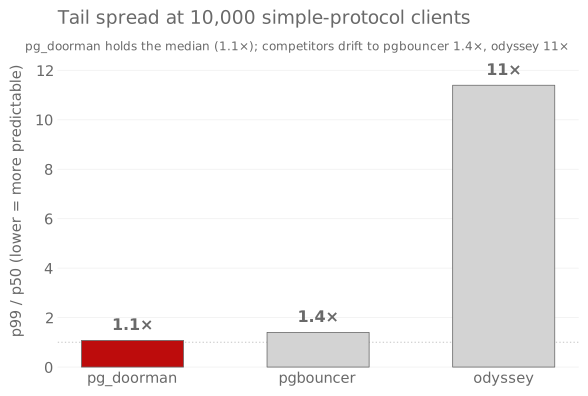
Environment
- Provider: Ubicloud
standard-60(eu-central-h1) - Resources: 60 vCPU / 235.9 GB
- Kernel:
Linux 5.15.0-139-generic x86_64 - Versions: PostgreSQL 14.22, pg_doorman 3.6.1, pgbouncer 1.25.1, odyssey 1.4.1
- Workers: pg_doorman: 30, odyssey: 30
- Duration per pgbench run: 60s
- Started: 2026-04-27 08:06 UTC
- Finished: 2026-04-27 11:03 UTC
- Total wall-clock: 2h 57m 08s
- Commit:
c9dd765c
Methodology
Each scenario runs pgbench -T <duration> against a 40-connection
server-side pool (pool_mode = transaction). The workload is a single
SELECT :aid (\set aid random(1, 100000)) — pure pooler overhead, no
real working set. Three poolers, one PostgreSQL backend, identical
hardware.
- Reconnect rows use
pgbench --connect: a fresh TCP+startup per transaction (worst case for login latency). - SSL rows set
PGSSLMODE=requireand a self-signed cert. - Latency is collected with
pgbench --log(per-transaction file); percentiles come from those samples, not frompgbenchsummary stats. - Scenarios run sequentially with the same data dir and warm OS caches.
Source: tests/bdd/features/bench.feature,
driver: benches/setup-and-run-bench.sh.
Reading the tables
Throughput — pg_doorman_TPS / competitor_TPS, rendered:
| Value | Meaning |
|---|---|
| +N% / -N% | Faster / slower by N percent |
| ≈0% | Within 3% — call it a tie |
| xN.N | N times faster (when ratio ≥ 1.5) |
| ∞ | Competitor returned 0 TPS |
| N/A | Competitor was not measured for this row |
| - | Not measured for either pooler |
Latency — per-transaction in ms. Each row shows p50 / p99 for
every pooler plus the spread (p99 / p50): how far the slowest 1%
drifts from the median. 1.0× means the tail equals the median;
100× means the worst 1% takes two orders of magnitude longer than a
typical request — the regime where fanout latency starts hitting users
(Dean & Barroso, 2013).
Watch the spread column to see whether tail latency stays bounded as
the client count grows. Full p95 series ships in the raw
pgbench --log files in the artifact tarball.
Simple protocol
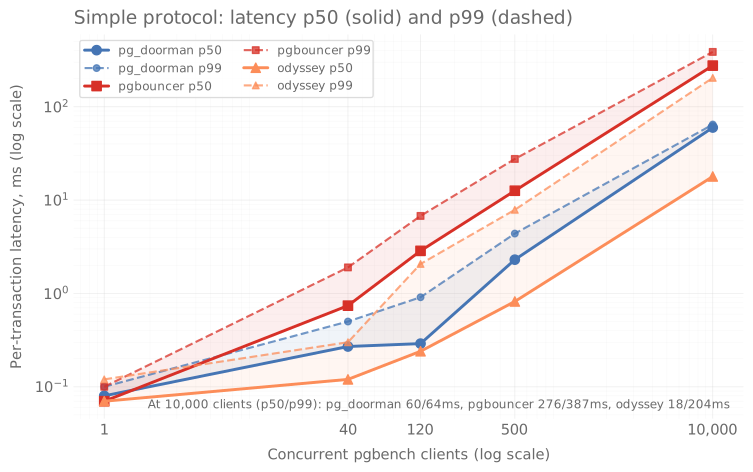
Throughput
| Test | vs pgbouncer | vs odyssey |
|---|---|---|
| 1 client | ≈0% | ≈0% |
| 40 clients | x2.9 | -46% |
| 120 clients | x9.9 | ≈0% |
| 500 clients | x6.6 | -32% |
| 10,000 clients | x4.7 | -34% |
| 1 client + Reconnect | -14% | x2.0 |
| 40 clients + Reconnect | x1.6 | N/A |
| 120 clients + Reconnect | x1.7 | N/A |
| 500 clients + Reconnect | x1.7 | N/A |
| 10,000 clients + Reconnect | +41% | N/A |
| 1 client + SSL | ≈0% | ≈0% |
| 40 clients + SSL | x3.1 | -38% |
| 120 clients + SSL | x8.5 | -5% |
| 500 clients + SSL | x10.6 | +18% |
| 10,000 clients + SSL | x7.1 | +12% |
| 1 client + SSL + Reconnect | -6% | x1.6 |
| 40 clients + SSL + Reconnect | ≈0% | -35% |
| 120 clients + SSL + Reconnect | +5% | -39% |
| 500 clients + SSL + Reconnect | +17% | -28% |
| 10,000 clients + SSL + Reconnect | -8% | -16% |
Latency (ms; spread = p99 / p50)
| Test | pg_doorman p50/p99 | spread | pgbouncer p50/p99 | spread | odyssey p50/p99 | spread |
|---|---|---|---|---|---|---|
| 1 client | 0.08 / 0.10 | 1.4× | 0.07 / 0.10 | 1.4× | 0.07 / 0.12 | 1.7× |
| 40 clients | 0.27 / 0.50 | 1.8× | 0.74 / 1.90 | 2.6× | 0.12 / 0.30 | 2.5× |
| 120 clients | 0.29 / 0.91 | 3.2× | 2.86 / 6.77 | 2.4× | 0.24 / 2.07 | 8.8× |
| 500 clients | 2.30 / 4.38 | 1.9× | 12.6 / 27.6 | 2.2× | 0.82 / 7.87 | 9.5× |
| 10,000 clients | 59.9 / 64.5 | 1.1× | 276 / 387 | 1.4× | 17.9 / 204 | 11× |
| 1 client + Reconnect | 0.14 / 0.23 | 1.6× | 0.11 / 0.21 | 1.9× | 0.18 / 0.31 | 1.7× |
| 40 clients + Reconnect | 1.26 / 4.10 | 3.2× | 1.91 / 6.26 | 3.3× | 1.85 / 5.35 | 2.9× |
| 120 clients + Reconnect | 3.83 / 11.1 | 2.9× | 5.89 / 18.1 | 3.1× | 5.95 / 16.7 | 2.8× |
| 500 clients + Reconnect | 16.3 / 42.9 | 2.6× | 26.2 / 71.1 | 2.7× | 25.3 / 65.4 | 2.6× |
| 10,000 clients + Reconnect | 369 / 763 | 2.1× | 524 / 1106 | 2.1× | 744 / 1519 | 2.0× |
| 1 client + SSL | 0.08 / 0.11 | 1.4× | 0.08 / 0.11 | 1.4× | 0.08 / 0.12 | 1.6× |
| 40 clients + SSL | 0.27 / 0.50 | 1.8× | 0.87 / 2.16 | 2.5× | 0.15 / 0.28 | 1.9× |
| 120 clients + SSL | 0.42 / 1.16 | 2.7× | 3.71 / 8.61 | 2.3× | 0.30 / 2.07 | 7.0× |
| 500 clients + SSL | 1.09 / 2.54 | 2.3× | 17.0 / 34.7 | 2.0× | 1.04 / 5.42 | 5.2× |
| 10,000 clients + SSL | 26.9 / 64.0 | 2.4× | 369 / 511 | 1.4× | 29.7 / 82.4 | 2.8× |
| 1 client + SSL + Reconnect | 0.23 / 0.36 | 1.6× | 0.19 / 0.35 | 1.9× | 0.28 / 0.43 | 1.5× |
| 40 clients + SSL + Reconnect | 17.6 / 42.2 | 2.4× | 16.3 / 53.1 | 3.3× | 11.4 / 31.7 | 2.8× |
| 120 clients + SSL + Reconnect | 57.0 / 130 | 2.3× | 55.6 / 166 | 3.0× | 33.9 / 95.7 | 2.8× |
| 500 clients + SSL + Reconnect | 212 / 483 | 2.3× | 237 / 619 | 2.6× | 150 / 392 | 2.6× |
| 10,000 clients + SSL + Reconnect | 5033 / 10055 | 2.0× | 4052 / 10245 | 2.5× | 4361 / 8612 | 2.0× |
Extended protocol
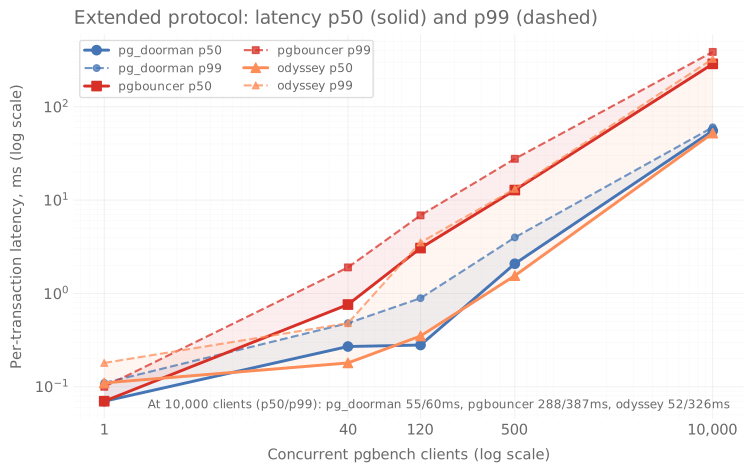
Throughput
| Test | vs pgbouncer | vs odyssey |
|---|---|---|
| 1 client | ≈0% | x1.6 |
| 40 clients | x3.0 | -21% |
| 120 clients | x10.4 | +40% |
| 500 clients | x7.4 | +7% |
| 10,000 clients | x5.2 | ≈0% |
| 1 client + Reconnect | -16% | x1.9 |
| 40 clients + Reconnect | x1.7 | N/A |
| 120 clients + Reconnect | x1.6 | x1.5 |
| 500 clients + Reconnect | x1.7 | N/A |
| 10,000 clients + Reconnect | +41% | x2.2 |
| 1 client + SSL | ≈0% | +49% |
| 40 clients + SSL | x3.3 | -13% |
| 120 clients + SSL | x9.4 | +50% |
| 500 clients + SSL | x10.4 | x1.7 |
| 10,000 clients + SSL | x7.1 | +25% |
Latency (ms; spread = p99 / p50)
| Test | pg_doorman p50/p99 | spread | pgbouncer p50/p99 | spread | odyssey p50/p99 | spread |
|---|---|---|---|---|---|---|
| 1 client | 0.07 / 0.11 | 1.4× | 0.07 / 0.10 | 1.4× | 0.11 / 0.18 | 1.6× |
| 40 clients | 0.27 / 0.48 | 1.8× | 0.76 / 1.90 | 2.5× | 0.18 / 0.48 | 2.7× |
| 120 clients | 0.28 / 0.89 | 3.2× | 3.06 / 6.87 | 2.2× | 0.35 / 3.52 | 10× |
| 500 clients | 2.08 / 3.98 | 1.9× | 12.8 / 27.7 | 2.2× | 1.55 / 13.2 | 8.5× |
| 10,000 clients | 55.4 / 60.3 | 1.1× | 288 / 387 | 1.3× | 52.2 / 326 | 6.2× |
| 1 client + Reconnect | 0.14 / 0.22 | 1.6× | 0.12 / 0.22 | 1.8× | 0.24 / 0.41 | 1.7× |
| 40 clients + Reconnect | 1.25 / 4.02 | 3.2× | 1.96 / 6.44 | 3.3× | 1.85 / 5.48 | 3.0× |
| 120 clients + Reconnect | 3.81 / 11.1 | 2.9× | 5.62 / 17.8 | 3.2× | 5.74 / 15.7 | 2.7× |
| 500 clients + Reconnect | 16.5 / 44.6 | 2.7× | 26.5 / 72.3 | 2.7× | 27.1 / 72.2 | 2.7× |
| 10,000 clients + Reconnect | 368 / 764 | 2.1× | 511 / 1139 | 2.2× | 816 / 1657 | 2.0× |
| 1 client + SSL | 0.09 / 0.11 | 1.2× | 0.08 / 0.12 | 1.5× | 0.12 / 0.20 | 1.7× |
| 40 clients + SSL | 0.27 / 0.49 | 1.8× | 0.91 / 2.20 | 2.4× | 0.23 / 0.37 | 1.6× |
| 120 clients + SSL | 0.38 / 1.05 | 2.8× | 3.68 / 8.69 | 2.4× | 0.57 / 2.62 | 4.6× |
| 500 clients + SSL | 1.01 / 2.65 | 2.6× | 17.6 / 36.1 | 2.1× | 2.29 / 7.34 | 3.2× |
| 10,000 clients + SSL | 27.7 / 65.9 | 2.4× | 384 / 521 | 1.4× | 49.2 / 152 | 3.1× |
Prepared protocol
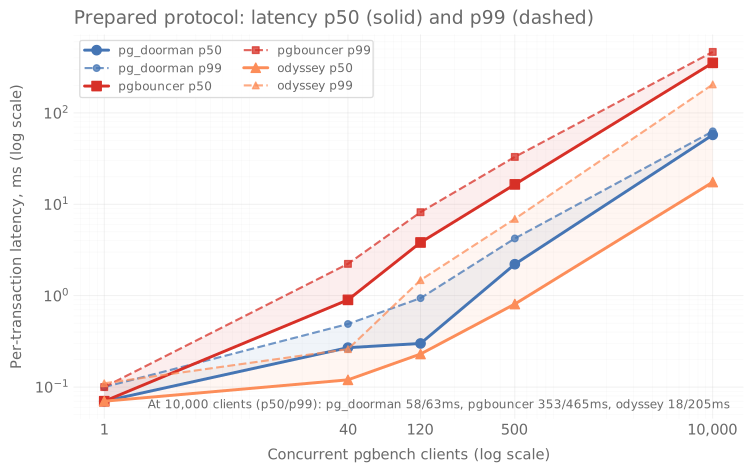
Throughput
| Test | vs pgbouncer | vs odyssey |
|---|---|---|
| 1 client | ≈0% | ≈0% |
| 40 clients | x3.4 | -49% |
| 120 clients | x12.0 | ≈0% |
| 500 clients | x8.5 | -29% |
| 10,000 clients | x6.2 | -32% |
| 1 client + Reconnect | -9% | x2.1 |
| 40 clients + Reconnect | x1.6 | +48% |
| 120 clients + Reconnect | x1.7 | N/A |
| 500 clients + Reconnect | x1.8 | N/A |
| 10,000 clients + Reconnect | +40% | x2.1 |
| 1 client + SSL | +3% | ≈0% |
| 40 clients + SSL | x3.8 | -36% |
| 120 clients + SSL | x10.0 | ≈0% |
| 500 clients + SSL | x12.7 | +19% |
| 10,000 clients + SSL | x8.6 | +12% |
Latency (ms; spread = p99 / p50)
| Test | pg_doorman p50/p99 | spread | pgbouncer p50/p99 | spread | odyssey p50/p99 | spread |
|---|---|---|---|---|---|---|
| 1 client | 0.07 / 0.10 | 1.4× | 0.07 / 0.10 | 1.4× | 0.07 / 0.11 | 1.6× |
| 40 clients | 0.27 / 0.49 | 1.8× | 0.90 / 2.23 | 2.5× | 0.12 / 0.26 | 2.2× |
| 120 clients | 0.30 / 0.94 | 3.2× | 3.82 / 8.20 | 2.1× | 0.23 / 1.48 | 6.3× |
| 500 clients | 2.21 / 4.23 | 1.9× | 16.5 / 33.0 | 2.0× | 0.81 / 6.93 | 8.6× |
| 10,000 clients | 57.5 / 62.9 | 1.1× | 353 / 465 | 1.3× | 17.5 / 205 | 12× |
| 1 client + Reconnect | 0.20 / 0.33 | 1.6× | 0.20 / 0.33 | 1.7× | 0.37 / 0.61 | 1.6× |
| 40 clients + Reconnect | 1.84 / 5.20 | 2.8× | 2.67 / 8.54 | 3.2× | 2.73 / 7.35 | 2.7× |
| 120 clients + Reconnect | 5.25 / 14.6 | 2.8× | 8.11 / 25.0 | 3.1× | 7.72 / 21.6 | 2.8× |
| 500 clients + Reconnect | 21.6 / 58.4 | 2.7× | 38.0 / 101 | 2.7× | 33.3 / 82.8 | 2.5× |
| 10,000 clients + Reconnect | 485 / 1031 | 2.1× | 672 / 1421 | 2.1× | 1026 / 2214 | 2.2× |
| 1 client + SSL | 0.08 / 0.12 | 1.4× | 0.08 / 0.12 | 1.5× | 0.08 / 0.13 | 1.7× |
| 40 clients + SSL | 0.26 / 0.48 | 1.8× | 1.02 / 2.59 | 2.5× | 0.15 / 0.27 | 1.8× |
| 120 clients + SSL | 0.42 / 1.16 | 2.8× | 4.44 / 9.74 | 2.2× | 0.28 / 1.15 | 4.0× |
| 500 clients + SSL | 1.08 / 2.60 | 2.4× | 21.5 / 41.0 | 1.9× | 1.06 / 5.35 | 5.0× |
| 10,000 clients + SSL | 27.1 / 58.3 | 2.1× | 463 / 609 | 1.3× | 29.8 / 86.2 | 2.9× |
Caveats
- 30 s per run is short by
pgbenchstandards (the docs recommend minutes); expect ±5% variance between runs. Re-run for production decisions. - Single PostgreSQL backend, no replicas, no real working set — these numbers measure pooler overhead, not full-system throughput.
- All three poolers use vendor defaults plus
pool_size = 40. Tuning specific knobs (pgbouncer so_reuseport,odyssey workers) will move the curves. Reconnectis the worst-case login-latency scenario; the headline numbers in production rarely look like the Reconnect rows.- Workload is a 1-row
SELECT. Read-heavy OLTP, OLAP, orLISTEN/NOTIFYpaths are not represented.
Changelog
3.11.0
Talos can route through client-specific pools
For user=talos, pg_doorman now selects the pool user in this order: clientId, srv-<clientId>, then the max token role (owner, read_write, read_only). Each Talos login logs the selected username and route.
Backend application_name stays the Talos clientId, so SHOW SERVERS and pg_stat_activity still show the client service. Talos bypasses pg_hba for the resolved pool user; enforce per-service access in the token issuer policy or PostgreSQL grants.
3.10.8
Cancelled backend startups clear their server stats row
Each backend startup attempt publishes a SERVER_STATS row before the
PostgreSQL handshake finishes. If connect_timeout cancels pool checkout, or
startup fails before a Server takes ownership, pg_doorman removes that row.
SHOW SERVERS, SHOW POOLS (sv_login), /api/servers, and /metrics no
longer show a long-lived login backend for a blackholed PostgreSQL address.
When a local backend attempt fails and Patroni-assisted fallback is enabled,
pg_doorman clears the local row before probing fallback candidates or waiting
in retry backoff. Each visible SHOW SERVERS row now maps to an active startup
attempt or an established server connection.
3.10.7
pgjdbc LargeObject fastpath calls work in transaction pooling
pg_doorman now forwards PostgreSQL Fastpath FunctionCall (F) messages and
passes FunctionCallResponse (V) back to the client. pgjdbc
LargeObjectManager uses this protocol path for functions such as lo_open,
lo_read, and lo_write. Transaction-mode clients could previously hang
because pg_doorman did not forward the frontend F message.
Large FunctionCallResponse messages now use the same large-message streaming
path as oversized DataRow and CopyData messages. This avoids buffering a
large fastpath lo_read response in pg_doorman memory before forwarding it to
the client.
Large object calls now work through pg_doorman and can hold transaction-pool backends while reads or writes are in flight. Size pools for concurrent large object traffic and keep application-side reads chunked. See Fastpath and Large Objects for pool sizing, timeout, and read-size guidance.
3.10.6
Binary upgrade no longer carries migrated client fds into the next generation
Client fds received over the SIGUSR2 migration socket are now marked
close-on-exec in the new process. A chained binary upgrade used to inherit
stale copies of already-migrated client sockets, so every generation could
start with extra fds and eventually fail with Too many open files under
load.
The foreground upgrade path also marks inherited service fds close-on-exec after startup and cleans up unexpected inherited descriptors before config load when the process starts as a binary-upgrade child. This lets an upgraded binary recover from a parent that was already polluted by older non-CLOEXEC fds instead of preserving that fd garbage forever.
Local fd exhaustion no longer enters Patroni-assisted fallback
Backend connection failures caused by pg_doorman's own EMFILE/ENFILE
state are now classified as local resource exhaustion, not as PostgreSQL
unreachability. Those errors no longer blacklist the local backend or enter
the Patroni-assisted fallback discovery path, so fd pressure does not amplify
itself with fallback connection attempts and noisy discovery failures.
Web admin sockets use the safe TCP policy
Accepted Web UI and /metrics TCP sockets now receive the same low-risk TCP
keepalive, buffer-size and user-timeout configuration as other TCP sockets,
but do not inherit the pooler client SO_LINGER policy. This avoids abortive
HTTP closes when general.tcp_so_linger = 0 while still bounding web socket
resource usage.
3.10.5
Binary upgrade survives a tight RLIMIT_NOFILE
SIGUSR2 binary upgrade now handles EMFILE/ENFILE from the old
process without spinning in the accept loop or overfilling the migration
queue.
-
The TCP and Unix accept loops treat
EMFILE/ENFILEas local resource pressure: they sleep for 10 ms and log at most once every 5 seconds. Other accept errors still log normally. -
The migration channel is no longer fixed at 4096 entries. At upgrade time pg_doorman reads the current
RLIMIT_NOFILE, counts open fds via/proc/self/fd, reserves headroom for the handoff pipe/socketpair and per-client fd work, and caps the queue by the remaining budget. If no safe headroom remains, pg_doorman starts the new process without client migration and logs the budget decision. -
Client migration reserves a channel slot before calling
dup()on the client fd. A full channel now applies backpressure before creating an extra fd.
If the pre-flight pg_doorman -t spawn fails with local EMFILE/ENFILE,
pg_doorman skips that validation step and continues with the binary
upgrade. Other validation failures still abort the upgrade before shutdown.
/metrics scrape uses cached socket-state counts
/metrics no longer walks /proc/PID/net/tcp and /proc/PID/net/unix
on the request path. On hosts with thousands of sockets, that synchronous
walk could hold worker threads long enough for regular Prometheus scrapes
to increase client p99.
Socket-state counts now live in a cached ArcSwap snapshot refreshed by a
background spawn_blocking task. The /metrics handler, periodic
print_all_stats output, and admin SHOW SOCKETS command read the cached
snapshot. The Web UI sockets endpoint still refreshes socket details on
demand for operator use.
The cache keeps scrape cost independent of the number of live sockets in the common Prometheus path.
3.10.1
Configurable kernel TCP socket buffer size
New general.tcp_socket_buffer_size (ByteSize, default 0). When set
to a non-zero value, pg_doorman calls setsockopt(SO_RCVBUF/SO_SNDBUF)
on every accepted client TCP socket and outbound backend TCP socket,
sets fixed send/receive buffer limits, and disables Linux TCP autotuning
for that socket. Linux applies/reports doubled values and may clamp them
by net.core.rmem_max / net.core.wmem_max.
The default 0 keeps the current behaviour (autotuning on). Operators
who observe MemFree jumping back up after a pg_doorman restart with
many long-lived idle clients may be seeing kernel TCP buffer
accumulation. This memory is not process RSS; depending on kernel and
cgroup mode it may show up as socket memory, for example sock in
cgroup v2 memory.stat. Those deployments can bound per-socket kernel
buffer limits by setting this knob to a value in the 64 KiB – 256 KiB
range suitable for OLTP traffic in one datacenter. See the
tcp_socket_buffer_size
reference for details and trade-offs.
Config reloads do not resize already-open sockets. During SIGUSR2
binary upgrade, migrated client sockets are reconfigured in the new
process; backend sockets pick up the value only when opened or
reconnected.
Equivalent of PgBouncer's tcp_socket_buffer parameter. Odyssey and
PgCat have no analogue.
3.10.0
Prepared statements and startup-time planner parameters
sync_server_parameters now replays safe parameters sent by the client
in StartupMessage, not only the small set of PostgreSQL-reported
ParameterStatus values. This lets transaction-mode pools preserve
startup-time session state such as search_path,
default_transaction_isolation, and role when a client transaction
lands on a different backend connection. Configured
startup_parameters still win over client-supplied values.
The prepared-statement cache key now includes a digest of the
startup-time planner parameters that pg_doorman can safely replay:
search_path, default_transaction_isolation,
default_transaction_read_only, default_text_search_config, and
role. Two clients that prepare the same query under different
search_path values now get separate server-side prepared statements
instead of sharing one PostgreSQL plan.
Runtime SET for planner parameters that PostgreSQL does not report is
still not tracked. Clients that need to change those values after
connection startup should set them in StartupMessage, reconnect or
run DISCARD ALL after changing them, or disable prepared_statements
for that pool.
PgDoorman also rolls back optimistic per-backend prepared-statement LRU
entries when PostgreSQL rejects Parse. Reusing the same client
statement name after a failed Parse now forces a fresh Parse instead of
hitting a stale DOORMAN_<N> entry and surfacing SQLSTATE 26000.
Per-pool response cache for general.pooler_check_query. The first
matching SimpleQuery in each pool's lifetime is forwarded to PostgreSQL;
every subsequent matching probe is answered from the cache without
touching the backend.
Behavior change for cold pools
Before this release pg_doorman answered any pooler_check_query match
locally with a hardcoded empty result. The default ; came back instantly
without ever talking to PostgreSQL, and a non-empty value such as select 1
returned an empty response that did not match what a real PostgreSQL would
have produced.
The first probe per pool now does one PostgreSQL round-trip and captures
the real response. If PostgreSQL is unreachable at that moment, the
probing client sees a probe failure instead of an unconditional OK; the
earlier hardcode reported the pooler as healthy even when PostgreSQL was
down. Typical JDBC keepalive queries such as select 1 (WildFly, HikariCP)
and select 'pg_doorman' now return the expected row.
Cache lifecycle
The cache is per pool and keyed by the query string. A RELOAD that
changes pooler_check_query invalidates the cache on the next ping; the
new value triggers one fresh backend probe and is then served from cache
until the value changes again. A reload that keeps the same value keeps
the cached response. ErrorResponse from the backend is forwarded to
the client unchanged and is never cached, so the next probe retries
against PostgreSQL.
Operator contract
pooler_check_query must be stable: the same input must produce the
same bytes, with no side effects. Safe values: ;, select 1,
select 'pg_doorman', select version().
Unsafe values that the cache will silently freeze:
select now(),select clock_timestamp()— the cached timestamp never advances.select pg_is_in_recovery()— a failover flips the role on PostgreSQL but the cached response still reports the old role.select count(*) from <table>— the cached count is whatever the first probe observed.UPDATE,INSERT,DELETE,CALL,DO— the side effect runs once and the success response is cached forever.
New metrics
pg_doorman_pooler_check_query_backend_total— counter, increments on each probe forwarded to PostgreSQL (cache miss or RELOAD-induced re-probe).pg_doorman_pooler_check_query_cache_total— counter, increments on each probe served from the cache.
The ratio cache_total / (cache_total + backend_total) is the cache
hit rate.
Eviction visibility for prepared-statement caches
Per-eviction events from the named and anonymous query interner and
from the per-client anonymous LRU are now emitted as TRACE log
lines. The default INFO level is unchanged; turn them on at
runtime with
SET log_level = 'info,pg_doorman::server::prepared_statement_cache=trace,pg_doorman::client::protocol=trace';
The GC sweep task additionally emits one DEBUG aggregate line per
cycle that actually evicted something. Operators that previously had
only the aggregate pg_doorman_query_interner_evictions_total and
pg_doorman_clients_prepared_anonymous_evictions_total Prometheus
counters can now follow individual evictions during an incident.
The 80-char-with-ellipsis and 120-char preview helpers used in those
log lines live in a new utils::strings module and replace three
inline copies that had drifted apart.
Web UI lifecycle events
The sidebar used to toast "pg_doorman restarted — rate baseline reset"
on every routine RELOAD. Totals are summed across the live pool set,
and RELOAD plus dynamic-pool GC drop pools from that set, so the sum
legitimately falls without the process going anywhere. The heuristic
is gone. A real restart is detected by a change in pid,
started_at_ms, or uptime_seconds.
/api/events grows two new event targets:
PROCESS_START— emitted once when setup finishes; carries the binary version and pid.CONFIG_VALIDATION_ERROR— emitted when SIGHUP, admin RELOAD, or/api/admin/reloadrejects the new config. Rate-limited to one per second per target so a SIGHUP loop with a bad config cannot fill the 1024-entry ring with duplicates.
A persistent banner across the top of the UI replaces the transient toast for conditions an operator must not miss:
shutdown_in_progress— pg_doorman is draining.migration_in_progress— binary upgrade in flight.- Last unresolved
CONFIG_VALIDATION_ERROR— stays up until a successfulRELOADclears it. /api/overviewsilent for >15 s — banner switches to "pg_doorman unreachable — last contact 23s ago", so the operator knows the rest of the page is no longer trustworthy.
A no-op SIGHUP (config file re-parsed identically) now emits a
RELOAD entry with message config unchanged instead of going
silent — one event per signal keeps the audit timeline complete.
/api/events and /api/overview send Cache-Control: no-store so
intermediate proxies cannot collapse two consecutive polls into the
same response.
3.9.1
Web admin console refresh and a follow-up pass on startup_parameters.
Upgrade notes for operators monitoring 3.9.0:
- The pg_doorman-side budget rejection now returns
SQLSTATE 53400(configuration_limit_exceeded) instead of54000. Alert rules and log filters keyed on54000need to switch. PgDoormanStartupParameterPgRejectionis nowseverity: warning(wascriticalin 3.9.0). Cascade-overflow stayscritical. Review the Alertmanager / on-call routing if you key on severity to page.
Web admin console
- Light theme by default. Three-position theme toggle (Light / System / Dark) in the sidebar footer; choice persists in localStorage.
- New
/serverspage reads SHOW SERVERS. Filters (database, user, state, application_name) and pagination live in the URL. - New "Top SQLSTATE codes" card on Overview aggregating
errors_by_sqlstateacross pools. - Patroni-assisted fallback banner on Overview when any pool reports
fallback_active=true. - Global RELOAD button on Config with typed confirmation.
- Logs and Clients filters move to URL parameters; deep links are shareable.
- Cmd+K / Ctrl-K command palette for navigation and pool lookup.
?opens a keyboard-shortcut sheet. Esc dismisses popovers and leaves the war room./wallrequests a screen wake lock so a TV stays on past the OS screensaver timeout.- Structured (i) popovers everywhere — definition, admin SHOW source, formula, thresholds, related metrics, link to docs.
- Sonner toast notifications for admin actions.
- Persistent transport indicator (http/https) in the sidebar footer.
- Counter-reset detection: a pg_doorman restart no longer renders as silent "0 qps" in the sidebar.
- Storage keys gained a host suffix, so two tabs against different poolers keep separate rolling buffers.
- Clients table memoises rows; poll cadence relaxed to 3 s. Resolves a memory growth reported on long sessions.
- Sidebar collapses below
md(mobile navigation via Cmd+K and URL). - Trimmed embedded font bundle: 5 woff2 (~146 KB) down from 9.
Backend: web/access_log.rs demotes authenticated 2xx reads to debug.
info covers admin actions, personal-data paths, /api/auth/,
/api/sso/, and any non-2xx.
Docs: guides/web-ui.md rewritten for the new pages and shortcuts.
startup_parameters follow-up
- If the resolved
startup_parametersset exceeds the startup packet budget, backend startup now fails withSQLSTATE 53400. A deterministicgeneral + pooloverflow is rejected at config load. - The final
ParameterStatusmessages sent to the client no longer overwrite operator-managed GUC names, so the client-visible values match the backend checkout state. auth_querynow rebuilds a dynamic pool after a successful MD5 refetch, rejects the stale-overlay race increate_dynamic_pool, and accepts nativejson/jsonbstartup_parameter columns without a::textcast./api/configand/api/poolsshow literal startup_parameter values only toAdmin; SSO readers get the masked view./api/configalso marksgeneral.host,general.port,web.host, andweb.portas restart-required.- Prometheus rules now cover PostgreSQL-side rejection, budget overflow, malformed auth_query columns, dedicated-mode drops, and rejected SSO credentials sent over insecure transport.
- Each pool now precomputes the merged startup map, budget decision, and canonical operator-key set. Backend checkout reuses those cached values instead of cloning and recalculating the map each time.
3.9.0
Per-pool PostgreSQL startup parameters. pg_doorman can now add
configured GUCs to each backend StartupMessage. Values apply in
three layers: general.startup_parameters, pools.<name>.startup_parameters,
and the optional startup_parameters column returned by passthrough
auth_query.
PostgreSQL stores these values as the session reset defaults, so
client-side RESET ALL and DISCARD ALL return to the configured value.
This gives one pool a different plan_cache_mode, statement_timeout,
work_mem, or idle_in_transaction_session_timeout without changing
postgresql.conf, ALTER ROLE, or ALTER DATABASE.
Cascade resolution
general.startup_parameters,pools.<name>.startup_parameters, and the optionalstartup_parameterstext column on anauth_queryrow are applied in order. Later layers override earlier ones per key.- Dedicated
auth_querymode uses a sharedserver_user, so pg_doorman ignores the per-user column there and logs one warning per pool and username. - A reload that changes startup parameters recycles the affected pools. Idle backends with the old reset defaults are not reused.
Validation and protocol safety
- Reserved protocol keys (
user,database,replication,options, the_pq_.*extension prefix) are refused at config load. - Keys must match the PG GUC naming shape
[A-Za-z_][A-Za-z0-9_.]*, values must not contain null bytes, and each level fits the startup-parameter budget ofMAX_STARTUP_PACKET_LENGTH - 512bytes. - The resolved parameter set is checked before each backend startup
against PG's 10 000-byte
MAX_STARTUP_PACKET_LENGTH. If only the auth_query layer overflows the packet, pg_doorman drops that layer and keeps the general/pool baseline. If the baseline itself does not fit, pg_doorman skips all configured keys for that spawn and logs the byte counts.
Behaviour on PG-side rejection
- If PostgreSQL rejects a configured startup parameter at backend
startup, pg_doorman returns PostgreSQL's
ErrorResponseto the client unchanged. pg_doorman does not retry without the key and does not disable the key automatically for the pool. Fix the parameter in the config; until then, backend startup for that pool fails with PostgreSQL's own SQLSTATE and message. - SQLSTATEs with the
57Pprefix (server unavailable) keep mapping toServerUnavailableErrorfirst so the Patroni-assisted fallback path can route around the failed node before the startup-parameter log line fires. - The configured parameter wins over the client sync path:
even if the client connect string carries an
application_name(or another tracked GUC likeTimeZone), the per-checkoutsync_parameterscall no longer overrides the configured value on the backend. That default stands until an explicitSETstatement on the client session changes it.
RELOAD coherence
- A SIGHUP that changes
general.startup_parametersdrains pools that inherit that baseline. The per-pool config hash includes the general startup map, and carried-over dynamicauth_querypools are recycled when the baseline changes.
Observability
pg_doorman_backend_startup_parameter_errors_total{pool, sqlstate}counts backend startups PostgreSQL rejected because of an configured startup parameter. The failing parameter name and username are written to the warning log line, not to metric labels.SHOW STARTUP_PARAMETERS(admin SQL console) lists the per-pool resolved parameters with the source of each value.psqltab completion onSHOW <TAB>now includes the command.- The Web UI pool detail page shows the same rows in a "Startup
parameters (configured)" section, driven by the new
startup_parameters[]field on/api/pools.
See PostgreSQL startup parameters for the configuration walkthrough, plus General Settings and Pool Settings for the full parameter list.
3.8.5
The web console now accepts JWTs issued by an external SSO proxy
alongside the existing Basic auth. The listener resolves every
request to one of three roles — Anonymous, Sso (read-only,
including logs and SQL text), and Admin (full access, including
POST /api/admin/*) — and a JWT can reach the Admin role through a
configurable group claim, so SSO operators run mutating admin actions
without sharing the Basic password. A per-request access log on a
dedicated logger target makes role transitions and 401/403 spikes
visible from journalctl. Full reference and an oauth2-proxy example
live in guides/web-ui.md.
SSO authentication
- New
[web]fields wire the SSO branch:sso_enabled,sso_proxy_url,sso_public_key_file,sso_audience,sso_allowed_users,sso_groups_claim,sso_admin_groups. JWTs are validated as RS256 against the PEM-encoded public key; the parsed key reloads onRELOAD. - A JWT whose
sso_groups_claimvalue intersectssso_admin_groupsresolves toAdminwithauth_source = sso. Emptysso_admin_groups(the default) keeps every SSO login on the read-onlySsorole. - Tokens are accepted from
Authorization: Bearer, thesso_access_tokencookie, or the?token=query parameter, in that priority order. Basic still wins over SSO when both are presented; a wrong Basic password no longer blocks a valid SSO token. GET /api/auth/configreportssso_enabled,sso_proxy_url,sso_admin_groups_configured,sso_config_error, and the resolvedcurrent_user, so the SPA renders the role-aware sign-in modal and sidebar without a second probe.
Role-aware gating
[web].ui_anonymous = falsenow requires theSsorole for the public/api/*endpoints; previously every authenticated request neededAdmin. Read-only privileged endpoints (/api/logs,/api/prepared/text/*,/api/interner/top,/api/top/queries) are reachable bySsousers.POST /api/admin/*remainsAdmin-only.- Insufficient-role rejections return
403 Forbiddenwith body{"error":"forbidden","message":"admin role required"}. Missing or invalid credentials still produce401. The SPA re-opens the sign-in modal on401and renders a non-blocking "admin role required" banner on403.
Browser sign-in flow
- The sign-in modal shows a Sign in via SSO button next to the
Basic form when the backend reports
sso_proxy_url. The proxy bounces the browser back with?token=<jwt>, which the SPA stores inlocalStorageand rewrites out of the URL. - A silent-refresh poller (every 60 s, fires when
expis under 90 s) opens a hidden iframe at${origin}/?sso_silent=1. The iframe renders a minimalSilentCallbackand posts the new token to the parent. If silent refresh fails and a Basic credential is available, the SPA falls back to Basic without redirecting; otherwise it performs a full redirect through the SSO proxy. - The SPA never sends cookies (
credentials: "omit"); cookie auth remains available for curl, sidecars, and oauth2-proxy variants that paste the token into a cookie on the shared domain.
Access log
- Every response (200/401/403/404/5xx,
/metricsscrapes included) emits one logfmt line on the dedicatedpg_doorman::web::accesstarget withmethod,path,query(presence flag only — raw query strings are never logged),status,bytes,latency_ms,peer,auth_role,auth_source, andauth_user. Bodies are not logged. - Levels are picked per request. Admin actions, personal-data reads,
every non-2xx response, and any authenticated request log at
info. Anonymous successful reads of public APIs and/metricsscrapes log atdebug, soRUST_LOG=infono longer drowns in scrape noise.
Real client IP behind a reverse proxy
- New
[web].trusted_proxiesCIDR list. When the TCP peer falls in this list, the access log parsesX-Forwarded-For(or RFC 7239Forwarded), walks the chain right-to-left skipping further trusted hops, and uses the first untrusted address aspeer. An untrusted client that sendsX-Forwarded-Foris ignored, so the field cannot be spoofed.
Observability
- New gauges
pg_doorman_web_sso_enabledandpg_doorman_web_sso_config_error. The latter stays at1whilesso_enabled = truebut the runtime failed to load (missing PEM file, empty audience, unparsable PEM). The exact reason is exported through/api/auth/config.sso_config_errorand rendered as a banner in the SPA. - New counters
pg_doorman_web_auth_attempts_total{role,source},pg_doorman_web_requests_total{status_class,role}, andpg_doorman_web_sso_validation_errors_total{reason}(reasons:signature,expired,audience,no_username,allowlist). Operators alert on SSO degradation without grepping logs.
3.8.0
Added
Built-in operator dashboard. pg_doorman exposes a single-page
diagnostic console on the same port as /metrics, served from
inside the binary and gated on [web].ui = true plus a non-default
admin_password. Getting comparable detail from the existing psql
admin console means running SHOW POOLS, SHOW CLIENTS,
SHOW STATS and friends in a loop, computing rates by hand between
two snapshots, and joining the rows mentally. The dashboard does
that on a 1.5 s tick.
What it shows that the psql admin console does not:
- Live time-series, not snapshots. Latency p95/p99, qps, errors/s and connection saturation render as sparklines, so "spiking now" is visually distinct from "always been like this".
- Errors broken down by SQLSTATE per pool. Plus top-N stuck
queries by
current_query_age_ms, top-N noisy clients by errors, top-N hottest prepared statements by hit rate. - Process memory by category. RSS split into jemalloc live allocations, jemalloc fragmentation, internal pg_doorman caches, code + libs, stacks + page tables, swap and anonymous remainder, with cgroup current / max alongside. Every category carries a one-line explanation on hover.
- Per-thread tokio-worker CPU. Drill-down from the threads
count to per-thread utilisation, so a stuck worker is visible
without
perf topon the host. - Live log tail. An in-process LogTap activates on the first
/api/logsrequest and self-disables two minutes after the last viewer. Level and target filters apply client-side over the rolling buffer. - Sortable, filterable tables. Pools, Clients, Apps and Caches sort by any column and filter by substring; Prepared statements adds a kind dropdown on top.
The dashboard is read-only by default. Pause / Resume / Reconnect /
Reload are the four writes, scoped to one pool via
?pool=user@db, to every pool of a database via ?db=, or
globally — the same semantics as the admin protocol.
Notes
[web].ui_anonymous(defaultfalse) controls whether the read-only/api/*endpoints answer without basic auth. Admin- only endpoints (/api/logs,/api/admin/*,/api/prepared/text/{hash},/api/interner/top,/api/top/queries) always require it regardless of that flag.- The dashboard polls every 1.5 s, but a 250 ms shared snapshot
feeds
/api/overview,/api/pools,/api/clients,/api/servers,/api/apps,/api/statsand/metrics, so a multi-tab dashboard does not multiply pool-stats work by the number of open tabs.
3.7.0
ACTION REQUIRED before upgrading to 3.7.0
- SQLSTATE for missing prepared statements changed from
58000to26000. AnyBindorDescribereferencing a prepared statement that pg_doorman cannot resolve now returns SQLSTATE26000(invalid_sql_statement_name), matching native PostgreSQL. Audit dashboards, log searches, alert rules, and retry middleware that filter on58000for this condition (Splunk saved searches, Grafana log alerts, custom retry policies). Drivers that auto-retry on26000(pgjdbc, pgx withcache_describe) now do so; drivers that closed the connection on58000will no longer. - Migration format v1 is no longer accepted. Upgrades from a pg_doorman that emitted v1 (3.5.0–3.5.x) must hop through 3.6.x first; from 3.4 and earlier no migration support existed, so the upgrade is unaffected.
client_prepared_statements_cache_sizeis deprecated. It remains a serde alias ofclient_anonymous_prepared_cache_size, with aWARNat startup. Planned for removal in 3.9; rename in configs now.- Anonymous prepared statements have a TTL by default. The
query interner evicts an anonymous entry after
query_interner_anon_idle_ttl_seconds(default 60) of idle time. Drivers like pgjdbc andpgxwithcache_describere-issueParsetransparently when the nextBindreturns SQLSTATE26000. If your driver relies on cross-batch unnamed prepared statements without a re-Parse, setquery_interner_anon_idle_ttl_seconds: 0to keep the pre-3.7 unbounded behaviour.
Added
- The query interner is split into NAMED (passive
Arc::strong_countGC) and ANON (idle TTL). Two general knobs control the GC:query_interner_gc_interval_seconds(default 60, restart-only) andquery_interner_anon_idle_ttl_seconds(default 60;0disables TTL and restores pre-3.7 unbounded behaviour; live-reloadable). A two-cycle mark-and-sweep grace prevents eviction of entries touched between cycles. SHOW INTERNERreports entries and bytes per kind;SHOW INTERNER Nlists the top N by interned text length with hash, kind, idle_ms, and a 120-character preview;RESET INTERNERclears both halves (diagnostics-only).- Prometheus interner metrics:
pg_doorman_query_interner_entries{kind},_bytes{kind},_evictions_total{kind, reason},_synthetic_misses_total,_gc_duration_seconds. server_prepared_statements_cache_size(general + per-pool) sizes the per-backend server-level prepared-statement LRU. When unset, inheritsprepared_statements_cache_size.client_anonymous_prepared_cache_sizebounds the Anonymous part of the per-client cache; named statements remain unbounded. The knob is now optional and inheritsprepared_statements_cache_sizewhen unset (0still means unlimited).kindcolumn appended toSHOW PREPARED_STATEMENTS(named/anonymous/mixed).SHOW POOLS_MEMORYgainsclient_named_count,client_anonymous_count, andclient_anonymous_evictions_alive(a gauge of evictions across currently connected clients; the authoritative cumulative counter lives in Prometheus aspg_doorman_clients_prepared_anonymous_evictions_total). The matching gaugespg_doorman_clients_prepared_named_entries/..._anonymous_entriesround out the surface.
Changed
- The per-client prepared-statement cache is split into Named
(unbounded) and Anonymous (LRU). Fixes a bug where the previous
combined LRU could evict a Named entry and cause the next
Bindto fail withprepared statement does not exist. Bindagainst an anonymous prepared statement that is no longer cached anywhere (interner, pool, client) now returns SQLSTATE26000(invalid_sql_statement_name) instead of58000, matching native PostgreSQL. Standard drivers re-issueParsetransparently.
Deprecated
client_prepared_statements_cache_sizeis renamed toclient_anonymous_prepared_cache_size. The old name remains a serde alias and logs aWARNat startup; rename it in your config.
Removed
- Migration format v1 is no longer accepted. Upgrades from versions
that emitted v1 (3.4 and earlier) must hop through a 3.5–3.6
binary first;
deserialize_statereturnsunsupported version 1otherwise.
3.6.5 May 4, 2026
Fix: stuck cl_active/sv_active after large DataRow client disconnect under pressure
When a large DataRow was deferred via pending_large_message, recv() cleared the deferred header before streaming. If the client disconnected during streaming write, the next drain/read path lost frame boundaries and could block in wait_available(). Under full pressure, this left cl_active/sv_active pinned at pool size and prevented normal server_lifetime recycling.
recv() now keeps pending_large_message until large-message handling succeeds and clears it only on Ok. On error, the next recv() still has correct frame context, allowing cleanup to complete and active counters to drop as expected.
Observability: oldest_active_age_ms per pool
SHOW POOLS exposes a new oldest_active_age_ms column and Prometheus exports pg_doorman_pools_oldest_active_age_ms{user, database}. The gauge reports the maximum age in milliseconds among ACTIVE servers in each pool, taken at snapshot time, and falls back to 0 when no server is currently ACTIVE. Sustained non-zero values flag stuck checkouts before pool exhaustion.
3.6.4 Apr 29, 2026
Fallback resilience
Patroni-assisted fallback now races Server::startup against every alive cluster member in parallel, with a strict sync_standby priority that protects write traffic during a local-backend outage. See Patroni-assisted fallback for operator-level details.
- Startup deadline per candidate.
Server::startupruns undertokio::time::timeout. Main path:connect_timeout(default3s), now also covers the StartupMessage round-trip. Fallback path:fallback_connect_timeout(default5s) per candidate. Raiseconnect_timeoutif local startup legitimately exceeds 3s (large WAL replay after restart). - Two-wave parallel race. Wave 1 races startup against every
sync_standbyin parallel and takes the first success; wave 2 (replica + leader) runs only if every sync_standby failed or none existed. While any sync_standby is still in-flight, a replica that already finished startup is intentionally not used — the user-facing requirement is "sync wins if it's alive at all", because the sync_standby is the lowest-data-loss promotion target. On full exhaustion the doorman log recordsall fallback candidates rejected (3 startup_error, 1 timeout)with a deterministic per-reason breakdown; the client always sees the sanitizedUnable to retrieve server parameters … may be unavailable or misconfiguredFATAL — read the doorman log for the wave/winner trace. - Per-host cooldown with exponential backoff. Failed candidate is marked unhealthy for
fallback_connect_timeout, doubling on consecutive failures up to60s; resets to base after the window elapses. The cooldown map is pruned of expired entries at the start of each discovery cycle, so its size stays linear in actively-failing candidates rather than accumulating dead pod IPs. - Soft outer deadline. The full fallback path runs under
query_wait_timeout(default5s). If it fires, pg_doorman aborts cleanly withfallback: outer deadline {ms}ms exceededin the log and returns the sanitized FATAL to the client. Per-candidate timeouts are the hard guarantee against hangs; the outer deadline is a soft cap on how long the client itself is willing to wait. - Whitelist post-failure rediscovery. Stale cached host failure clears the cache and runs one extra discovery round.
- Log rate-limit. Per-candidate
WARNrate-limited to 1 per 10s per(pool, host:port); suppressed lines log at DEBUG. pg_doorman_fallback_hostcleanup on switchover. Old(host, port)label removed when whitelist changes.- New metric
pg_doorman_fallback_candidate_failures_total{pool, reason}. Reasons:connect_error,startup_error,server_unavailable,timeout,other.
Use IP addresses (not hostnames) in member.host: a 5s DNS hang consumes the full per-candidate budget.
3.6.3 Apr 28, 2026
Fix: per-connection read buffer leak under multi-MiB simple-query INSERTs
Per-connection reusable read buffers (Client.read_buf, Server.read_buf) retained the largest allocation each connection had served. After one multi-MiB simple-query INSERT, every subsequent small message split out of that allocation, and the reusable buffer reclaimed the multi-MiB region as soon as the previous BytesMut was dropped. Across thousands of clients in transaction mode, occasional megabyte-sized payloads compounded into a 100 MB → 4 GB pooler RSS regression.
read_message_reuse and read_message_body_reuse now drop the backing allocation before each read when the buffer's capacity exceeds 256 KiB and fall back to a fresh 16 KiB buffer. The steady-state path (capacity within threshold) is unchanged.
3.6.2 Apr 27, 2026
New features:
-
Unix socket listener.
unix_socket_dircreates.s.PGSQL.<port>socket file. Connect withpsql -h <dir>orpgbench -h <dir>. No TCP overhead on local connections. -
HBA
localrule matching.localrules in pg_hba now apply to Unix socket connections.host/hostssl/hostnosslrules apply only to TCP. Previouslylocalrules were parsed but ignored. -
unix_socket_modecontrols socket file permissions. New[general]setting fixes the permission bits on.s.PGSQL.<port>after bind, so the access surface no longer depends on the process umask. Octal string, default"0600"(owner only). Set to"0660"to grant a Unix group, or"0666"to allow any local user. Validated at config load — invalid octal values, setuid/setgid/sticky bits, and overflow into bits above0o777are rejected upfront.
Known limitations (Unix socket):
- Unix listener not handed off during
SIGUSR2binary upgrade. New process re-creates the socket; connections refused for ~100ms. only_ssl_connectionsdoes not reject Unix socket connections. Unix sockets do not need TLS for transport security.
3.6.1 Apr 27, 2026
openssl 0.10.78 (CVE-2026-41678, CVE-2026-41681)
openssl 0.10.72 is affected by CVE-2026-41678 and CVE-2026-41681; some registry mirrors refuse downloads on that basis. pg_doorman now depends on openssl 0.10.78 and openssl-sys 0.9.114. API-compatible — no source changes.
3.6.0 Apr 24, 2026
Patroni-assisted fallback
When pg_doorman runs next to PostgreSQL on the same machine and connects via unix socket, a Patroni switchover or PostgreSQL crash leaves the pooler without a backend. With patroni_api_urls configured, pg_doorman queries the Patroni REST API /cluster endpoint, picks a live cluster member, and routes new connections there.
Candidate selection: sync_standby first (most likely next leader), then replica, then any other member. Members with noloadbalance, nofailover, or archive tags are excluded. All candidates are TCP-probed in parallel; the first responding sync_standby wins immediately.
The local backend stays in cooldown for fallback_cooldown (default 30s). During the cooldown, subsequent connection requests reuse the cached fallback host without re-querying Patroni. Fallback connections use a short fallback_lifetime (defaults to fallback_cooldown) so the pool returns to the local backend once it recovers.
Configuration:
pools:
  mydb:
    patroni_api_urls:
      - "http://10.0.0.1:8008"
      - "http://10.0.0.2:8008"
    fallback_cooldown: "30s"
    patroni_api_timeout: "5s"
    fallback_connect_timeout: "5s"
Prometheus metrics: pg_doorman_patroni_api_requests_total, pg_doorman_fallback_connections_total, pg_doorman_patroni_api_errors_total, pg_doorman_fallback_active, pg_doorman_patroni_api_duration_seconds, pg_doorman_fallback_host, pg_doorman_fallback_cache_hits_total.
If you tracked this feature under its working name in 3.5.x dev builds, the config keys and metric names changed before the public release: patroni_discovery_urls → patroni_api_urls, failover_blacklist_duration → fallback_cooldown, failover_discovery_timeout → patroni_api_timeout, failover_connect_timeout → fallback_connect_timeout, failover_server_lifetime → fallback_lifetime. Old pg_doorman_failover_* metrics are renamed to pg_doorman_patroni_api_* / pg_doorman_fallback_*.
Server-side TLS (pg_doorman → PostgreSQL)
Six SSL modes matching libpq semantics: disable, allow (default), prefer, require, verify-ca, verify-full. Mutual TLS supported via server_tls_certificate / server_tls_private_key.
Configuration is per-pool with global defaults in [general]. Cancel requests use TLS when the main connection used TLS.
Breaking change: server_tls (bool) and verify_server_certificate (bool) are removed. They were parsed but non-functional. Replace with:
| Old config | New config |
|---|---|
server_tls: false | server_tls_mode: "disable" |
server_tls: true | server_tls_mode: "require" |
server_tls: true + verify_server_certificate: true | server_tls_mode: "verify-full" |
| (not set) | server_tls_mode: "allow" (new default) |
The new default allow tries plain TCP first. If the server rejects the connection (e.g. pg_hba.conf requires TLS), pg_doorman retries with TLS on a new TCP socket. This matches libpq sslmode=allow.
SHOW SERVERS now includes a tls column showing whether each backend connection uses TLS.
3.5.3 Apr 22, 2026
Prepared statement cache overflow under concurrent load
The pool-level prepared statement cache could grow well above its configured prepared_statements_cache_size under concurrent client traffic. Production showed 480 entries with a limit of 300. The check-then-insert sequence in the cache had a race: multiple clients passed the size check simultaneously, each inserted without evicting. Now insertion happens first, followed by eviction in a loop until the cache is within bounds.
3.5.2 Apr 21, 2026
Semaphore permit leak on direct handoff
Each return_object handoff (delivering a connection to a waiting client via oneshot channel) permanently consumed one semaphore permit. After max_size handoffs the pool semaphore was fully drained, blocking all new timeout_get callers. The pool could not create connections and stabilized at whatever size it reached during cold start (typically 4-8 out of 40).
Root cause: wrap_checkout calls permit.forget(), and the handoff path in return_object skipped add_permits(1). Now return_object restores the permit on both the handoff and idle-queue paths. Compensating add_permits(1) in pre_replace_one removed (no longer needed).
Burst gate select race
The tokio::select! in the burst gate loop randomly picked among ready branches. When sleep(5ms) or create_done won over an already-delivered oneshot, the connection was silently dropped, inflating slots.size without a live server. Fixed with biased; (oneshot checked first) and a try_recv drain that pushes orphaned connections to idle without double-counting the permit.
Migration fixes
-
Client ID collision after migration. The new process started its connection counter at 0, colliding with migrated client IDs. Now the counter advances past the highest migrated ID.
-
SCRAM passthrough state preserved. The ClientKey from the first client's SCRAM handshake is serialized in the migration payload (v2 format, backward compatible). The new process skips the
ScramPendingfallback toserver_password.
Session mode statistics fix
xact_time percentiles in session mode showed the entire session duration instead of individual transaction time. Now recorded per-transaction at each ReadyForQuery(Idle), matching transaction mode semantics.
query_time had the same accumulation bug: the timer was set once before the inner loop and never reset, so each subsequent query reported the cumulative session duration. Now reset per-query in session mode.
Adaptive anticipation budget
Anticipation wait (formerly fixed 300-500ms) scales with real transaction latency: xact_p99 * 2 +/- 20% jitter, clamped to [5ms, 500ms]. Cold start default: 100ms.
Diagnostic logging
Slow checkout warnings (>500ms) now include pool state: size, avail, waiting, inflight, creates, gate_waits, antic_ok, antic_to, fallback. Phase-specific warnings added for semaphore timeout, burst gate timeout, coordinator exhaustion, and create failure.
3.5.1 Apr 20, 2026
systemd Type=notify support
pg_doorman now sends sd_notify(READY=1) on startup and sd_notify(MAINPID=<child_pid>) during binary upgrade. With Type=notify in the systemd unit, systemctl reload performs a zero-downtime binary upgrade without PID tracking issues — systemd follows the new process correctly and does not restart the service.
The shipped pg_doorman.service changes from Type=forking + --daemon to Type=notify (foreground). Existing installations using --daemon continue to work but do not benefit from client migration.
Docker STOPSIGNAL changed from SIGINT to SIGTERM to prevent binary upgrade in containers (where PID 1 exit kills the container).
3.5.0 Apr 15, 2026
Client migration during binary upgrade
Idle clients now transfer to the new process via Unix socket (SCM_RIGHTS) without reconnecting. Active-transaction clients finish their transaction on the old process, then migrate. Prepared statement caches are serialized and transparently re-parsed on the new backend. The old process exits once all clients have migrated or shutdown_timeout expires.
TLS connection migration (opt-in)
Build with --features tls-migration to migrate TLS sessions without re-handshake. A patched vendored OpenSSL 3.5.5 exports/imports symmetric cipher state (keys, IVs, sequence numbers). Linux-only. Offline builds supported via OPENSSL_SOURCE_TARBALL env var with SHA-256 verification.
3.4.0 Apr 11, 2026
Pool Coordinator — database-level connection limits
When multiple user pools share one PostgreSQL database, the sum of their pool_size values can exceed max_connections. A spike in one pool starves the others, or PostgreSQL rejects connections outright.
max_db_connections caps total backend connections per database across all user pools. When the cap is reached, the coordinator frees capacity through three mechanisms, tried in order:
-
Reserve pool. If
reserve_pool_size > 0and the reserve has headroom, a permit is granted immediately — no eviction, no wait. The reserve is a burst buffer: idle reserve connections are upgraded to main permits by the retain cycle once pressure drops, and closed if they stay idle longer thanmin_connection_lifetime. -
Eviction. The coordinator closes one idle connection from a peer pool with the largest surplus above its
min_guaranteed_pool_sizefloor. Candidates are ranked by p95 transaction time — slow pools donate first, because a 1 ms reconnect cost is negligible against a 15 ms p95 but doubles a 0.96 ms one. Only connections older thanmin_connection_lifetime(default 30 s) are eligible, which suppresses cyclic reconnect between pools that take turns stealing slots. -
Wait. If nothing is evictable, the caller parks for up to
reserve_pool_timeout(default 3 s), waking on any peer connection return or permit drop. After the wait, the reserve is retried once more before the client receives an error.
Disabled by default (max_db_connections = 0) — zero overhead when not configured. The hot path (idle connection reuse) never touches the coordinator; only new connection creation does, at the cost of one atomic operation.
New pool-level config fields:
| Parameter | Default | Purpose |
|---|---|---|
max_db_connections | 0 (disabled) | Hard cap on backend connections per database |
min_connection_lifetime | 30000 ms | Eviction age floor — connections younger than this are immune |
reserve_pool_size | 0 (disabled) | Extra permits above the cap, granted on burst |
reserve_pool_timeout | 3000 ms | Coordinator wait budget before error |
min_guaranteed_pool_size | 0 | Per-user eviction protection floor |
New admin commands: SHOW POOL_COORDINATOR (per-database coordinator state), SHOW POOL_SCALING (per-pool checkout counters). Both are also exported as Prometheus metrics under pg_doorman_pool_coordinator{type, database} and pg_doorman_pool_scaling{type, user, database}.
See the pool pressure tutorial for acquisition phases, tuning recipes, and alert examples.
Connection checkout under pressure
Replaces scaling_cooldown_sleep (a fixed 10 ms delay before creating a backend connection) with a multi-phase checkout that reuses connections about to be returned before resorting to connect().
When the idle pool is empty and the pool is above its warm threshold (scaling_warm_pool_ratio, default 20%), a caller first spins briefly (scaling_fast_retries, default 10 yield iterations), then registers a direct-handoff waiter. Connections returned by other clients are delivered through the waiter channel — no idle-queue round-trip, no race with other checkout attempts. The waiter deadline is bounded by query_wait_timeout minus a 500 ms reserve for the create path. If no connection arrives, the caller proceeds to create.
Backend connect() calls are capped at scaling_max_parallel_creates (default 2) per pool. Callers above the cap wait for a peer create to finish or a connection to be returned. Background replenish (min_pool_size) respects the same cap and defers to the next retain cycle when the gate is full, so it does not compete with client-driven creates during spikes.
Connections nearing server_lifetime expiry (95% of age) trigger a pre-replacement: a background task creates a successor before the old connection fails recycle, so the next checkout hits the hot path.
The direct-handoff queue is FIFO. On a 500-client / 40-connection AWS Fargate benchmark, p99/p50 ratio is 1.08 (pg_doorman) vs 25.5 (Odyssey). Every client pays roughly the same queue cost.
Migration: remove scaling_cooldown_sleep from your config if present. Replace with scaling_max_parallel_creates (default 2) if you need to tune the concurrency cap.
Improvements:
-
Runtime log level control.
SET log_level = 'debug'changes the log filter without restart;SET log_level = 'warn,pg_doorman::pool::pool_coordinator=debug'targets specific modules.SHOW LOG_LEVELdisplays the current filter. Changes are ephemeral (lost on restart). -
Log readability overhaul. Consistent
[user@pool #cN]prefix. Durations as4m30sinstead of raw milliseconds. Stats line in logfmt. PG error newlines escaped. Expensive debug computations guarded bylog_enabled!()to avoid allocations at production log levels. -
Auth failure logs include client IP. SCRAM, MD5, JWT, and PAM failures show the source address.
-
Replenish failure noise suppression. Repeated
min_pool_sizefailures log once at warn, then a periodic reminder every ~10 minutes with the failure count. -
avg_xact_timecolumn inSHOW POOLS. Average transaction time per pool, visible alongside existing connection counts. -
Smart session cleanup in transaction mode. pg_doorman tracks which session state a client dirtied (
SET,DECLARE CURSOR, prepared statements) and sends the matching reset on checkin. If the client cleaned up after itself —RESET ALL,CLOSE ALL,DEALLOCATE ALL, orDISCARD ALL— pg_doorman sees the confirmation and skips its own reset. Drivers likejackc/pgxthat send a cleanup batch on disconnect no longer cause a redundant round-trip to PostgreSQL. ASETwithout a follow-up reset still triggers cleanup as before.
3.3.5 Mar 31, 2026
Bug Fixes:
- Prepared statement eviction during batch breaks buffered Bind. When a client sent a batch like
Parse(A), Bind(A), Parse(C), SyncandParse(C)triggered server-side LRU eviction of statement A, theClose(A)was sent to PostgreSQL immediately (out-of-band), deleting A before the client buffer was flushed.Bind(A)then failed withprepared statement "DOORMAN_X" does not exist(error 26000). Two fixes: (1)has_prepared_statement()now promotes entries in the LRU on access (get()instead ofcontains()), so actively-used statements resist eviction. (2) EvictionCloseis deferred until after the batch completes — the statement stays alive on PostgreSQL while Binds in the buffer are processed, thenCloseis sent as post-batch cleanup. If the client disconnects beforeSync,checkin_cleanupdetects the pending deferred closes and triggersDEALLOCATE ALL.
3.3.4 Mar 30, 2026
Bug Fixes:
- Prepared statement cache desync after client disconnect. When a client sent Parse but disconnected before Sync/Flush, pg_doorman registered the statement in the server-side LRU cache but never sent the actual Parse to PostgreSQL (it was still in the client buffer, which was dropped on disconnect). The next client that got the same server connection and used the same query saw the stale cache entry, skipped sending Parse, and received
prepared statement "DOORMAN_X" does not exist(error 26000) from PostgreSQL. Fixed by tracking ahas_pending_cache_entriesflag on the server connection: set when a statement is added to the cache without immediate Parse confirmation, cleared after successful buffer flush. If the client disconnects before flushing,checkin_cleanupdetects the flag and triggersDEALLOCATE ALLto re-synchronize the cache. Zero overhead on the normal path (one boolean check per checkin).
3.3.3 Mar 26, 2026
Bug Fixes:
-
Log spam from missing
/proc/net/tcp6when IPv6 disabled.get_socket_states_countfailed entirely if any of the three /proc files was absent, logging errors every 15 seconds and losing tcp/unix metrics that were available. Missing files are now skipped — counters stay at zero. Other I/O errors (permission denied) still propagate. -
Protocol violation when streaming large DataRow with cached prepared statements.
handle_large_data_rowwrote accumulated protocol messages (BindComplete, RowDescription) directly to the client socket, bypassingreorder_parse_complete_responses. When Parse was skipped (prepared statement cache hit), the client received BindComplete without the synthetic ParseComplete — causingReceived backend message BindComplete while expecting ParseCompleteMessagein Npgsql and similar drivers. Triggered whenmessage_size_to_be_stream≤ 64KB. Fixed by returning accumulated messages fromrecv()before entering the streaming path, so response reordering runs first. Same fix applied tohandle_large_copy_data.
3.3.2 Mar 1, 2026
Breaking Changes:
auth_queryconfig field renames: Two fields in theauth_querysection have been renamed for clarity.auth_query.pool_size(number of connections for running auth queries) is nowauth_query.workers.auth_query.default_pool_size(data pool size for dynamic users) is nowauth_query.pool_size, matching the same parameter name used in static pools. Migration: renamepool_sizetoworkersanddefault_pool_sizetopool_sizein yourauth_queryconfig. If you don't update, the oldpool_sizevalue (typically 1-2) will be interpreted as the data pool size, drastically reducing connection capacity. The olddefault_pool_sizekey is silently ignored and defaults to 40.
Bug Fixes:
-
Session mode: keep server connections alive after SQL errors. A query like
SELECT 1/0returns anErrorResponsefrom PostgreSQL but leaves the connection fully usable. Previously,handle_error_responsecalledmark_bad()unconditionally in async mode, so the connection was destroyed at session end. Nowmark_badis skipped when the pool runs in session mode. Transaction mode still callsmark_badbecause the connection returns to a shared pool where protocol desync is dangerous. -
Pool-level
server_lifetimeandidle_timeoutoverrides ignored: Pool-level overrides forserver_lifetimeandidle_timeoutwere silently ignored — the general (global) values were always used instead. Fixed in 6 places across 3 pool creation contexts (static pools, auth_query shared pools, dynamic pools). Nowpool.server_lifetimeandpool.idle_timeoutcorrectly override the general settings when specified. -
idle_timeoutdefault was 83 hours instead of 10 minutes: The defaultidle_timeoutwas set to 300,000,000ms (83 hours), effectively disabling idle connection cleanup. Idle server connections could accumulate indefinitely. Changed default to 600,000ms (10 minutes). -
retain_connections_maxquota exhaustion causing unlimited closure: Whenretain_connections_max > 0and the global counter reached the limit, the remaining quota became0viasaturating_sub. Since0means "unlimited" inretain_oldest_first(), pools processed after quota exhaustion lost ALL idle connections in a single retain cycle instead of none. With non-deterministic HashMap iteration order, this bug manifested as random pools losing all connections. Fixed by adding an early return when the quota is exhausted. -
retain_connections_maxdoc comment incorrectly stated default as0(unlimited): The actual default is3. -
server_lifetimedefault changed from 5 minutes to 20 minutes: The previous default of 5 minutes was shorter thanidle_timeout(10 minutes), which meantidle_timeoutcould never trigger — connections were always killed byserver_lifetimefirst. Changed to 20 minutes so thatidle_timeout(10 min) handles idle cleanup whileserver_lifetime(20 min) rotates long-lived connections. Note:idle_timeoutonly applies to connections that have been used at least once — prewarmed/replenished connections that were never checked out by a client are not subject toidle_timeoutand will only be closed whenserver_lifetimeexpires. -
idle_timeout = 0did not disable idle timeout:idle_timeout = 0should disable idle connection cleanup, matching PgBouncer'sserver_idle_timeout = 0and pg_doorman'sserver_lifetime = 0. Instead, pg_doorman closed connections after ~1 ms of idle time. Fixed by adding anidle_timeout_ms > 0guard before the elapsed-time check. -
idle_timeouthad no jitter — synchronized mass closures: Unlikeserver_lifetimewhich applies ±20% per-connection jitter to prevent thundering herd,idle_timeoutused a single pool-wide value. When many connections became idle simultaneously (e.g., after a traffic burst), they all expired at the exact same moment, causing mass closures in one retain cycle. Nowidle_timeoutapplies the same ±20% per-connection jitter asserver_lifetime. -
retain_connections_maxunfair quota distribution across pools: The retain cycle iterated pools via HashMap, whose order is deterministic within a process (fixed RandomState seed). The same pool always got iterated first and consumed the entireretain_connections_maxquota, starving other pools. Expired connections in starved pools were never cleaned up by retain — clients had to discover them via failedrecycle()checks, adding latency. Fixed by shuffling pool iteration order each cycle. -
Retain and replenish used separate pool snapshots: The retain and replenish phases each called
get_all_pools()separately. IfPOOLSwas atomically updated between them (config reload, dynamic pool GC), retain operated on one set of pools and replenish on another, potentially missing pools that need replenishment. Fixed by using a single snapshot for both phases.
Testing:
- PHP PDO_PGSQL driver added to test infrastructure. PHP 8.4 with
pdo_pgsqlextension is now included in the Nix-based Docker test image. Two BDD scenarios verify basic connectivity (SELECT 1) and session mode behavior (SQL error does not change backend PID). Run withmake test-phpor--tags @php.
New Features:
-
pool_sizeobservability: Newpg_doorman_pool_sizePrometheus gauge exposes the configured maximum pool size per user/database. Thepool_sizecolumn is also added toSHOW POOLSandSHOW POOLS_EXTENDEDadmin commands (aftersv_login), allowing operators to compare current server connections against configured capacity directly from the admin console. Works for both static and dynamic (auth_query) pools. -
PAUSE, RESUME, RECONNECT admin commands: New admin console commands for managing connection pools.
PAUSE [db]blocks new backend connection acquisition (active transactions continue).RESUME [db]lifts the pause and unblocks waiting clients.RECONNECT [db]forces connection rotation by incrementing the pool epoch — idle connections are immediately closed and active connections are discarded when returned to the pool. Without arguments, all pools are affected; with a database name, only matching pools. Specifying a nonexistent database returns an error. UseSHOW POOLSto see thepausedstatus column. -
min_pool_sizefor dynamic auth_query passthrough pools: Newauth_query.min_pool_sizesetting controls the minimum number of backend connections maintained per dynamic user pool in passthrough mode. Connections are prewarmed in the background when the pool is first created and replenished by the retain cycle afterserver_lifetimeexpiry. Pools withmin_pool_size > 0are never garbage-collected. Default is0(no prewarm — backward compatible). Note: total backend connections scale asactive_users × min_pool_size.
3.3.1 Feb 26, 2026
Bug Fixes:
-
Fix Ctrl+C in foreground mode: Pressing Ctrl+C in foreground mode (with TTY attached) now performs a clean graceful shutdown instead of triggering a binary upgrade. Previously, each Ctrl+C would spawn a new pg_doorman process via
--inherit-fd, leaving orphan processes accumulating. SIGINT in daemon mode (no TTY) retains its legacy binary upgrade behavior for backward compatibility with existingsystemdunits. -
Minimum pool size enforcement (
min_pool_size): Themin_pool_sizeuser setting is now enforced at runtime. After each connection retain cycle, pg_doorman checks pool sizes and creates new connections to maintain the configured minimum. Previously,min_pool_sizewas accepted in config but never applied — pools started empty and could drop to 0 connections even withmin_pool_sizeset. Replenishment stops on the first connection failure to avoid hammering an unavailable server.
New Features:
-
SIGUSR2 for binary upgrade: New dedicated signal
SIGUSR2triggers binary upgrade + graceful shutdown in all modes (daemon and foreground). This is now the recommended signal for binary upgrades. Thesystemdservice file has been updated to useSIGUSR2forExecReload. -
UPGRADEadmin command: New admin console command that triggers binary upgrade via SIGUSR2. Use it frompsqlconnected to the admin database:UPGRADE;.
Improvements:
-
Pool prewarm at startup: When
min_pool_sizeis configured, pg_doorman now creates the minimum number of connections immediately at startup, before the first retain cycle. Previously, pools started empty and connections were only created lazily on first client request or after the first retain interval (default 60s). This eliminates cold-start latency for the first clients connecting after pg_doorman restart. -
Configurable connection scaling parameters: New
generalsettingsscaling_warm_pool_ratio,scaling_fast_retries, andscaling_cooldown_sleepallow tuning connection pool scaling behavior. All three can be overridden at the pool level.scaling_cooldown_sleepuses the human-readableDurationtype (e.g."10ms","1s") consistent with other timeout fields. -
max_concurrent_createssetting: Controls the maximum number of server connections that can be created concurrently per pool. Uses a semaphore instead of a mutex for parallel connection creation.
3.3.0 Feb 23, 2026
New Features:
-
Dynamic user authentication (
auth_query): PgDoorman can now authenticate users dynamically by querying PostgreSQL at connection time — no need to list every user in the config. Supportspg_shadow, custom tables, andSECURITY DEFINERfunctions. The query must return a column namedpasswdorpassword(or any single column) containing an MD5 or SCRAM-SHA-256 hash. -
Passthrough authentication: Default mode for both static and dynamic users — PgDoorman reuses the client's cryptographic proof (MD5 hash or SCRAM ClientKey) to authenticate to the backend automatically. No plaintext
server_passwordin config needed when the pool user matches the backend PostgreSQL user. -
Two auth_query modes:
- Passthrough mode (default) — each dynamic user gets their own backend connection pool and authenticates as themselves, preserving per-user identity on the backend.
- Dedicated mode (
server_userset) — all dynamic users share a single backend pool under one PostgreSQL role.
-
Auth query caching: DashMap-based cache with configurable TTL, double-checked locking, rate-limited refetch, and request coalescing. Supports separate TTLs for successful and failed lookups.
-
SHOW AUTH_QUERYadmin command: Displays per-pool metrics — cache entries/hits/misses, auth success/failure counters, executor stats, and dynamic pool count. -
Prometheus metrics for auth_query: New metric families
pg_doorman_auth_query_cache,pg_doorman_auth_query_auth,pg_doorman_auth_query_executor,pg_doorman_auth_query_dynamic_pools. -
Idle dynamic pool garbage collection: Background task cleans up expired dynamic pools when all connections have been idle beyond
server_lifetime. Zero overhead for static-only configs. -
Smart password column lookup: Password column resolved by name (
passwd→password→ single-column fallback), works withpg_shadow, custom tables, and arbitrary single-column queries.
Improvements:
-
server_username/server_passwordnow optional: Previously documented as required for MD5/SCRAM hash configs. Now only needed when the backend user differs from the pool user (username mapping, JWT auth). -
Data-driven config & docs generation:
fields.yamlis the single source of truth for all config field descriptions (EN/RU). Reference docs, annotated configs, and inline comments are all generated from it.
Testing:
- 39 new BDD scenarios (260+ steps) covering auth_query executor, end-to-end auth, HBA integration, passthrough mode, SCRAM-only auth, RELOAD/GC lifecycle, observability, and static user passthrough.
3.2.4 Feb 20, 2026
New Features:
-
Annotated config generation: The
generatecommand now produces well-documented configuration files with inline comments for every parameter by default. Previously it only did plain serde serialization without any documentation. -
--referenceflag: Generates a complete reference config with example values without requiring a PostgreSQL connection. The rootpg_doorman.tomlandpg_doorman.yamlare now auto-generated from this flag, ensuring they always stay in sync with the codebase. -
--format(-f) flag: Explicitly choose output format (yamlortoml). Default output format changed from TOML to YAML. When--outputis specified, format is auto-detected from file extension;--formatoverrides auto-detection. -
--russian-comments(--ru) flag: Generates comments in Russian for quick start guide. All ~100+ comment strings are translated to clear, simple Russian. -
--no-commentsflag: Disables inline comments for minimal config output (plain serde serialization, the old default behavior). -
Passthrough authentication documentation: Documents passthrough auth as the default mode —
server_username/server_passwordare no longer needed when the pool user matches the backend PostgreSQL user. PgDoorman reuses the client's MD5 hash or SCRAM ClientKey to authenticate to the backend automatically.
Testing:
-
Config field coverage guarantee: New test parses config struct source files (
general.rs,pool.rs,user.rs, etc.) at compile time and verifies everypubfield appears in annotated output. If someone adds a new config parameter but forgets to add it toannotated.rs, CI will fail with a clear message listing the missing fields. -
BDD tests for generate command: End-to-end tests that generate TOML and YAML configs, start pg_doorman with them, and verify client connectivity.
Bug Fixes:
-
Fixed protocol desynchronization on prepared statement cache eviction in async mode: When asyncpg/SQLAlchemy uses
Flush(instead ofSync) for pipelinedParse+Describebatches and the prepared statement LRU cache is full, eviction sendsClose+Syncto the server. In async mode,recv()was exiting immediately whenexpected_responses==0, leavingCloseCompleteandReadyForQueryunread in the TCP buffer. The nextrecv()call would then read these stale messages instead of the expected response, causing protocol desynchronization. Fixed by temporarily disabling async mode during eviction so thatrecv()waits forReadyForQueryas the natural loop terminator. -
Fixed generated config startup failure:
syslog_prog_nameanddaemon_pid_fileare now commented out by default in generated configs. Previously they were uncommented, causing pg_doorman to fail when started in foreground mode or when syslog was unavailable. -
Fixed Go test goroutine leak:
TestLibPQPreparednow usessync.WaitGroupto wait for all goroutines before test exit, fixing sporadic panics caused by logging after test completion. -
Fixed protocol violation on flush timeout — client now receives ErrorResponse: When the 5-second flush timeout fires (server TCP write blocks because the backend is overloaded or unreachable), the
FlushTimeouterror was propagating via?throughhandle_sync_flush→ transaction loop →handle()without sending any PostgreSQL protocol message to the client. The TCP connection was simply dropped, causing drivers like Npgsql to report "protocol violation" due to unexpected EOF. Now pg_doorman sends a properErrorResponsewith SQLSTATE58006and message containing "pooler is shut down now" before closing the connection, allowing client drivers to detect the error and reconnect gracefully.
3.2.3 Feb 10, 2026
Improvements:
- Jitter for
server_lifetime(±20%): Connection lifetimes now have a random ±20% jitter applied to prevent mass disconnections from PostgreSQL. When pg_doorman is under heavy load, it creates many connections simultaneously, which previously caused them all to expire at the same time, creating spikes of connection closures. Now each connection gets an individual lifetime calculated asbase_lifetime ± random(20%). For example, withserver_lifetime: 300000(5 minutes), actual lifetimes range from 240s to 360s, spreading connection closures evenly over time.
3.2.2 Feb 9, 2026
New Features:
-
Configuration test mode (
-t/--test-config): Added nginx-style configuration validation flag. Runningpg_doorman -torpg_doorman --test-configwill parse and validate the configuration file, report success or errors, and exit without starting the server. Useful for CI/CD pipelines and pre-deployment configuration checks. -
Configuration validation before binary upgrade: When receiving SIGINT for graceful shutdown/binary upgrade, the server now validates the new binary's configuration using
-tflag before proceeding. If the configuration test fails, the shutdown is cancelled and critical error messages are logged to alert the operator. This prevents accidental downtime from deploying a binary with invalid configuration. -
New
retain_connections_maxconfiguration parameter: Controls the maximum number of idle connections to close per retain cycle. When set to0, all idle connections that exceedidle_timeoutorserver_lifetimeare closed immediately. Default is3, providing controlled cleanup while preventing connection buildup. Previously, only 1 connection was closed per cycle, which could lead to slow connection cleanup when many connections became idle simultaneously. Connection closures are now logged for better observability. -
Oldest-first connection closure: When
retain_connections_max > 0, connections are now closed in order of age (oldest first) rather than in queue order. This ensures that the oldest connections are always prioritized for closure, providing more predictable connection rotation behavior. -
New
server_idle_check_timeoutconfiguration parameter: Time after which an idle server connection should be checked before being given to a client (default: 30s). This helps detect dead connections caused by PostgreSQL restart, network issues, or server-side idle timeouts. When a connection has been idle longer than this timeout, pg_doorman sends a minimal query (;) to verify the connection is alive before returning it to the client. Set to0to disable. -
New
tcp_user_timeoutconfiguration parameter: Sets theTCP_USER_TIMEOUTsocket option for client connections (in seconds). This helps detect dead client connections faster than keepalive probes when the connection is actively sending data but the remote end has become unreachable. Prevents 15-16 minute delays caused by TCP retransmission timeout. Only supported on Linux. Default is60seconds. Set to0to disable. -
Removed
wait_rollbackmechanism: The pooler no longer attempts to automatically wait for ROLLBACK from clients when a transaction enters an aborted state. This complex mechanism was causing protocol desynchronization issues with async clients and extended query protocol. Server connections in aborted transactions are now simply returned to the pool and cleaned up normally via ROLLBACK during checkin. -
Removed savepoint tracking: Removed the
use_savepointflag and related logic that was tracking SAVEPOINT usage. The pooler now treats savepoints as regular PostgreSQL commands without special handling.
Bug Fixes:
- Fixed protocol desynchronization in async mode with simple prepared statements: When
prepared_statementswas disabled but clients used extended query protocol (Parse, Bind, Describe, Execute, Flush), the pooler wasn't tracking batch operations, causingexpected_responsesto be calculated as 0. This led to the pooler exiting the response loop immediately without waiting for server responses (ParseComplete, BindComplete, etc.). Now batch operations are tracked regardless of theprepared_statementssetting.
Performance:
- Removed timeout-based waiting in async protocol: The pooler now tracks expected responses based on batch operations (Parse, Bind, Execute, etc.) and exits immediately when all responses are received. This eliminates unnecessary latency in pipeline/async workloads.
3.1.8 Jan 31, 2026
Bug Fixes:
-
Fixed ParseComplete desynchronization in pipeline on errors: Fixed a protocol desynchronization issue (especially noticeable in .NET Npgsql driver) where synthetic
ParseCompletemessages were not being inserted if an error occurred during a pipelined batch. When the pooler caches a prepared statement and skips sendingParseto the server, it must still provide aParseCompleteto the client. If an error occurs before subsequent commands are processed, the server skips them, and the pooler now ensures all missing syntheticParseCompletemessages are inserted into the response stream upon receiving anErrorResponseorReadyForQuery. -
Fixed incorrect
use_savepointstate persistence: Fixed a bug where theuse_savepointflag (which disables automatic rollback on connection return if a savepoint was used) was not reset after a transaction ended.
3.1.7 Jan 28, 2026
Memory Optimization:
-
DEALLOCATE now clears client prepared statements cache: When a client sends
DEALLOCATE <name>orDEALLOCATE ALLvia simple query protocol, the pooler now properly clears the corresponding entries from the client's internal prepared statements cache. Previously, synthetic OK responses were sent but the client cache was not cleared, causing memory to grow indefinitely for long-running connections using many unique prepared statements. This fix allows memory to be reclaimed when clients properly deallocate their statements. -
New
client_prepared_statements_cache_sizeconfiguration parameter: Added protection against malicious or misbehaving clients that don't callDEALLOCATEand could exhaust server memory by creating unlimited prepared statements. When the per-client cache limit is reached, the oldest entry is evicted automatically. Set to0for unlimited (default, relies on client callingDEALLOCATE). Example:client_prepared_statements_cache_size: 1024limits each client to 1024 cached prepared statements.
3.1.6 Jan 27, 2026
Bug Fixes:
-
Fixed incorrect timing statistics (xact_time, wait_time, percentiles): The statistics module was using
recent()(cached clock) without proper clock cache updates, causing transaction time, wait time, and their percentiles to show extremely large incorrect values (e.g., 100+ seconds instead of actual milliseconds). The root cause was that thequanta::Upkeephandle was not being stored, causing the upkeep thread to stop immediately after starting. Now the handle is properly retained for the lifetime of the server, ensuringClock::recent()returns accurate cached time values. -
Fixed query time accumulation bug in transaction loop: Query times were incorrectly accumulated when multiple queries were executed within a single transaction. The
query_start_attimestamp was only set once at the beginning of the transaction, causing each subsequent query's elapsed time to include all previous queries' durations (e.g., 10 queries of 100ms each would report the last query as ~1 second instead of 100ms). Nowquery_start_atis updated for each new message in the transaction loop, ensuring accurate per-query timing.
New Features:
-
New
clock_resolution_statisticsconfiguration parameter: Addedgeneral.clock_resolution_statisticsparameter (default:0.1ms= 100 microseconds) that controls how often the internal clock cache is updated. Lower values provide more accurate timing measurements for query/transaction percentiles, while higher values reduce CPU overhead. This parameter affects the accuracy of all timing statistics reported in the admin console and Prometheus metrics. -
Sub-millisecond precision for Duration values: Duration configuration parameters now support sub-millisecond precision:
- New
ussuffix for microseconds (e.g.,"100us"= 100 microseconds) - Decimal milliseconds support (e.g.,
"0.1ms"= 100 microseconds) - Internal representation changed from milliseconds to microseconds for higher precision
- Full backward compatibility maintained: plain numbers are still interpreted as milliseconds
- New
3.1.5 Jan 25, 2026
Bug Fixes:
- Fixed PROTOCOL VIOLATION with batch PrepareAsync
- Rewritten ParseComplete insertion algorithm
Performance:
- Deferred connection acquisition for standalone BEGIN: When a client sends a standalone
BEGIN;orbegin;query (simple query protocol), the pooler now defers acquiring a server connection until the next message arrives. SinceBEGINitself doesn't perform any actual database operations, this optimization reduces connection pool contention when clients are slow to send their next query after starting a transaction.- Micro-optimized detection: first checks message size (12 bytes), then content using case-insensitive comparison
- If client sends Terminate (
X) afterBEGIN, no server connection is acquired at all - The deferred
BEGINis automatically sent to the server before the actual query
3.1.0 Jan 18, 2026
New Features:
- YAML configuration support: Added support for YAML configuration files (
.yaml,.yml) as the primary and recommended format. The format is automatically detected based on file extension. TOML format remains fully supported for backward compatibility.- The
generatecommand now outputs YAML or TOML based on the output file extension. - Include files can mix YAML and TOML formats.
- New array syntax for users in YAML:
users: [{ username: "user1", ... }]
- The
- TOML backward compatibility: Full backward compatibility with legacy TOML format
[pools.*.users.0]is maintained. Both the legacy map format and the new array format[[pools.*.users]]are supported. - Username uniqueness validation: Added validation to reject duplicate usernames within a pool, ensuring configuration correctness.
- Human-readable configuration values: Duration and byte size parameters now support human-readable formats while maintaining backward compatibility with numeric values:
- Duration:
"3s","5m","1h","1d"(or milliseconds:3000) - Byte size:
"1MB","256M","1GB"(or bytes:1048576) - Example:
connect_timeout: "3s"instead ofconnect_timeout: 3000
- Duration:
- Foreground mode binary upgrade: Added support for binary upgrade in foreground mode by passing the listener socket to the new process via
--inherit-fdargument. This enables zero-downtime upgrades without requiring daemon mode. - Optional tokio runtime parameters: The following tokio runtime parameters are now optional and default to
None(using tokio's built-in defaults):tokio_global_queue_interval,tokio_event_interval,worker_stack_size, and the newmax_blocking_threads. Modern tokio versions handle these parameters well by default, so explicit configuration is no longer required in most cases. - Improved graceful shutdown behavior:
- During graceful shutdown, only clients with active transactions are now counted (instead of all connected clients), allowing faster shutdown when clients are idle.
- After a client completes their transaction during shutdown, they receive a proper PostgreSQL protocol error (
58006 - pooler is shut down now) instead of a connection reset. - Server connections are immediately released (marked as bad) after transaction completion during shutdown to conserve PostgreSQL connections.
- All idle connections are immediately drained from pools when graceful shutdown starts, releasing PostgreSQL connections faster.
Performance:
- Statistics module optimization: Major refactoring of the
src/statsmodule for improved performance:- Replaced
VecDequewith HDR histograms (hdrhistogramcrate) for percentile calculations — O(1) percentile queries instead of O(n log n) sorting, ~95% memory reduction for latency tracking. - Histograms are now reset after each stats period (15 seconds) to provide accurate rolling window percentiles.
- Replaced
3.0.5 Jan 16, 2026
Bug Fixes:
- Fixed panic (
capacity overflow) in startup message handling when receiving malformed messages with invalid length (less than 8 bytes or exceeding 10MB). Now gracefully rejects such connections withClientBadStartuperror.
Testing:
- Integration fuzz tests: Added BDD fuzz tests (
@fuzztag) for malformed PostgreSQL protocol messages. - All fuzz tests connect and authenticate first, then send malformed data to test post-authentication resilience.
CI/CD:
- Added dedicated fuzz test job in GitHub Actions workflow (without retries, as fuzz tests should not be flaky).
3.0.4 Jan 16, 2026
New Features:
- Enhanced DEBUG logging for PostgreSQL protocol messages: Added grouped debug logging that displays message types in a compact format (e.g.,
[P(stmt1),B,D,E,S]or[3xD,C,Z]). Messages are buffered and flushed every 100ms or 100 messages to reduce log noise. - Protocol violation detection: Added real-time protocol state tracking that detects and warns about protocol violations (e.g., receiving ParseComplete when no Parse was pending). Helps diagnose client-server synchronization issues.
Bug Fixes:
- Fixed potential protocol violation when client disconnects during batch operations with cached prepared statements: disabled fast_release optimization when there are pending prepared statement operations.
- Fixed ParseComplete insertion for Describe flow: now correctly inserts one ParseComplete before each ParameterDescription ('t') or NoData ('n') message instead of inserting all at once.
3.0.3 Jan 15, 2026
Bug Fixes:
- Improved handling of Describe flow for cached prepared statements: added a separate counter (
pending_parse_complete_for_describe) to correctly insert ParseComplete messages before ParameterDescription or NoData responses when Parse was skipped due to caching.
Testing:
- Added .NET client tests for Describe flow with cached prepared statements (
describe_flow_cached.cs). - Added mixed tests combining batch operations, prepared statements, and extended protocol (
aggressive_mixed.cs).
3.0.2 Jan 14, 2026
Bug Fixes:
- Fixed protocol mismatch for .NET clients (Npgsql) using named prepared statements with
Prepare(): ParseComplete messages are now correctly inserted before ParameterDescription and NoData messages in the Describe flow, not just before BindComplete.
3.0.1 Jan 14, 2026
Bug Fixes:
- Fixed protocol mismatch for .NET clients (Npgsql): prevented insertion of ParseComplete messages between DataRow messages when server has more data available.
Testing:
- Extended Node.js client test coverage with additional scenarios for prepared statements, error handling, transactions, and edge cases.
3.0.0 Jan 12, 2026
Architecture refactor
PgDoorman 3.0.0 reorganizes the client, config, admin, auth, and
prometheus modules, and adds the patroni_proxy binary.
New Features:
- patroni_proxy — a TCP proxy for Patroni-managed PostgreSQL clusters:
- Zero-downtime connection management — existing connections are preserved during cluster topology changes
- Hot upstream updates — automatic discovery of cluster members via Patroni REST API without connection drops
- Role-based routing — route connections to leader, sync replicas, or async replicas based on configuration
- Replication lag awareness with configurable
max_lag_in_bytesper port - Least connections load balancing strategy
Improvements:
- Module split:
- Client handling split into dedicated modules (core, entrypoint, protocol, startup, transaction)
- Configuration system reorganized into focused modules (general, pool, user, tls, prometheus, talos)
- Admin, auth, and prometheus subsystems extracted into separate modules
- Async protocol support — improved handling of asynchronous PostgreSQL protocol messages.
- Extended protocol — improved client buffering and message handling.
- xxhash3 for prepared statement hashing — faster hash computation for prepared statement cache
- BDD test framework — multi-language integration tests (Go, Rust, Python, Node.js, .NET) in a Docker-based environment.
2.5.0 Nov 18, 2025
Improvements:
- Reworked the statistics collection system, yielding up to 20% performance gain on fast queries.
- Improved detection of
SAVEPOINTusage, allowing the auto-rollback feature to be applied in more situations.
Bug Fixes / Behavior:
- Less aggressive behavior on write errors when sending a response to the client: the server connection is no longer immediately marked as "bad" and evicted from the pool. We now read the remaining server response and clean up its state, returning the connection to the pool in a clean state. This improves performance during client reconnections.
2.4.3 Nov 15, 2025
Bug Fixes:
- Fixed handling of nested transactions via
SAVEPOINT: auto-rollback now correctly rolls back to the savepoint instead of breaking the outer transaction. This prevents clients from getting stuck in an inconsistent transactional state.
2.4.2 Nov 13, 2025
Improvements:
pg_hbarules now apply to the admin console as well; thetrustmethod can be used for admin connections when a matching rule is present (use with caution; restrict by address/TLS).
Bug Fixes:
- Fixed
pg_hbaevaluation:localrecords were mistakenly considered; PgDoorman only handles TCP connections, solocalentries are now correctly ignored.
2.4.1 Nov 12, 2025
Improvements:
- Performance optimizations in request handling and message processing paths to reduce latency and CPU usage.
pg_hbarules now apply to the admin console as well; thetrustmethod can be used for admin connections when a matching rule is present (use with caution; restrict by address/TLS).
Bug Fixes:
- Corrected logic where
COMMITcould be mishandled similarly toROLLBACKin certain error states; now transactional state handling is aligned with PostgreSQL semantics.
2.4.0 Nov 10, 2025
Features:
- Added
pg_hbasupport to control client access in PostgreSQL format. Newgeneral.pg_hbasetting supports inline content or file path. - Clients that enter the
aborted in transactionstate are detached from their server backend; the proxy waits for the client to sendROLLBACK.
Improvements:
- Refined admin and metrics counters: separated
cancelconnections and corrected calculation oferrorconnections in admin output and Prometheus metrics descriptions. - Added configuration validation to prevent simultaneous use of legacy
general.hbaCIDR list with the newgeneral.pg_hbarules. - Improved validation and error messages for Talos token authentication.
2.2.2 Aug 17, 2025
Features:
- Added new generate feature functionality
Bug Fixes:
- Fixed deallocate issues with PGX5 compatibility
2.2.1 Aug 6, 2025
Features:
- Improve Prometheus exporter functionality
2.2.0 Aug 5, 2025
Features:
- Added Prometheus exporter functionality that provides metrics about connections, memory usage, pools, queries, and transactions
2.1.2 Aug 4, 2025
Features:
- Added docker image
ghcr.io/ozontech/pg_doorman
2.1.0 Aug 1, 2025
Features:
- The new command
generateconnects to your PostgreSQL server, automatically detects all databases and users, and creates a complete configuration file with appropriate settings. This is especially useful for quickly setting up PgDoorman in new environments or when you have many databases and users to configure.
2.0.1 July 24, 2025
Bug Fixes:
- Fixed
max_memory_usagecounter leak when clients disconnect improperly.
2.0.0 July 22, 2025
Features:
- Added
tls_modeconfiguration option to enhance security with flexible TLS connection management and client certificate validation capabilities.
1.9.0 July 20, 2025
Features:
- Added PAM authentication support.
- Added
talosJWT authentication support.
Improvements:
- Implemented streaming for COPY protocol with large columns to prevent memory exhaustion.
- Updated Rust and Tokio dependencies.
1.8.3 Jun 11, 2025
Bug Fixes:
- Fixed critical bug where Client's buffer wasn't cleared when no free connections were available in the Server pool (query_wait_timeout), leading to incorrect response errors. #38
- Fixed Npgsql-related issue. Npgsql#6115
1.8.2 May 24, 2025
Features:
- Added
application_nameparameter in pool. #30 - Added support for
DISCARD ALLandDEALLOCATE ALLclient queries.
Improvements:
- Implemented link-time optimization. #29
Bug Fixes:
- Fixed panics in admin console.
- Fixed connection leakage on improperly handled errors in client's copy mode.
1.8.1 April 12, 2025
Bug Fixes:
- Fixed config value of prepared_statements. #21
- Fixed handling of declared cursors closure. #23
- Fixed proxy server parameters. #25
1.8.0 Mar 20, 2025
Bug Fixes:
- Fixed dependencies issue. #15
Improvements:
- Added release vendor-licenses.txt file. Related thread
1.7.9 Mar 16, 2025
Improvements:
- Added release vendor.tar.gz for offline build. Related thread
Bug Fixes:
- Fixed issues with pqCancel messages over TLS protocol. Drivers should send pqCancel messages exclusively via TLS if the primary connection was established using TLS. Npgsql follows this rule, while PGX currently does not. Both behaviors are now supported.
1.7.8 Mar 8, 2025
Bug Fixes:
- Fixed message ordering issue when using batch processing with the extended protocol.
- Improved error message detail in logs for server-side login attempt failures.
1.7.7 Mar 8, 2025
Features:
- Enhanced
show clientscommand with new fields:state(waiting/idle/active) andwait(read/write/idle). - Enhanced
show serverscommand with new fields:state(login/idle/active),wait(read/write/idle), andserver_process_pid. - Added 15-second proxy timeout for streaming large
message_size_to_be_streamresponses.
Bug Fixes:
- Fixed
max_memory_usagecounter leak when clients disconnect improperly.
Contributing to PgDoorman
Thank you for your interest in contributing to PgDoorman! This guide will help you set up your development environment and understand the contribution process.
Getting Started
Prerequisites
For running integration tests, you only need:
Nix installation is NOT required — test environment reproducibility is ensured by Docker containers built with Nix.
For local development (optional):
Setting Up Your Development Environment
- Fork the repository on GitHub
- Clone your fork:
git clone https://github.com/YOUR-USERNAME/pg_doorman.git cd pg_doorman - Add the upstream repository:
git remote add upstream https://github.com/ozontech/pg_doorman.git
Local Development
-
Build the project:
cargo build -
Build for performance testing:
cargo build --release -
Configure PgDoorman:
- Copy the example configuration:
cp pg_doorman.toml.example pg_doorman.toml - Adjust the configuration in
pg_doorman.tomlto match your setup
- Copy the example configuration:
-
Run PgDoorman:
cargo run --release -
Run unit tests:
cargo test
Integration Testing
PgDoorman uses BDD (Behavior-Driven Development) tests with a Docker-based test environment. Reproducibility is guaranteed — all tests run inside Docker containers with identical environments.
Test Environment
The test Docker image (built with Nix) includes:
- PostgreSQL 16
- Go 1.24
- Python 3 with asyncpg, psycopg2, aiopg, pytest
- Node.js 22
- .NET SDK 8
- Rust 1.87.0
Running Tests
From the project root directory:
# Pull the test image from registry
make pull

# Or build locally (takes 10-15 minutes on first run)
make local-build

# Run all BDD tests
make test-bdd

# Run tests with specific tag
make test-bdd TAGS=@copy-protocol
make test-bdd TAGS=@cancel
make test-bdd TAGS=@admin-commands

# Open interactive shell in test container
make shell
Debug Mode
Enable debug output with the DEBUG=1 environment variable:
DEBUG=1 make test-bdd TAGS=@copy-protocol
When DEBUG=1 is set:
- Tracing is enabled with DEBUG level
- Thread IDs are shown in logs
- Line numbers are included
- PostgreSQL protocol details are visible
- Detailed step-by-step execution is logged
This is useful when:
- Debugging failing tests
- Understanding protocol-level communication
- Investigating timing issues
- Developing new test scenarios
Available Test Tags
| Tag | Description |
|---|---|
@go | Go client tests (lib/pq, pgx) |
@python | Python client tests (asyncpg, psycopg2) |
@nodejs | Node.js client tests (pg) |
@dotnet | .NET client tests (Npgsql) |
@java | Java client tests (JDBC) |
@php | PHP client tests (PDO) |
@rust | Rust protocol-level tests |
@auth-query | Auth query authentication tests |
@copy-protocol | COPY protocol tests |
@cancel | Query cancellation tests |
@admin-commands | Admin console commands |
@admin-leak | Admin connection leak tests |
@buffer-cleanup | Buffer cleanup tests |
@rollback | Rollback functionality tests |
@hba | HBA authentication tests |
@prometheus | Prometheus metrics tests |
@fuzz | Fuzz resilience tests |
@bench | Performance benchmarks |
@binary-upgrade-grac-shutdown | Binary upgrade / daemon tests |
@static-passthrough | Static passthrough auth tests |
Writing New Tests
Tests are organized as BDD feature files in tests/bdd/features/. Each feature file describes test scenarios using Gherkin syntax.
Shell Tests (Recommended for Client Libraries)
Shell tests run external test commands (Go, Python, Node.js, .NET, Java, PHP) and verify their output. This is the simplest way to test client library compatibility.
Example (tests/bdd/features/my-feature.feature):
@go @mytag
Feature: My feature description

  Background:
    Given PostgreSQL started with pg_hba.conf:
      """
      local all all trust
      host all all 127.0.0.1/32 trust
      """
    And fixtures from "tests/fixture.sql" applied
    And pg_doorman started with config:
      """
      [general]
      host = "127.0.0.1"
      port = ${DOORMAN_PORT}
      admin_username = "admin"
      admin_password = "admin"

      [pools.example_db]
      server_host = "127.0.0.1"
      server_port = ${PG_PORT}

      [pools.example_db.users.0]
      username = "example_user_1"
      password = "md58a67a0c805a5ee0384ea28e0dea557b6"
      pool_size = 40
      """

  Scenario: Test my Go client
    When I run shell command:
      """
      export DATABASE_URL="postgresql://example_user_1:test@127.0.0.1:${DOORMAN_PORT}/example_db?sslmode=disable"
      cd tests/go && go test -v -run TestMyTest ./mypackage
      """
    Then the command should succeed
    And the command output should contain "PASS"
Test implementation (in your preferred language):
- Go:
tests/go/mypackage/my_test.go - Python:
tests/python/test_my.py - Node.js:
tests/nodejs/my.test.js - .NET:
tests/dotnet/MyTest.cs
Rust Protocol-Level Tests
For testing PostgreSQL protocol behavior at the wire level, use Rust-based tests. These tests directly send and receive PostgreSQL protocol messages, allowing precise control and comparison.
Example (tests/bdd/features/protocol-test.feature):
@rust @my-protocol-test
Feature: Protocol behavior test
  Testing that pg_doorman handles protocol messages identically to PostgreSQL

  Background:
    Given PostgreSQL started with pg_hba.conf:
      """
      local all all trust
      host all all 127.0.0.1/32 trust
      """
    And fixtures from "tests/fixture.sql" applied
    And pg_doorman started with config:
      """
      [general]
      host = "127.0.0.1"
      port = ${DOORMAN_PORT}
      admin_username = "admin"
      admin_password = "admin"
      pg_hba.content = "host all all 127.0.0.1/32 trust"

      [pools.example_db]
      server_host = "127.0.0.1"
      server_port = ${PG_PORT}

      [pools.example_db.users.0]
      username = "example_user_1"
      password = ""
      pool_size = 10
      """

  @my-scenario
  Scenario: Query gives identical results from PostgreSQL and pg_doorman
    When we login to postgres and pg_doorman as "example_user_1" with password "" and database "example_db"
    And we send SimpleQuery "SELECT 1" to both
    Then we should receive identical messages from both

  @session-test
  Scenario: Session management test
    When we create session "one" to pg_doorman as "example_user_1" with password "" and database "example_db"
    And we send SimpleQuery "BEGIN" to session "one"
    And we send SimpleQuery "SELECT pg_backend_pid()" to session "one" and store backend_pid
    # ... more steps
Available Rust test steps:
Protocol comparison (sends to both PostgreSQL and pg_doorman):
we login to postgres and pg_doorman as "user" with password "pass" and database "db"we send SimpleQuery "SQL" to bothwe send CopyFromStdin "COPY ..." with data "..." to bothwe should receive identical messages from both
Session management (for complex scenarios):
we create session "name" to pg_doorman as "user" with password "pass" and database "db"we send SimpleQuery "SQL" to session "name"we send SimpleQuery "SQL" to session "name" and store backend_pidwe abort TCP connection for session "name"we sleep 100ms
Cancel request testing:
we create session "name" ... and store backend keywe send SimpleQuery "SQL" to session "name" without waiting for responsewe send cancel request for session "name"session "name" should receive cancel error containing "text"
Adding Dependencies
If you need additional packages in the test environment, modify tests/nix/flake.nix:
- Add Python packages to
pythonEnv - Add system packages to
runtimePackages
After modifying flake.nix, rebuild the image with make local-build.
Contribution Guidelines
Code Style
- Follow the Rust style guidelines
- Use meaningful variable and function names
- Add comments for complex logic
- Write tests for new functionality
Pull Request Process
- Create a new branch for your feature or bugfix
- Make your changes and commit them with clear, descriptive messages
- Write or update tests as necessary
- Update documentation to reflect any changes
- Submit a pull request to the main repository
- Address any feedback from code reviews
Reporting Issues
If you find a bug or have a feature request, please create an issue on the GitHub repository with:
- A clear, descriptive title
- A detailed description of the issue or feature
- Steps to reproduce (for bugs)
- Expected and actual behavior (for bugs)
Getting Help
If you need help with your contribution, you can:
- Ask questions in GitHub issues
- Join the Telegram channel: @pg_doorman
- Reach out to the maintainers
Thank you for contributing to PgDoorman!